Even if you disable SSID broadcast, your router still sends out “beacon” frames.
When you connect to a hidden SSID, your device has to actively probe for that network by sending out “messages”. This reveals your SSID to anyone nearby. With visible SSIDs, devices just wait for the router’s broadcast instead.
So, it is pointless to hide SSID.
What you need to do is to connect to routers web interface and set it up properly with a long key.
Just for fun of it I have my SSID in hiragana, so it might mess with basic scripts or small gadget displays
We need to know specifics of your setup to assess properly and make appropriate recommendations.
For your modem/router, what is the Make and Model?
For your computer, could you share the results of the following command?
inxi -SMN -xxx
Also, on your router, along with anything else that might help, you need to confirm these two settings are “sane”.
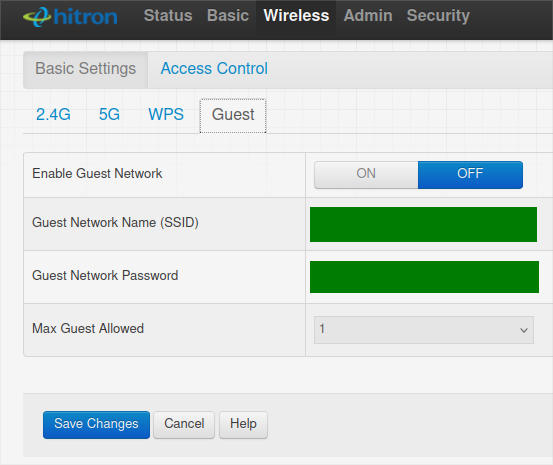
[1] Disabling Guests
Ensure that you find the option screen for Guests and turn that option off to block “guests”, similar to what is shown below:
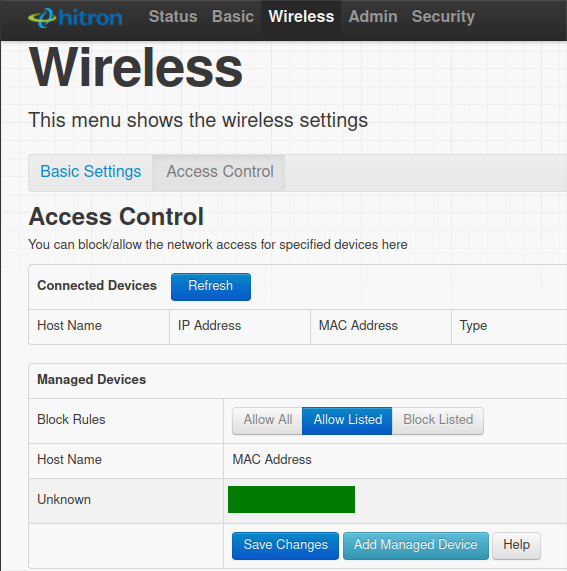
[2] Allowing ONLY Registered Devices
Maybe … Choosing the option to only allow recognized listed devices. Again, look for the screen where you can control that “mode”, similar to the below:
True, and important to be aware of (especially if you have any devices that automatically connect to this WiFi network). But most “WiFi stealers” won’t know how to obtain a hidden SSID from that.
… where “properly” includes setting security type to WPA2 and/or WPA3.
And … to state the obvious … make sure you have changed the factory-default Admin password on your modem/router to something entirely different … and not some simple thing. This is where a randomly generated 24-character alpha-numeric is most appropriate !!!
Majority of consumer and many enterprise routers run some kind of management interface, and very often it’s an HTTP/HTTPS server and that is what most people refer when saying “web interface or web app” so yea it would be on your LAN. Tbh I don’t really know much consumer router cloud solutions for that, though I haven’t looked. Usually enterprise solutions run their admin in cloud infra.
I meant remote access from the WAN side. I use a pfSense router… OpenSense has the same feature… remote access to the router’s web configurator application. I think it’s via SSH, but I wouldn’t use it. I have seen it on some consumer grade routers as well.
Just saying, avoid remote access to your router. If I need to access my router settings while away, I use a remote access VPN to the LAN.
I only bring this up because I read in the OP something about the user trying to use a phone app to access the router.
Oh, got it.
Leaving ports forwarded and open for web ui remote access for sure would be bad.
For home use I usually use the app since it’s much more straight forward.
Modern devices, I think, use something like STUN/TURN-like or/and STUN/ICE style communication so it’s mostly safe to remote in via app. Mine do, so I use that.
Thanks for the many comments and suggestions. Everything changed, new SSID, WiFi password, router password.
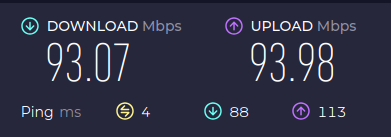
As for how I know someone is stealing my WiFi, even pages won’t load in a 100 Mbps Fibre connection. That is random, I think only when the person needs my WiFi, which is most of the time as I have experienced.
I understand that hiding SSID won’t work. Because nmcli command can list all available WiFi with SSID. I have checked that and I see my hidden SSID listed.
I used to rely on MAC filter during the old days. Because new devices have a habit of using random MAC, I cannot use this efficiently. At least not without turning this off on every device at my place.
I use 2.4 GHz band for range sake. I have 5G enabled, but it does not give enough signal at my point due to the position of the router. I actually have 2 SSIDs. One from router, another as an access point, which is from an output from the main router and connected to secondary router.
I don’t think this person, whoever it is, is an idiot. He/she knows what they are doing and is doing it with proper research. I can counter it with reverse attacks or traps. But I am not interested in that kind of actions. I just am looking for an alert when a new device is there on my network.
Avast does that on Windows. There is a tool called Network Inspector. I once got a script from AskUbuntu where some kind person helped me find details of new devices on the network, comparing with the previously stored list of known devices. That was at least 2-3 years ago and I cannot find it anymore.
I have nmap installed, can scan nmap -sP iprange/24
Well, that explains a lot. I think the one that is stealing your wifi is distance and obstacles. I would look at that first since 2.4 GHz can have a massive negative impact when it comes to other devices near by. There could be numerous factors that cause interference with your network. Any device that uses the 2.4 GHz band like Wi-Fi routers, wireless peripherals, Bluetooth gadgets, cordless phones, baby monitors, and microwaves can cause interference.
I would advise you to get a cord and test ethernet speed first. If that doesn’t remedy it, you will for sure know that something is wrong. Either with isp → you connection or router in general.
Another tip. If you have a distance to cover and you can’t really drive a cable through that distance, try out powerline ethernet adapter. Those are also available with wifi at the endpoint so would advise to look at those with 5 GHz output. Those too can have interference if you run a machinery on that powerline, but that is mostly filtered out.
Ok, can we assume that someone is actually stealing and help me with a script or tool. Not being impatient or anything, but there are numerous possibilities and I understand that. I would answering them all while I am almost 100% sure that someone is stealing my WiFi.
The above is when someone is not stealing, that is right now.
Why do you start with assuming the absolutely least likely instead of researching why the slowness actually occurs based on some facts and data ?
There is likely a slowness but if your WIFI is properly WPA3 protected and you change passwords and even SSID regularly it is really really unlikely there is someone makes the effort of hacking into your WLAN to steal anything (this isn’t something done easily when your setup is proper)
It is a lot more likely that you are just having a bad connection, an issue with your router, network bits being blocked or even some app running in background on your machine that saturates the network (i.e. a forgotten torrent client or some such)…
Start with researching these instead of assuming someone sat down and invested a big amount of work to hack your WLAN (they would have to do that literally every time from scratch if you change passwords and SSID)…
I also happen to be an active member of top Indian broadband forums, dating early 2007. I assumed that I have enough understanding of domestic WiFi setups. I could be wrong though.
Hacking a WiFi’s password is not hard. You just need to find the SSID and there are thousand Android apps which will crack the password for you.
This is not evidence of WiFi stealing. This description matches issue I’m facing with a system that is simply stuck being located too far away from the WiFi router and needs several Bluetooth devices connected at the same time.
Are you able to set up wired ethernet or a wired MoCA connection?
nmcli lists your hidden SSID because your NetworkManager knows your SSID exists and is a hidden SSID, so NetworkManager actively probes for your SSID and if it finds it, it will list it in nmcli output. Even after deleting the WiFi connection from NetworkManger, I have seen it still continue to list the hidden SSID for some time afterwards or until restarting NetworkManager and forcing rescan of available WiFi networks.
The point of having a strong password is so that cracking would take an unrealistically long time. There are programs that can estimate password strength (e.g. KeePassXC)