With Ubuntu 25.10 released in October 2025, we are phasing out Ubuntu Report and replacing it with Ubuntu Insights, a new method for handling anonymous telemetry collection. For most users nothing will change; telemetry will still be strictly opt-in. We collect no personally identifiable information, and every report is stored locally in plain text so you can always see what is being sent, and the information will be used in aggregate. Past consent decisions made for Ubuntu Report will not carry over as we migrate to Ubuntu Insights, and you’ll be asked again so you can make an informed decision.
This post explains why telemetry exists, how it is changing, and what to expect beyond Ubuntu 25.10.
Why have telemetry at all?
We know users care deeply about privacy, and so do we. The privacy concerns that are often brought up are legitimate and need to be taken seriously, especially in the context of an ecosystem that advertises itself as something open and transparent. That’s why our approach to telemetry is designed around informed consent, openness, and user control.
When the information is put together in aggregate, the insights that the data provides are genuinely useful for us as developers and publishers. For instance, hardware and display data guide performance and design optimizations and improve Ubuntu itself. Having data on partition types and whether encryption is enabled helps us as developers understand how users of Ubuntu use the cryptographic features we are developing, such as TPM-backed FDE, to stay secure.
Collected data can also help us advocate for Ubuntu and demonstrate to hardware and peripheral manufacturers that there is a strong demand for Linux support.
Crucially, all the data we collect is used in aggregate, never to build personal profiles, and never for targeted advertising or sales. We intentionally design our data collection methods so that individual reports cannot be linked to specific Ubuntu installations.
The current state of affairs and why things are changing.
Before 25.10, Ubuntu Desktop utilized an application called Ubuntu Report to collect consent-based, non-personally identifiable information. On initial installation of Ubuntu, a screen prompts the user, asking if they want to share system data with the Ubuntu team to help improve Ubuntu. There is also an option to show the first report that Ubuntu Report would send, should you consent.
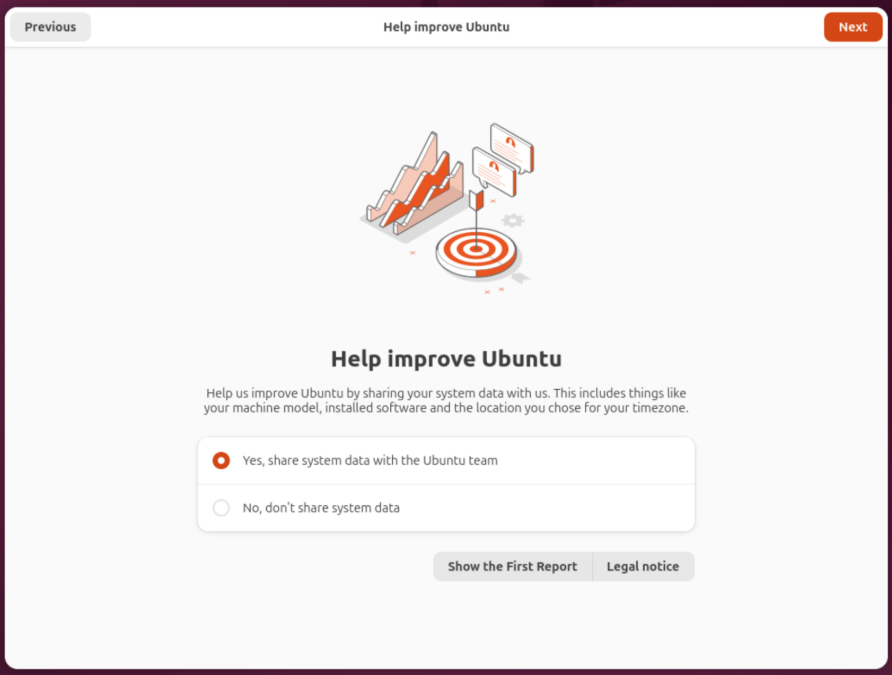
Following this, we only ever sent information whenever you upgraded your Ubuntu installation, while still respecting the decision you made at this initial screen.
At either of these points, if you declined to share your system data, the only thing ever sent to our servers was a simple opt-out flag.
The reports sent were stored locally in an accessible file, typically at ~/.cache/ubuntu-report/, but Ubuntu Report would try to send the data as soon as it was collected.
Generally, Ubuntu Report did its job. However, its age is starting to show; it is becoming more difficult to maintain, and it is limiting in its flexibility. Plus, its server components weren’t open source.
Ubuntu has evolved quite a bit over the years. For example, there is the ongoing transition from Xorg to Wayland. There has also been the introduction and rapid growth of Ubuntu for WSL. The shortcomings of Ubuntu Report only grew as Ubuntu grew, so we decided to re-evaluate how we collect system data.
What changed in Ubuntu 25.10.
In the 25.10 release, Ubuntu Insights partially replaced Ubuntu Report as the new telemetry system. Ubuntu Insights maintains an opt-in model and only collects non-personally identifiable data. Users are still able to preview the initial report during installation to assist in their decision to opt-in, and reports continue to be stored locally for viewing. Like Ubuntu Report, Ubuntu Insights is open source.
There are still some things to iron out, so for the interim release 25.10, Ubuntu Insights and Ubuntu Report are both present by default on Ubuntu Desktop installations, though by default, only one is active at a time. The consent decision you made for Ubuntu Report does not transfer to Ubuntu Insights. This means that by default, for those that are upgrading from a prior release, only Ubuntu Report will be active, and nothing will change for you. For fresh installations, only Ubuntu Insights is active, and the example first report you see at installation time will be compiled by Ubuntu Insights.
Keeping this all in mind, there are several upcoming changes in how Ubuntu Insights changes telemetry on Ubuntu Desktop starting with 25.10 that we would like to highlight.
How we collect
Firstly, the specifics of how we collect these metrics is changing. Most notably, we are separating the collection and upload steps into independent events that are controlled separately. This enables us to provide a grace period of about one week between collection and uploading. At collection time, the report is generated and stored locally on your disk in a plain-text JSON file. This allows you some time to review the information that Ubuntu may send to Canonical. If you dislike what you see, you can revoke your consent as long as you do so before the upload event, as we check the consent state at both collection time and upload time. If you declined to send your data at any of those two points, your system information will not be sent to Canonical. Additionally, once a report has been uploaded, a copy of the payload sent is kept on your local disk for audit. Both the pending and uploaded reports can generally be found at ~/.cache/ubuntu-insights/.
We also changed how we handle consent under the hood so that it is more fine-tuned. Using the command line interface tool or by directly modifying the consent configuration files, you’ll be able to choose the scenarios and sources that you’re okay with sharing data with Canonical.
Furthermore, we are now open-sourcin the server services we use to process incoming information, as well as the Juju Charm we use for deploying the server components. The goal is to be more accountable and transparent regarding the pipeline that your data goes through should you decide to share it with us.
What we collect
We are also changing what we collect slightly. If you take a peek at the example reports shown in the Ubuntu Insights repository on GitHub, most of the items should be familiar (note, fields specific to the installer and upgrader are not present in these examples). Some things are modified, like how we record disk and partition information, while certain fields are entirely new, for example, collection time, as well as a number of fields specific to WSL.
When we collect
When collections occur also changed with Ubuntu 25.10. In addition to at the time of initial setup, collection now also occurs periodically, once per month. This new methodology provides us with more consistent and up-to-date data, allowing us to react faster to trends as we support present releases and prepare for the future releases of Ubuntu.
As mentioned earlier, since consent is checked at the operation time, and there is a delay between collection and upload, you can give or revoke consent at any time.
The future beyond Ubuntu 25.10.
The immediate goal for the LTS release 26.04 and beyond is to add the finishing touches so that Ubuntu Report can be fully retired. Primarily this means switching over to using Ubuntu Insights for the upgrade event and introducing a way to display a consent prompt for those migrating from Ubuntu Report to Ubuntu Insights via an upgrade, thus skipping the initial installation screen.
Additionally, we want to make it easier to control your consent via toggles in the Settings app, allowing you to ignore the CLI tool entirely.
Beyond Desktop, we are also exploring ways to integrate Ubuntu Insights with other products such as our WSL releases. The hope is to find a way to maintain informed consent while being unintrusive, especially for users that make many short-lived instances. We don’t have more to share on this, but we will in time.
If you have any suggestions or if you want to contribute, feel free to reach out! We will do our best to respond.
Huge thanks to @kkuo for making this project happen!