Problem Description:
I always stay with the LT versions & I want to upgrade to from 24.04 to 26.04. I assume I can do that without any problems but my question is when newer versions of 26.04 are available will it be the same process or is it a simpler upgrade. I’m setting this laptop up for someone else & I probably won’t be around to help them when the newer versions come out.
Relevant System Information:
Screenshots or Error Messages:
What I’ve Tried:
I recently installed 24.04 dual boot with windows 10 on this laptop & now that 26.04 is out I want to install the newest LT version
In essence, 3rd party package sources, such as PPA or upstream vendor package repositories, should be avoided at all costs; they are what breaks release upgrades, mostly.
You may also want to consider setting up an Ubuntu Pro account for or with them, which is free for personal use on up to five machines, so they get ESMApps security support for the universe component of the Ubuntu repository, kernel livepatching being the cherry on top.
The upgrade from 24.04 to 26.04 is NOT currently supported; as that upgrade doesn’t open until after Ubuntu 26.04.1 LTS has been released.
The upgrades from the prior release, ie. from Ubuntu 25.10 ARE supported; as that is a much smaller upgrade; involving only ~six months of change; but this is normal procedure.
The point release detail (ie. 26.04 or 26.04.1) represents mostly new INSTALL MEDIA, and whether or not you use a 26.04 or 26.04.1 ISO to install a system, the installed system will still be 26.04.
The point release detail is an easy way to check to see if you’ve applied all upgrades. If you’re using Ubuntu 26.04, you don’t need to do anything special to upgrade to a newer point release; just apply upgrades normally and you’ll be using it normally the week before actual point release ISO release which is new install media.
I’ll provide a link to a 24.04.4 point release announcement, ie. Ubuntu 24.04.4 LTS released where the detail that may help understanding is
If you want to Quality Assurance test the upgrade from 24.04 to 26.04; you’re welcome to now, as it’s open for that (the -d or development option makes it possible), but that’s there for users who understand & are willing to accept the risk, and report bugs should they be encountered; so they can be fixed before it’s opened and supported for users who prize stability.
If you want stability, I’d wait until you’ve been offered the upgrade option; as that only occurs after the Ubuntu Release team have concluded its stable and thus supported. (look in https://changelogs.ubuntu.com/meta-release-lts and you’ll see Supported: 0 currently for resolute or 26.04)
Could I upgrade from 24.04 to 25.10 & then upgrade to 26.04?
The other option might be just installing 26.04 from a live USB & overwriting my 24.04 install. The main thing I need to keep is the Windows partition in tack but there’s not much I need to worry about overwriting on the Ubuntu partition.
Yes, that is the other option. Or, since you are the one doing it, you could choose to volunteer in testing the release upgrade and provide a valuable upgrade report, especially if something does go wrong. You can always do a clean installation from scratch, if that comes to pass. I’m not saying you should do it but that you should consider it. If nobody tests it and everybody waits for .1 it kind of defeats the purpose of the extra testing period.
Or just disable the search for release upgrades altogether and stick to 24.04; it’s LTS, after all. That way you can do it the next time you see each other; as good an excuse as any for a visit.
I’m now considering just booting from a 26.04 live USB & wiping my previous 24.04 install since I really don’t have much on the Ubuntu drive that I need to keep. My question in that scenario would be since I’m dual booting with Windows 10 will there be any problems keeping my Windows 10 in tact. I have always just added different Ubuntu versions from a live disk while keeping Windows in the past but have never overwritten Ubuntu versions while keeping Windows. I don’t know if I’ll be prompted to overwrite. Does anyone have any experience with overwriting the older version of Ubuntu while still dual booting with Windows?
There is nothing special to overwriting an existing Ubuntu installation; when in doubt just make as if you were doing an initial dual boot installation. If you want to keep the partition layout of the existing Ubuntu installation, just select the manual partitioning option and mark the appropriate partition(s) to be “formatted” which will just overwrite the existing filesystem.
The usual caveats apply, so you should make backups of everything you cannot afford to lose on the Windows side, because even experts occasionally manage to select the wrong partition to wipe.
Is there any pressing functional need that is forcing you to go ahead with a re-install, instead of waiting for upgrading?
Having 24.04 LTS, you are getting all the security upgrades, so there shouldn’t be anything pressing, unless there is a special Application that demands libraries not available with 24.04 LTS.
I have to give the computer back to someone that lives out of town so it needs to be done before next weekend. I wanted to have it all set up for them so they won’t have to do any upgrades for a few years. Otherwise I would just wait for the upgrade since 24.04 is running fine on it right now.
Pretty much the only thing I’ll have to reinstall if I overwrite 24.04 is the LAMP server, a few MYSQL databases & some website files.
Wow is all I’ve got to say. I just tried to install 26.04 from USB & I am totally lost.
I’ve installed three different versions of Ubuntu from 24.04 & down along with Puppy Linux & Windows on my desktop computer & nothing was as confusing as trying to install 26.04 on this laptop.
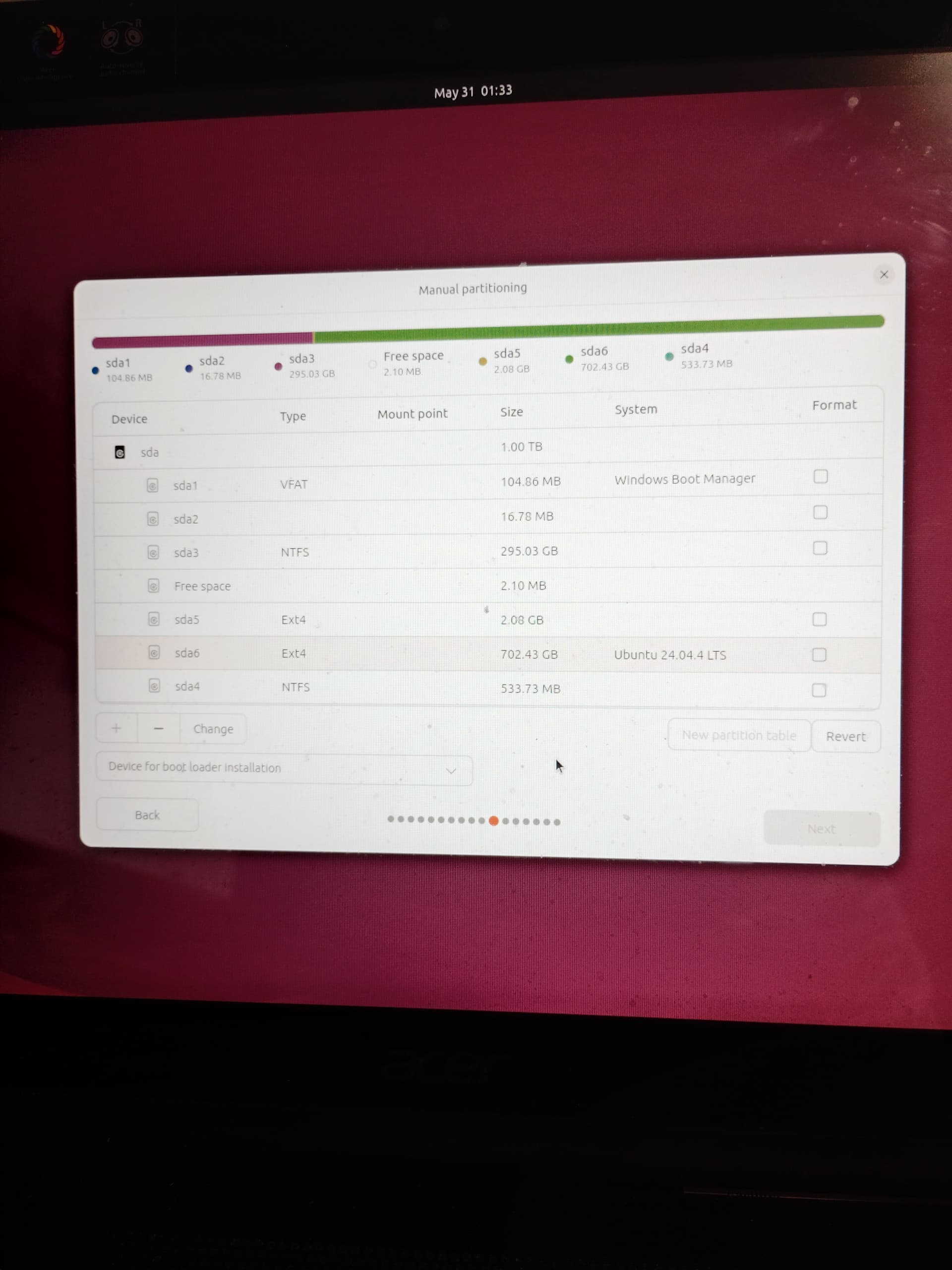
If I choose manual installation I get stuck on this screen & I can’t go to the “next” step
What’s confusing? Obviously sda5 needs to be set as mountpoint /boot and sda6 is /; and both need the “Format” checkbox ticked. You should consider making sda5 a swap partition, though; there is no point in a separate /boot when / is a plain ext4 filesystem.
I should have made myself more clear. Not only did I not know what to select, it didn’t matter what I selected because it wouldn’t let me even check anything in the manual partitioning.
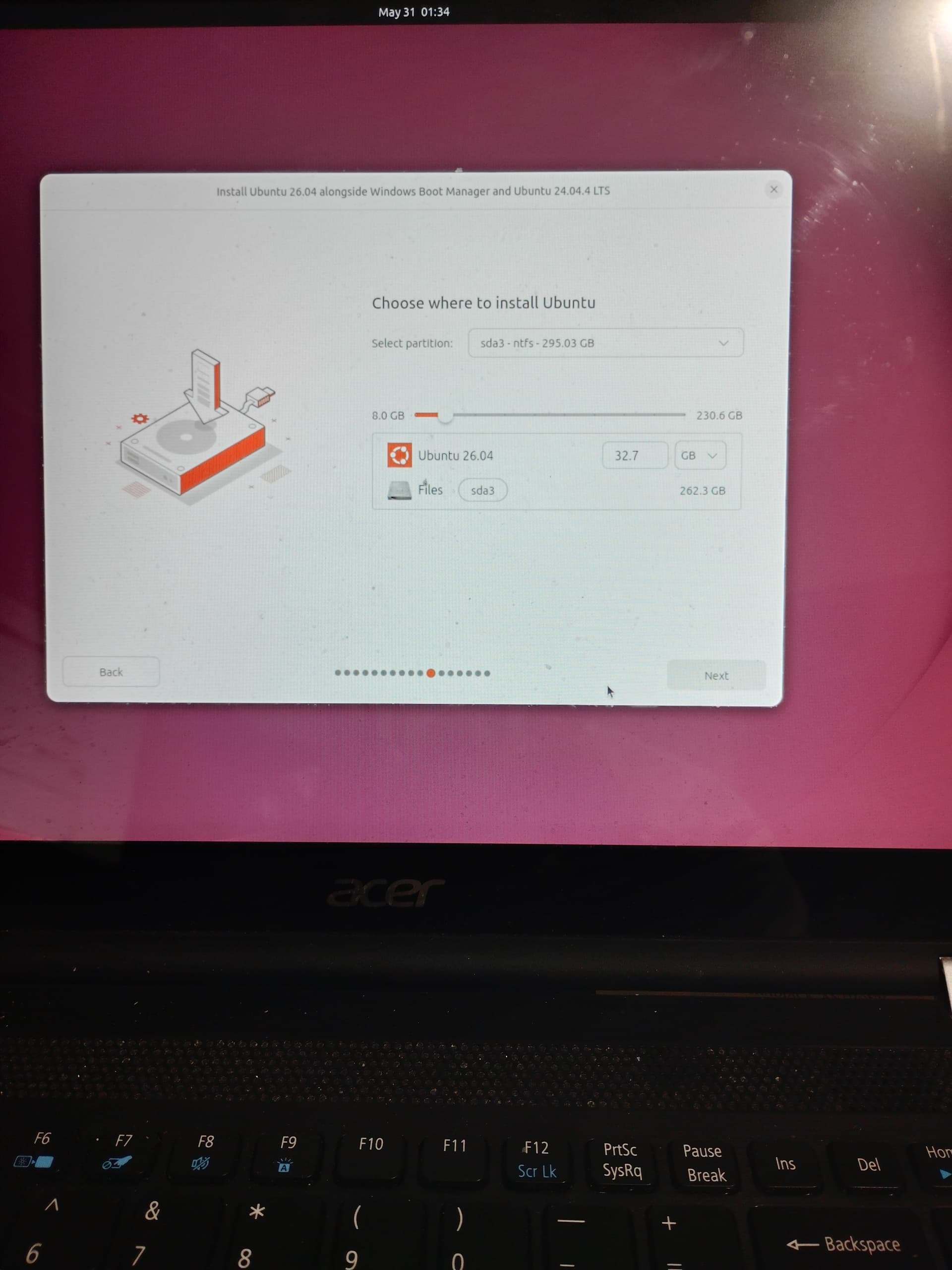
That’s when I decided to install Ubuntu 26.04 alongside Windows & Ubuntu 24.04 & the only partition that was available to select where to install was the windows partition.
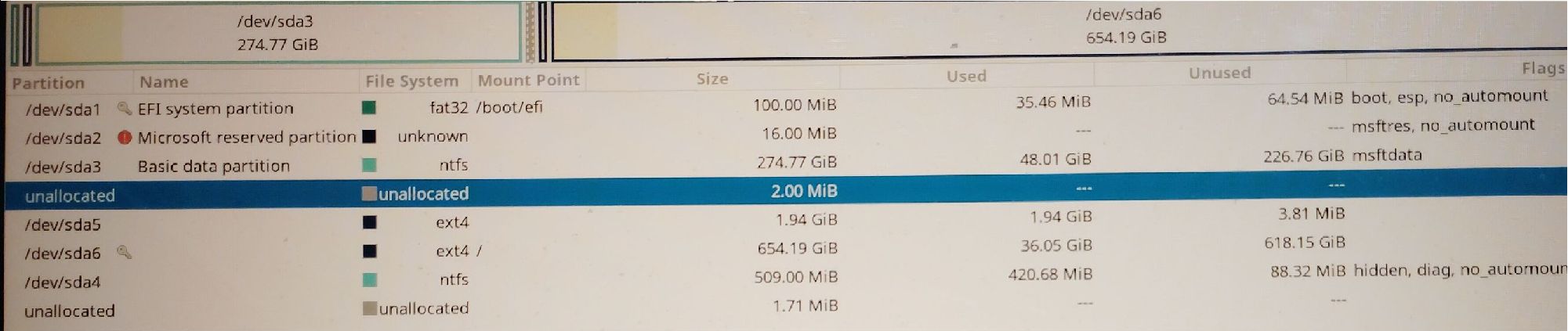
Also there is no option to install alongside Windows only . I was considering deleting the Ubuntu 24.04 partition with Gparted after installing 26.04 alongside but I’m a little nervous about messing up Windows during the install process. Now I’m wondering what would happen if I used Gparted live to delete all the ext4 partitions & just left the Windows ntfs & fat32 partitions & then tried to install from the 26.04 live usb again.
Look at the bottom of the list of the partition editor in your first screen photo and note the “Change” button.
Why?!
I don’t think you’ve got that in the right order. Why not delete the Ubuntu 24.04 partition and then tell the installer to install alongside Windows only, because then there will be no more 24.04; that might require a restart of the installer or, at least, a jump back to that detection step. But that’s also utterly redundant.
You can do that as well, as I’ve just outlined above, but the question is still: Why?! Those are just opportunities. If the 24.04 partition layout is alright, there is no need to change it; just “format” the / partition and use sda5 as swap.
Well whatever happened when I attempted to install & aborted the install it messed with my bios.
When I tried the live usb again it wouldn’t let me boot from usb using F12 on startup. Then I tried getting into the bios with F2 & it prompted me for a password that I didn’t have. I then used the password descrambler from biosbug.com to get back into my bios but pretty much every option is locked & it shows the supervisor password is set. I can only set the user password but it doesn’t do me any good because I can’t change anything like the boot order etc.. Eventually after a bunch of tries the bios did recognize the usb & I could boot into live Ubuntu 26.04 but I wouldn’t dare try to install anything until I know I can change what might be needed in the bios settings. It took me forever to get 24.04 working due to some bios tweaks that had to be done on this laptop. At least everything else is still working fine but I have no idea how trying to install Ubuntu could mess with the bios password.
What you saw was probably the MOK (machine owner key) utility trying to enroll signing keys for 3rd party drivers, e.g. Nvidia’s DKMS module; there must have been a prompt to set that password during installation. Other than that I don’t know of any facility that can even do such a thing as changing your UEFI password from a running OS.
Or it’s something to do with the infamous “Fast Startup” mode of Windows.
Also, how far along were you actually, when you “decided to install Ubuntu 26.04 alongside Windows & Ubuntu 24.04 & the only partition that was available to select where to install was the windows partition”?
The pictures I showed in my earlier post of the installation process was as far as I went both times I tried. I just hit the “back” button from each attempt from there. After thinking more about it, I might have set a bios password a few months ago & forgot about it. The Acer bios would not allow the grub menu to come up after installing 24.04 without making a change in the bios. That change could only be made by setting a supervisor password which I thought I removed after making the change needed. I must have forgotten to get rid of the password & I have no idea what password I used. This Acer laptop didn’t trust any boot files that wasn’t Windows so it put a lock on them in the bios. Anyways I appreciate all the help & ideas but unless I can remember or remove the bios superuser password I’m not going to try any more installations.
I’ve tried the software way & it works to clear the user password but not the supervisor password. That’s what makes me think I must have set the supervisor password because once I get the password code & get into the bios it will only let me access the user bios password. It will not let me access the supervisor password. For a hardware reset to get to the cmos battery I would have to take the laptop completely apart with no guarantee it would even work.




 opportunities. If the 24.04 partition layout is alright, there is no need to change it; just “format” the