Ubuntu Unity 24.04 Booting with refind ‘boot/vmlinuz/6.11.28’
System was running fine until I downloaded the latest update which included Kernel 6.14.0-4 on Jul.18.2025. Then, when I tried to boot I got this scary message:
Kernel Panic - Please Reboot your computer
UFS: Unable to mount root FS on unknown - block (0,0)
I’m running on my Jul.01.2025 backup. My fear is if I allow the latest OS update on the backup, I’ll die with another Kernel Panic message on my backup.
HI. Without my desktop I’m slow at responding - please bear with me.
System does not come up - just goes into Panic message.
I can get to REfind - but how to get it to boot into old kernel???
Thanks,
M, on my wife’s laptop
From your backup or from a live usb check /etc/default/grub and see if you have a line with:
#GRUB_DISABLE_OS_PROBER=false
and remove the ‘#’
then run update grub and at reboot you should have the GRUB menu allowing to select the ol kernel.
Hi.
I’m back in the saddle again. After much frustration, I realized that refind allows me to select which kernel to boot from if I hit the ‘F2’ key.
I am back on my Desktop using the fallback kernel 6.11.0.29.
So now the question is, how come booting from the 6.14.0.24 Kernel sends me to a Kernel Panic screen ?? Is this just me or are there others with this problem ?
Will the next kernel update cause me the same problem, and then the fallback kernel will be 6.14.0-24 and I’m in big trouble.
And something else I don’t understand - when I booted with my backup, I said NO to ‘OS Updates’, but somehow the Kernel got updated without asking me. This wiped out my backup (Kernel Panic). How come ??
Thanks for all you help - I’ll keep at it. Have a nice day,
M…
Impossible for anybody to answer until the next kernel arrives.
Yes, this is a potential problem.
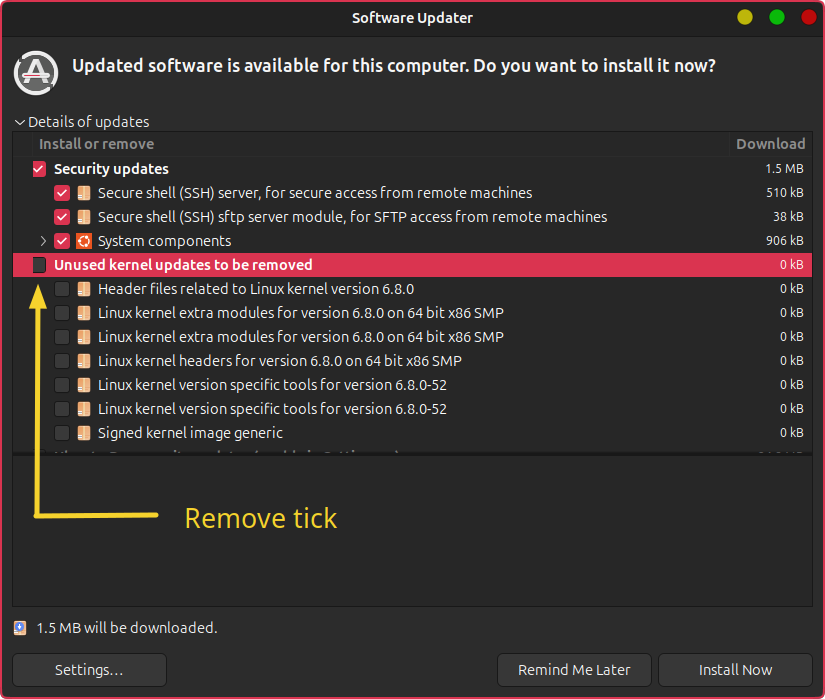
The answer is to always keep your working kernel 6.11.0-29.
When the Software Updater next appears, pay attention to Unused kernels to be removed
Remove the tick from the checkbox
Are you referring to Notify me of a new Ubuntu version?
This means updates between OS versions e.g. 24.04 > 24.10 > 25.04 etc.
This does not prevent the introduction of new kernels within the same version.
No, I’m not referring to Notify me of a new Ubuntu version?. If a request comes in to update software, I just say ‘remind me later’, yet somehow, the kernel got updated 6.11.0.29 to 6.14.0-24.
To be safe I just did a fresh backup.
Now when I go to Software Updater, I get :
Package Operation Failed
The installation or removal of a software package failed
mg@MGDesktopUnity:~$ sudo apt upgrade
Reading package lists... Done
Building dependency tree... Done
Reading state information... Done
Calculating upgrade... Done
The following package was automatically installed and is no longer required:
  libfilezilla42t64
Use 'sudo apt autoremove' to remove it.
0 upgraded, 0 newly installed, 0 to remove and 0 not upgraded.
4 not fully installed or removed.
After this operation, 0 B of additional disk space will be used.
Do you want to continue? [Y/n] y
Setting up linux-headers-6.14.0-24-generic (6.14.0-24.24~24.04.3) ...
/etc/kernel/header_postinst.d/dkms:
 * dkms: running auto installation service for kernel 6.14.0-24-generic
Sign command: /usr/bin/kmodsign
Binary update-secureboot-policy not found, modules won't be signed

Building module:
Cleaning build area...
make -j8 KERNELRELEASE=6.14.0-24-generic KVER=6.14.0-24-generic...(bad exit status: 2)
ERROR: Cannot create report: [Errno 17] File exists: '/var/crash/broadcom-sta-dkms.0.crash'
Error! Bad return status for module build on kernel: 6.14.0-24-generic (x86_64)
Consult /var/lib/dkms/broadcom-sta/6.30.223.271/build/make.log for more information.
dkms autoinstall on 6.14.0-24-generic/x86_64 succeeded for virtualbox
dkms autoinstall on 6.14.0-24-generic/x86_64 failed for broadcom-sta(10)
Error! One or more modules failed to install during autoinstall.
Refer to previous errors for more information.
 * dkms: autoinstall for kernel 6.14.0-24-generic
   ...fail!
run-parts: /etc/kernel/header_postinst.d/dkms exited with return code 11
dpkg: error processing package linux-headers-6.14.0-24-generic (--configure):
 installed linux-headers-6.14.0-24-generic package post-installation script subprocess returned err
or exit status 11
Setting up linux-image-6.14.0-24-generic (6.14.0-24.24~24.04.3) ...
dpkg: dependency problems prevent configuration of linux-headers-generic-hwe-24.04:
 linux-headers-generic-hwe-24.04 depends on linux-headers-6.14.0-24-generic; however:
  Package linux-headers-6.14.0-24-generic is not configured yet.

dpkg: error processing package linux-headers-generic-hwe-24.04 (--configure):
 dependency problems - leaving unconfigured
dpkg: dependency problems prevent configuration of linux-generic-hwe-24.04:
 linux-generic-hwe-24.04 depends on linux-headers-generic-hwe-24.04 (= 6.14.0-24.24~24.04.3); howev
er:
  Package linux-headers-generic-hwe-24.04 is not configured yet.

dpkg: error processing package linux-generic-hwe-24.04 (--configure):
 dependency problems - leaving unconfigured
No apport report written because the error message indicates its a followup error from a previous f
ailure.
       No apport report written because the error message indicates its a followup error from a pre
vious failure.
              Processing triggers for linux-image-6.14.0-24-generic (6.14.0-24.24~24.04.3) ...
/etc/kernel/postinst.d/dkms:
 * dkms: running auto installation service for kernel 6.14.0-24-generic
Sign command: /usr/bin/kmodsign
Binary update-secureboot-policy not found, modules won't be signed

Building module:
Cleaning build area...
make -j8 KERNELRELEASE=6.14.0-24-generic KVER=6.14.0-24-generic...(bad exit status: 2)
ERROR: Cannot create report: [Errno 17] File exists: '/var/crash/broadcom-sta-dkms.0.crash'
Error! Bad return status for module build on kernel: 6.14.0-24-generic (x86_64)
Consult /var/lib/dkms/broadcom-sta/6.30.223.271/build/make.log for more information.
dkms autoinstall on 6.14.0-24-generic/x86_64 succeeded for virtualbox
dkms autoinstall on 6.14.0-24-generic/x86_64 failed for broadcom-sta(10)
Error! One or more modules failed to install during autoinstall.
Refer to previous errors for more information.
 * dkms: autoinstall for kernel 6.14.0-24-generic
   ...fail!
run-parts: /etc/kernel/postinst.d/dkms exited with return code 11
dpkg: error processing package linux-image-6.14.0-24-generic (--configure):
 installed linux-image-6.14.0-24-generic package post-installation script subprocess returned error
 exit status 11
No apport report written because MaxReports is reached already
                                                              Errors were encountered while process
ing:
 linux-headers-6.14.0-24-generic
 linux-headers-generic-hwe-24.04
 linux-generic-hwe-24.04
 linux-image-6.14.0-24-generic
E: Sub-process /usr/bin/dpkg returned an error code (1)
mg@MGDesktopUnity:~$ mg@MGDesktopUnity:~$ sudo apt upgrade
Reading package lists... Done
Building dependency tree... Done
Reading state information... Done
Calculating upgrade... Done
The following package was automatically installed and is no longer required:
  libfilezilla42t64
Use 'sudo apt autoremove' to remove it.
0 upgraded, 0 newly installed, 0 to remove and 0 not upgraded.
4 not fully installed or removed.
After this operation, 0 B of additional disk space will be used.
Do you want to continue? [Y/n] y
Setting up linux-headers-6.14.0-24-generic (6.14.0-24.24~24.04.3) ...
/etc/kernel/header_postinst.d/dkms:
 * dkms: running auto installation service for kernel 6.14.0-24-generic
Sign command: /usr/bin/kmodsign
Binary update-secureboot-policy not found, modules won't be signed

Building module:
Cleaning build area...
make -j8 KERNELRELEASE=6.14.0-24-generic KVER=6.14.0-24-generic...(bad exit status: 2)
ERROR: Cannot create report: [Errno 17] File exists: '/var/crash/broadcom-sta-dkms.0.crash'
Error! Bad return status for module build on kernel: 6.14.0-24-generic (x86_64)
Consult /var/lib/dkms/broadcom-sta/6.30.223.271/build/make.log for more information.
       No apport reptten because the error message indicates its a followup error from a previous f
tea-for-one:
I can’t find the ‘unused kernel updates to be removed’ option. I’m concerned that I may be in trouble with the next kernel update and no fallback kernel that will work.
rubi1200: Thanks for adding the code tags.
tea-for-one:
When sudo apt update is used, I would expect to see the entries from the ubuntu repositories - Are they disabled on your system?
As far as I can see, ubuntu repos are not disabled
tea-for-one:
Upon closer examination, you do not seem to have two repos enabled:-
noble-backports
noble-updates
I don’t see these 2 repos in the ‘other software’ tab.
imadsaddik:
I was surprised today when I got the same issue. Downgrading to kernel v6.11.0-29 solved the issue.
Nice to see someone else with my same issue. Hopefully it will be resolved in the next Kernel.
YamiYukiSenpai:
I think that Broadcom driver may need to be updated, I think.
I need the Broadcom driver.
Interesting to note that successive attempts to do OS Updates yields no error - just says the “Software is up to date on this computer”
Thanks for all your responses. For now I will use the 6.11 kernel and backup every other day until the next kernel update. Hopefully this post will trigger someone to look onto the next kernel.
If I enter ‘Software Updater’ in DASH, system goes into Software Updater. I click on ‘Settings’, but I do not see the keep old Kernels option. What am I missing here ?