Don’t click on the Settings (lower left) button
The Settings button takes you to Software & Updates
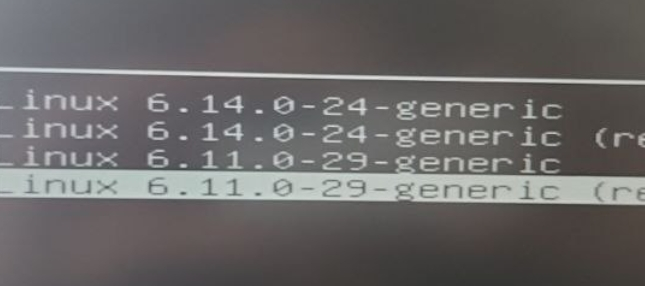
I bought a couple of computers for my team and they all got the same problem this week. First issue was yesterday and today the other 3 had it. So there had to be like a kernel update pr something like that. One of them send me the picture here where if he selects the version 24 it shows the panic but if he uses the previous 11 it works fine.
1 Like
I’ve just re-read your first post and realised that you are using Ubuntu Unity.
I am unfamiliar with the Unity desktop environment and may have inadvertently misled you.
Apologies
tea-for-one:
I’ve just re-read your first post and realised that you are using Ubuntu Unity.
No worries.
Is there a simple way to keep a specific fallback kernel , or prevent updates from deleting old kernels ?
luisalvarado: I am glad to see others are having this problem. It’s a tough one to resolve - once you get the “kernel panic” screen, there is no where to go to get any insight into the cause.
Hopefully the next kernel will resolve this.
Thanks,
M…
Thanks,
M…
Could you please post the output, wrapped with code tags, for this command:
dpkg -l | grep linux-image
Do you have AMD graphics?
sudo lspci | grep amd
will tell.
im running the following. and am experiencing the same issue as @mikegreen8
System Details Report
Report details
- Date generated: 2025-07-23 09:40:57
Hardware Information:
- Hardware Model: Dell Inc. Dell G16 7630
- Memory: 32.0 GiB
- Processor: 13th Gen Intel® Core™ i9-13900HX × 32
- Graphics: Intel® Graphics (RPL-S)
- Graphics 1: NVIDIA GeForce RTX™ 4070 Laptop GPU
- Disk Capacity: 1.0 TB
Software Information:
- Firmware Version: 1.23.0
- OS Name: Ubuntu 24.04.2 LTS
- OS Build: (null)
- OS Type: 64-bit
- GNOME Version: 46
- Windowing System: X11
- Kernel Version: Linux 6.11.0-29-generic
Details
had the same behaviour where it auto updated the kernal to version
6.14.0.24
rolling back to 6.11.0.29 allows me to boot and rebulding the initrd through update-initramfs didnt resolve the issue either.
can rule out potential ubuntu-unity and amd issues discuessed as i have neither.
the only thing i noticed was the actual initrd command was missing from grub boot options for 6.14.0-24. found in boot/grub/grub.cfg
My resolution
sudo apt update and upgrade ran just fine upgrade ended with the following logs
Processing triggers for linux-image-6.14.0-24-generic (6.14.0-24.24~24.04.3) ...
/etc/kernel/postinst.d/dkms:
 * dkms: running auto installation service for kernel 6.14.0-24-generic
 * dkms: autoinstall for kernel 6.14.0-24-generic
   ...done.
/etc/kernel/postinst.d/initramfs-tools:
update-initramfs: Generating /boot/initrd.img-6.14.0-24-generic
/etc/kernel/postinst.d/zz-update-grub:
Sourcing file `/etc/default/grub'
Generating grub configuration file ...
Found linux image: /boot/vmlinuz-6.14.0-24-generic
Found initrd image: /boot/initrd.img-6.14.0-24-generic
Found linux image: /boot/vmlinuz-6.11.0-29-generic
Found initrd image: /boot/initrd.img-6.11.0-29-generic
Found memtest86+ 64bit EFI image: /boot/memtest86+x64.efi
Warning: os-prober will not be executed to detect other bootable partitions.
Systems on them will not be added to the GRUB boot configuration.
Check GRUB_DISABLE_OS_PROBER documentation entry.
Adding boot menu entry for UEFI Firmware Settings ...
done
Processing triggers for libc-bin (2.39-0ubuntu8.5) ...
this added the following to the boot options, which allowed me to boot successfully
echo	'Loading initial ramdisk ...'
initrd	/boot/initrd.img-6.14.0-24-generic
hopefully this gives insights
I think that I may have found the reason for your system not displaying Unused kernel updates to be removed
The checkbox will not appear if you only have two kernels.
I’m sure it will appear if you have three or more.
Open a terminal and enter:-
ls /boot | grep vmlinuz-
mark@gmktec:~$ ls /boot | grep vmlinuz-
vmlinuz-6.11.0-28-generic
vmlinuz-6.11.0-29-generic
vmlinuz-6.14.0-24-generic
mark@gmktec:~$
If you always use the GUI to upgrade software, the default for Ubuntu is to keep two kernels.
The third will be removed automatically.
If you choose to use the terminal to upgrade, then the third kernel will not be automatically removed
sudo apt update
sudo apt upgrade
To remove a kernel via the terminal (be careful to choose the correct version) e.g.
sudo apt remove *6.11.0-24*
The asterisks are needed to also remove all the kernel components
@michaelpdup welcome to Ubuntu Discourse. I think your issue may be different from the OP. There is a reported bug for systems with AMD gpu, since the module has not been built for the 6.14.0-24 kernel. See:
mg@MGDesktopUnity:~$ dpkg -l | grep linux-image
rc linux-image-6.11.0-17-generic 6.11.0-17.17~24.04.2 amd64 Signed kernel image generic
rc linux-image-6.11.0-21-generic 6.11.0-21.21~24.04.1+1 amd64 Signed kernel image generic
rc linux-image-6.11.0-24-generic 6.11.0-24.24~24.04.1 amd64 Signed kernel image generic
rc linux-image-6.11.0-25-generic 6.11.0-25.25~24.04.1 amd64 Signed kernel image generic
rc linux-image-6.11.0-26-generic 6.11.0-26.26~24.04.1 amd64 Signed kernel image generic
rc linux-image-6.11.0-28-generic 6.11.0-28.28~24.04.1 amd64 Signed kernel image generic
ii linux-image-6.11.0-29-generic 6.11.0-29.29~24.04.1 amd64 Signed kernel image generic
iF linux-image-6.14.0-24-generic 6.14.0-24.24~24.04.3 amd64 Signed kernel image generic
ii linux-image-generic-hwe-24.04 6.14.0-24.24~24.04.3 amd64 Generic Linux kernel image
mg@MGDesktopUnity:~$
No AMD graphics.
sudo lspci | grep amd - nothing displays
Then it does not seem to be the same issue as the bug report that I found.
tea-for-one: “I think that I may have found the reason for your system not displaying Unused kernel updates to be removed”
I have to go now - I will look into this later today and get back to you.
Has this Kernel Panic issue been reported ??
Thanks for all the help,
CYA soon,
M…
To discard that it is not the same issue as the one mentioned by @michaelpdup :
sudo cat /boot/grub/grub.cfg | grep initrd.img
This will check if the initrd command line for 6.14.0-24 is in grub.cfg.
This topic seems to be getting a bit confusing (perhaps) but I will address your output since that is what I asked for.
rc = removed but config files remain
ii = installed correctly
iF = installed but with a failed or broken configuration
Here is what I would recommend doing (if it was my system).
Anything marked as rc can be safely removed.
If I understand correctly, please confirm, you want to keep the 6.11.0.29 kernel and not have it removed for now when an update comes in?
The easiest way to achieve this is using apt-mark hold to ensure the package will not be upgraded or removed when there are system updates.
Can also be easily undone when you decide to.
For the broken kernel, I would either try fixing it or remove it unless you need it.
1 Like
The following command will remove configuration files from removed (rc) kernels
sudo apt purge $(dpkg -l | egrep '^rc' | awk '{print $2}')
I don’t know.
As this kernel (iF) is marked as half-configured, I would imagine that the kernel panic is the result of a misconfigured package.
I woke up this morning when all is fine , only to see this after a few hours on my machine
So I had to switch to the old kernel version.
Can someone please report this Kernel Panic Issue.
rubi1200
pkg -l | grep linux-image
iFlinux-image-6.14.0-24-generic 6.14.0-24.24~24.04.3
This may be the cause of my kernel panic problem -
iF= installed but with a failed or broken configuration
How to find and fix the "failed or broken configuration on kernel 6.14.0-24-?
Thanks,
M…
First try this:
sudo dpkg --configure -a
Then check again:
dpkg -l | grep linux-image
If it worked, it will show ii and not iF
However, if that did not work, then the next step is to run this:
sudo apt-get install -f
Final check with dpkg -l as above.
If neither of these options resolves the issue, we will need to purge and reinstall but first try the steps above.
1 Like