Anyone using Daily Builds as a daily driver?

I know 25.10 is out now (great release btw) and Resolute now has daily builds available. I was wondering if any users have run Ubuntu Daily Builds on bare metal hardware? I was thinking of giving it a try, knowing full well to expect bugs and/or breakages.

My understanding is the daily builds are more of a prototype, but I am curious to help test and try out new packages and features. I’d like to hear anyone’s input if you do currently or have run daily builds on bare metal in the past, I’d love to know your experience. It’s not trouble for me to install it, I am just curious if any others out there might be like me.

1 Like

The box I’m using now reports itself as …

guiverc@d7050-next:~$   lsb_release -a
No LSB modules are available.
Distributor ID: Ubuntu
Description:    Ubuntu Resolute Raccoon (development branch)
Release:        26.04
Codename:       resolute

It was installed last in the questing cycle; using a daily

guiverc@d7050-next:~$   cat /var/log/installer/media-info 
Lubuntu 25.10 "Questing Quokka" - Daily amd64 (20250603)

It was moved to resolute using ubuntu-release-upgrader tools rather than re-install

guiverc@d7050-next:~$   ls /var/log/dist-upgrade/
20241101-1124  20251019-1544  apt.log      history.log  screenlog.0
20241101-1152  apt-term.log   eipp.log.xz  main.log     xorg_fixup.log
guiverc@d7050-next:~$   ls -ltrha /var/log/dist-upgrade/main.log 
-rw-r--r-- 1 root root 110K Oct 19 15:56 /var/log/dist-upgrade/main.log

I use this system as my primary box, though it’s dual boot with a noble or 24.04 system my alternative if/should I have problems on this alpha or unstable system. This isn’t a VM, but an actual install on a dell optiplex box.

I’ve been running the development release on my primary box since artful or during the 17.10 cycle.

Have I had problems; Yes I have; though I’d struggle to remember most of them. The somewhat recent install (July 2025) was me exploring an issue that I hoped re-install would fix; nope, but it did give me more info, but my problem was something I’d done months before anyway and unrelated to using a unstable Ubuntu release anyway.

A prior re-install was done when my prior boxes PSU died; that wasn’t Ubuntu’s fault either; the box was originally purchased in 2009 so had done well.

The most major problem I recall was when Lubuntu switched from LXDE to LXQt, and that took me near three weeks to get back so I was willing to use it normally… But this install is a multi-desktop install anyway; so even then with Lubuntu broken, I could just login with a Ubuntu Desktop (GNOME) or Xubuntu (Xfce) session & continue working… then return to Lubuntu/LXQt when I had time to fight with it some more…

The major concern (in my opinion) with using an unstable release is where do you go if you have problems? Most support sites don’t support alpha or beta products, which includes this site too, so before you do it, consider that problems CAN OCCUR, and have an alternative.

I have another box here on a stable release, a box running Debian forky, or I could reboot this box into the LTS release anyway (I do that each fortnight, so its kept somewhat up-to-date & not just ignored).

(You may also note I asked about a problem on this site I had after questing’s release as Ubuntu 25.10, as seeking that help before then would have been off-topic; I have alternatives of anything I do on this install!)

You can detect & report problems using the unstable or Ubuntu development release, and with that help with the discovery of bugs if you file reports, but you do need to somewhat deal with things yourself, so I’d NOT recommend it unless you’ve got an alternative to use on the rare circumstances when problems do occur. Also note problems can be rarer & specific to particular hardware and you’ll have find less other users reporting issues when you do internet searches to try and fix things.

4 Likes

Running Kubuntu 26.04 daily on my fully AMD system and it’s running perfectly, no issues.

1 Like

Running Ubuntu Resolute 26.04 daily on Geekom IT15 AI mini with no major issues. Of course running alpha as major OS means taking risks and question of what you expect to gain. If you need security and reliability better to stick with official releases as has been pointed out.

3 Likes

I’m running Resolute on a Lenovo T14, upgraded from Noble release after release. I update the packages every day. It’s easier to pinpoint any issue that may occur and possibly revert what caused problems.
Be careful though when there are major stack updates as it may introduce discrepancies between versions of packages (e.g when the Gnome 50 stack will be updated)

3 Likes

zebra1@zebra1:~$ inxi1
No LSB modules are available.
Distributor ID: Ubuntu
Description: Ubuntu Resolute Raccoon (development branch)
Release: 26.04
Codename: resolute
inxi -Sxx
System:
Host: zebra1 Kernel: 6.17.0-5-generic arch: x86_64 bits: 64 compiler: gcc
v: 15.2.0
Desktop: GNOME v: 49.0 tk: GTK v: 3.24.50 wm: gnome-shell dm: GDM3
Distro: Ubuntu 26.04 (Resolute Raccoon)
$DESKTOP_SESSION
ubuntu
$XDG_SESSION_TYPE
wayland
GNOME Shell 49.0
Version: 49.0-1ubuntu1
loginctl type
Type=wayland

Type=unspecified
UEFI

I switched my repos from questing to resolute .before the base files were released. So far it is a well behaved dev. Still a lot of questing in the mix.

1 Like

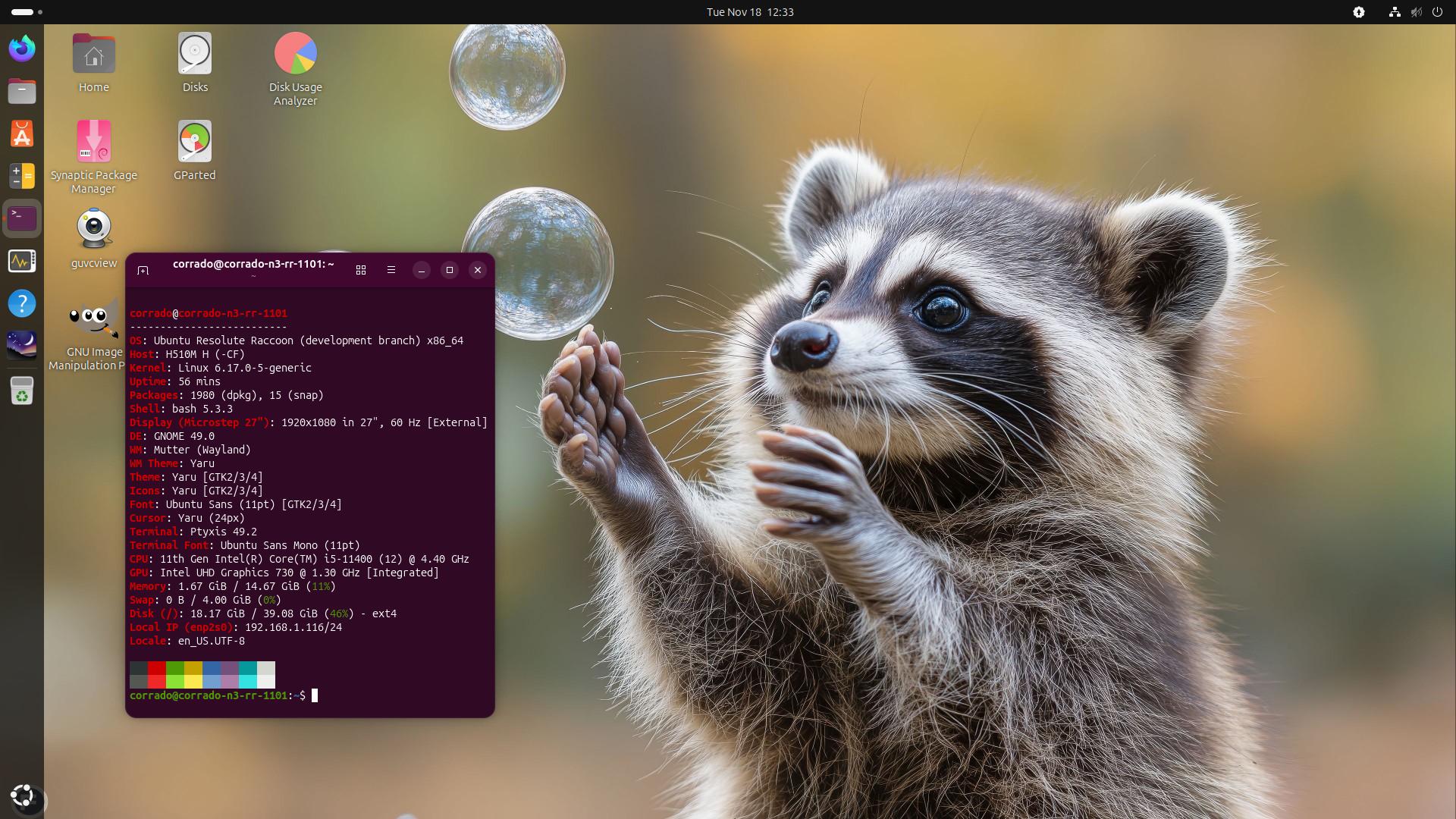
I’m using Resolute installed from last available ISO: Ubuntu 26.04 LTS “Resolute Raccoon” - Daily amd64 (20251101) since Nov 1 and I didn’t have any problems.
Also OS installed from ISO dated Oct22 and Oct24 was ok.
My Resolute is in multiboot with other Ubuntu versions, Lubuntu, Xubuntu, Debian and Fedora. NO WINDOWS.

corrado@corrado-n3-rr-1101:~$ inxi -Fxc
System:
  Host: corrado-n3-rr-1101 Kernel: 6.17.0-5-generic arch: x86_64 bits: 64
    compiler: gcc v: 15.2.0
  Desktop: GNOME v: 49.0 Distro: Ubuntu 26.04 (Resolute Raccoon)
Machine:
  Type: Desktop System: Gigabyte product: H510M H v: -CF
    serial: <superuser required>
  Mobo: Gigabyte model: H510M H v: x.x serial: <superuser required>
    UEFI: American Megatrends LLC. v: F14 date: 03/25/2022
CPU:
  Info: 6-core model: 11th Gen Intel Core i5-11400 bits: 64 type: MT MCP
    arch: Rocket Lake rev: 1 cache: L1: 480 KiB L2: 3 MiB L3: 12 MiB
  Speed (MHz): avg: 800 min/max: 800/4400 cores: 1: 800 2: 800 3: 800 4: 800
    5: 800 6: 800 7: 800 8: 800 9: 800 10: 800 11: 800 12: 800 bogomips: 62208
  Flags-basic: avx avx2 ht lm nx pae sse sse2 sse3 sse4_1 sse4_2 ssse3 vmx
Graphics:
  Device-1: Intel RocketLake-S GT1 [UHD Graphics 730] vendor: Gigabyte
    driver: i915 v: kernel arch: Xe bus-ID: 00:02.0
  Device-2: Logitech HD Webcam C615 driver: snd-usb-audio,uvcvideo type: USB
    bus-ID: 1-6:3
  Display: wayland server: X.Org v: 24.1.8 with: Xwayland v: 24.1.8
    compositor: gnome-shell driver: dri: iris gpu: i915
    resolution: 1920x1080~60Hz
  API: EGL v: 1.5 drivers: iris,swrast platforms:
    active: gbm,wayland,x11,surfaceless,device inactive: N/A
  API: OpenGL v: 4.6 compat-v: 4.5 vendor: intel mesa v: 25.2.6-1ubuntu1
    glx-v: 1.4 direct-render: yes renderer: Mesa Intel Graphics (RKL GT1)
  Info: Tools: api: eglinfo,glxinfo x11: xdriinfo, xdpyinfo, xprop, xrandr
Audio:
  Device-1: Intel Tiger Lake-H HD Audio vendor: Gigabyte driver: snd_hda_intel
    v: kernel bus-ID: 00:1f.3
  Device-2: Logitech HD Webcam C615 driver: snd-usb-audio,uvcvideo type: USB
    bus-ID: 1-6:3
  API: ALSA v: k6.17.0-5-generic status: kernel-api
  Server-1: PipeWire v: 1.4.9 status: active
Network:
  Device-1: Realtek RTL8111/8168/8211/8411 PCI Express Gigabit Ethernet
    vendor: Gigabyte driver: r8169 v: kernel port: 3000 bus-ID: 02:00.0
  IF: enp2s0 state: up speed: 1000 Mbps duplex: full mac: 74:56:3c:01:8f:cb
  Device-2: D-Link driver: rtl8xxxu type: USB bus-ID: 1-1:2
  IF: wlx04bad667ffcb state: up mac: 04:ba:d6:67:ff:cb
Drives:
  Local Storage: total: 1.36 TiB used: 16.14 GiB (1.2%)
  ID-1: /dev/nvme0n1 vendor: Kingston model: SNV2S500G size: 465.76 GiB
    temp: 29.9 C
  ID-2: /dev/sda vendor: Crucial model: CT500MX500SSD1 size: 465.76 GiB
  ID-3: /dev/sdb vendor: Crucial model: CT500MX500SSD1 size: 465.76 GiB
Partition:
  ID-1: / size: 39.08 GiB used: 16.11 GiB (41.2%) fs: ext4 dev: /dev/nvme0n1p3
  ID-2: /boot/efi size: 511 MiB used: 29 MiB (5.7%) fs: vfat
    dev: /dev/nvme0n1p1
Swap:
  ID-1: swap-1 type: file size: 4 GiB used: 0 KiB (0.0%) file: /swap.img
Sensors:
  System Temperatures: cpu: 33.0 C mobo: 24.0 C
  Fan Speeds (rpm): N/A
Info:
  Memory: total: 16 GiB available: 14.67 GiB used: 2.56 GiB (17.4%)
  Processes: 311 Uptime: 1h 26m Init: systemd
  Packages: 2001 Compilers: N/A Shell: Bash v: 5.3.3 inxi: 3.3.39
corrado@corrado-n3-rr-1101:~$
1 Like

Not a bare metal install but I installed Xubuntu-Resolute from the first daily iso archive that was available on 23rd October, but in my case as a VM in KVM/QEMU

It has been working perfectly so far with absolutely no problems, not even a minor glitch of any kind.
Will it continue that way? Who knows!

Using resolute (26.04)since the day the branch opened and have had zero issues it’s my daily driver laptop

1 Like

Currently creating a timeshift backup snapshot, just in case, but so far for the past couple of days it’s been pretty good, no issues so far that I couldn’t fix on my own which is very nice. I do have some follow up questions, but it’s very late so I’ll try again soon. Thanks for hearing a random Ubuntu user out :wink:

1 Like

Installed from Ubuntu 26.04 LTS “Resolute Raccoon” - Daily amd64 (20251101)
Now anxiously waiting for a new ISO that has been missing since November 1st

2 Likes

Yeah, i’ve been wondering about that too. Maybe @ogra knows what might be going on with the main daily builds?

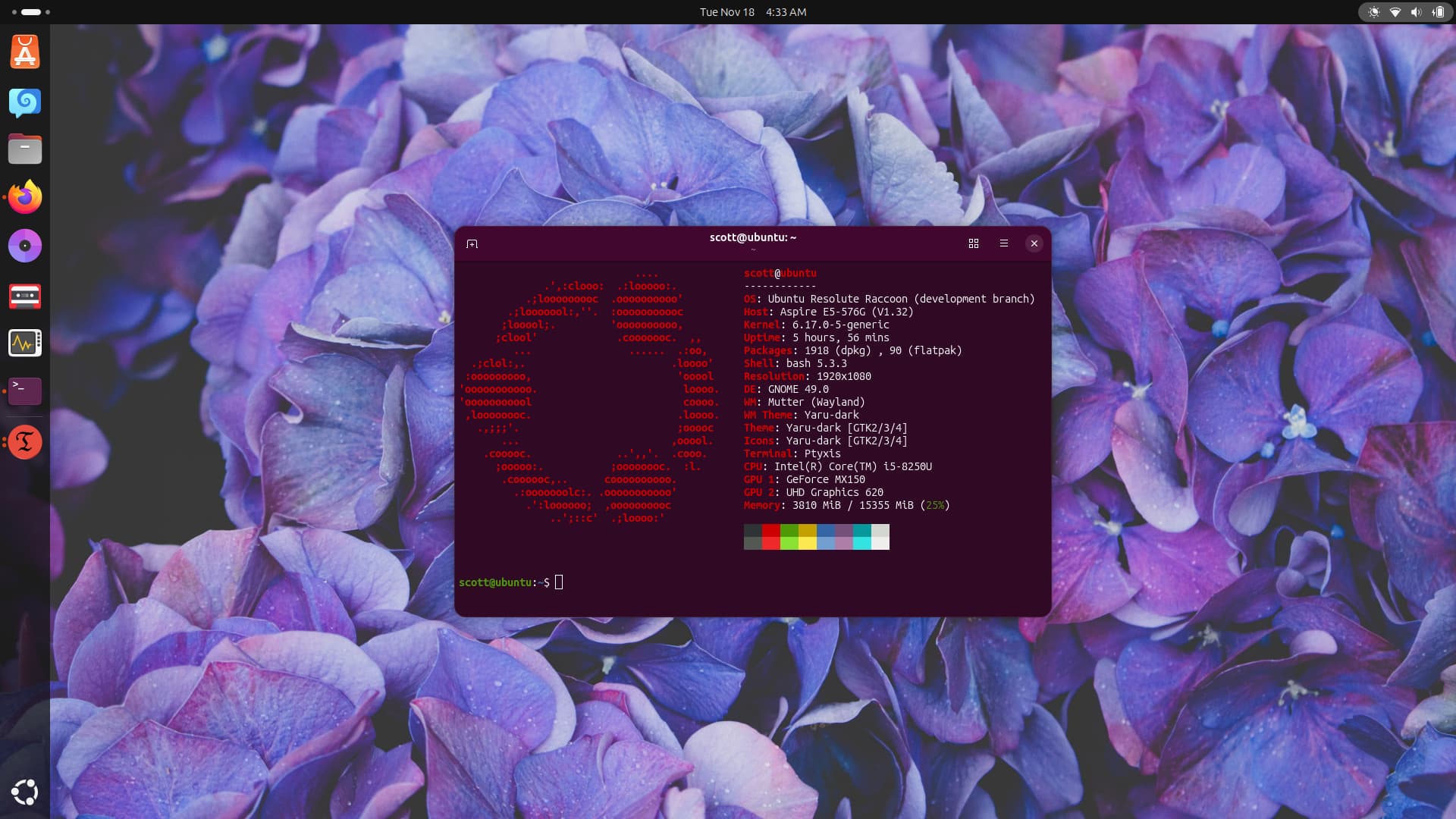
I myself am using a Pi4 8GB to test and follow the 26.04 dev cycle. Might post a screenshot and photo later on the day or evening.

Since November 1st build of ISO continues to fail: ubuntu : Live filesystems : “Ubuntu CD Image Team” team

1 Like

Interesting!

I assume this is the default Ubuntu iso, whereas I installed an iso of Xubuntu downloaded and dated Nov 16th and it ran live and installed perfectly, admittedly in KVM/QEMU.

I have today also downloaded and installed the iso dated today, Nov 19, and once again it ran and installed perfectly in KVM/QEMU.

So is this lack of new iso files just Ubuntu which I never bother trying any more.

It’s just a normal part of the development cycle. Every .iso image, whether it’s a flavor or Desktop, Server, etc., has build failures. Someone is definitely working on it, but having a bad attitude about it doesn’t help anyone.

2 Likes

Thanks for that info.
I hope I did not give the impression of a bad attitude with my comment. I was also aware that during the development of the Ubuntu family of OSs there are often many slips and problems that stop the iso files from working as needed.

I merely was saying that I do not bother testing Ubuntu any more as I have after many years realised that Xubuntu is the OS for me. I am very happy however, for other users who prefer the other versions from the Ubuntu family.

1 Like

Thanks for the clarification. :slight_smile:

And just for reference, all flavors (Xubuntu, Kubuntu, etc.) are Ubuntu, so same OS. You’re probably referring to Ubuntu Desktop (GNOME desktop version).

1 Like

Yes, just a misunderstanding. I know that all the 'buntus are basically the same, just using different DEs.
I also wanted to tell users that Xubuntu iso files are still appearing in the “dailys” and are still working fine.

Ubuntu ISO still failed to build: https://launchpad.net/~ubuntu-cdimage/+livefs/ubuntu/resolute/ubuntu
today also Xubuntu ISO failed to build https://launchpad.net/~ubuntu-cdimage/+livefs/ubuntu/resolute/xubuntu
and also Kubuntu https://launchpad.net/~ubuntu-cdimage/+livefs/ubuntu/resolute/kubuntu
and Lubuntu too: https://launchpad.net/~ubuntu-cdimage/+livefs/ubuntu/resolute/lubuntu