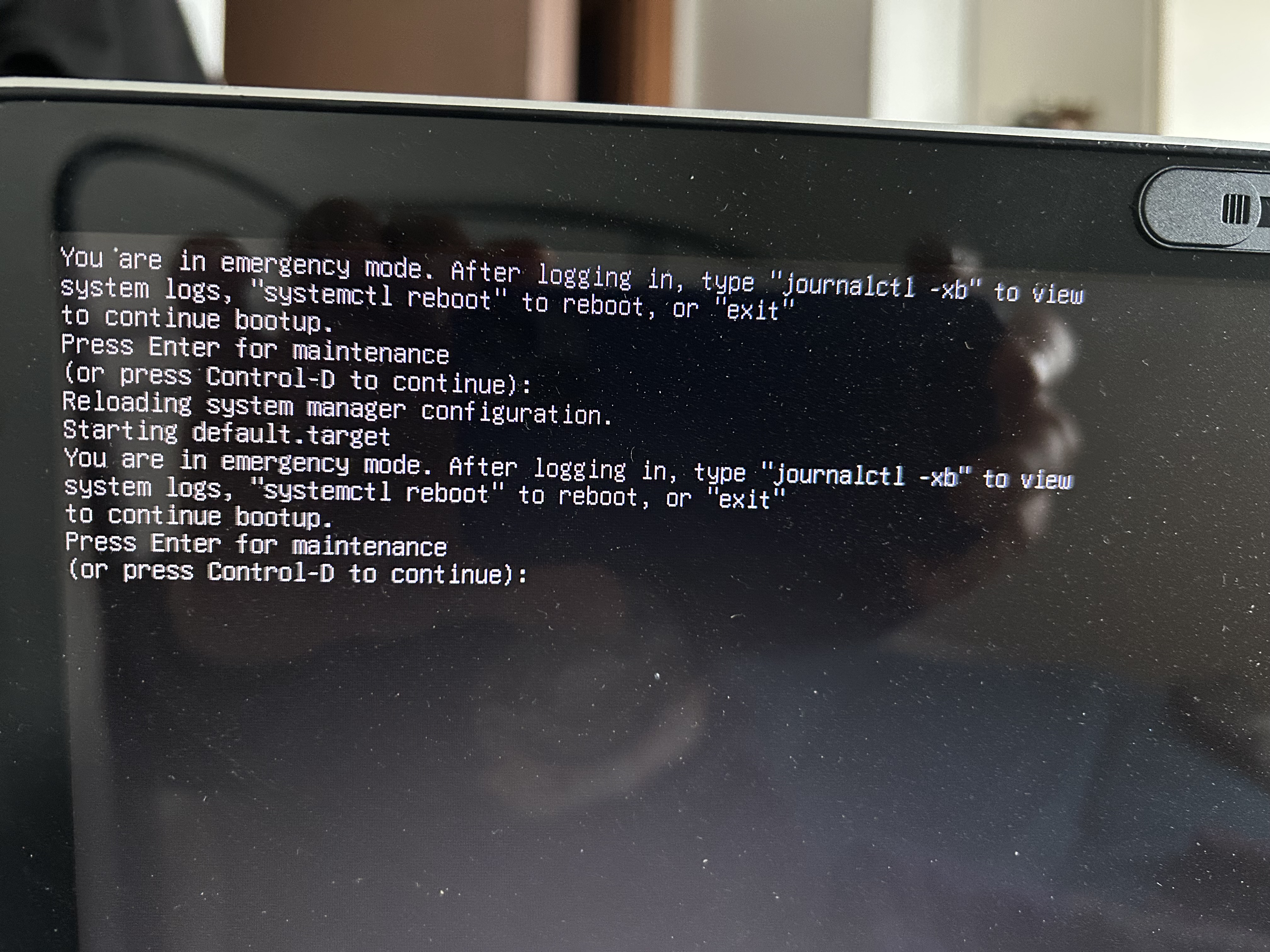
"You're in emergency mode. After logging in" error

Ubuntu Support Template

Ubuntu Version:
24.00 LTS

Desktop Environment (if applicable):
Budgie

Problem Description:
Hi, recently, not always but frequently, when I start the laptop this writing appears (see photo). I tried to use the various options proposed with the only result of always returning to the same error screen. Or the laptop freezes completely. The only thing I can do is restart until I no longer see the error. I’ve looked for solutions on the net but I couldn’t find anything that was easily understandable. I hope there is someone among you who can help me. Thanks.

Relevant System Information:
Include any details that might help (e.g., hardware, drivers, or special configurations).

Screenshots or Error Messages:
"


, type “journalctl -xb” to view log system logs. “systemcyl -reboot” to reboot, or “exit” to continue bootup. Press enter for maintenance. (or press control-D to continue):"

What I’ve Tried:
I’ve tried to:
I’ve type “systemctl -reboot” to reboot and “exit” to continue bootup.
I pressed enter for maintenance and control -D to continue. But without getting results. Either the laptop restarted always crashing to the same error or it crashed completely.

Welcome to Ubuntu Discourse :slight_smile:

Firstly, what is the actual Ubuntu version you are using?

There is no 24.00 so please update your post.

Next, at the prompt what appears if you type journalctl -xb?

Anything you can capture and post here might be helpful.

Finally, did this start after a recent update or upgrade, after installing new software or perhaps a power outage?

This is just a small point that I am sure will not correct the problem. I make it for the sake of accuracy. You say:

There should not be a hyphen between systemctl & reboot.

Have you tried Advance Options for Ubuntu at the Grub boot menu? You can select an earlier Linux kernel and a Linux kernel with Recovery Mode.

At the recovery menu we can run fsck - check all file systems. That would be the easiest thing to do.

It seems that Linux enters Emergency mode when it cannot find and mount all the partitions that the fstab file says are there or there is something wrong with the instructions in fstab file on how the partitions should be mounted.

I am now going to ask a stupid question. Are you able to somehow and some way load into Ubuntu? Perhaps the desktop? or at least up to the recovery menu?

Once at the recovery menu we can do things to get an Internet connection. (useful if updating/upgrading might help things along). We can also get access to a commandline terminal where we can enter commands that might correct things. There is also an option to repair broken packages. I do not think that is the problem here.

Regards

Hi, sorry if I’m only replying now but I’ve been ill and haven’t had the chance. I’ll answer you without following the order of your questions but simply in the order of the options I tried.

  1. I tried typing “journalctl -xb” I got a list of more than 5000 lines!! I don’t know if I should post it.

  2. Even if I have to try several times I still manage to enter the operating system.

  3. I tried running fsck from the terminal and got the following message:
    fsck from util-linux 2.39.3
    e2fsck 1.47.0 (5-Feb-2023)
    /dev/sda3 is mounted.

Warning the file system is mounted. Continuing the operation will cause serious damage to the file system. Continue?

Clearly I didn’t continue.

  1. I’ll try to update the operating system later.
    Thanks anyway for your advice.

I want to edit my first post but I don’t understand how!!! :((

At the bottom of your original post there are 3 … next to Reply

Click on that and then on the pencil icon to edit your post.

1 Like

Probably not a good idea to post the entire journalctl output but you could copy/paste the last 20-30 lines to a text file and upload that.

You can’t run fsck on a mounted partition and if you are booting into your installed system, it will obviously be mounted. Use the USB which you have that you installed Ubuntu with and run fsck on /dev/sda3. If you boot form a usb device, your internal drive might show as other
than sda so check to make sure you have the correct device by their size.

If you are able to boot your system, check the /etc/fstab file or possibly post it here if you don’t know what it should show.

Hi, I tried both from a laptop and a cell phone but there is no pencil.

Yes, you are correct. Apologies, I forgot about the edit timers.

But as @yancek pointed out you can post the last part of the log so we can try and figure out what is going on.

Hi, the output of “fsck /dev/sda3” is as follows:
fsck from util-linux 2.39.3
e2fsck 1.47.0 (Feb 5, 2023)
dev/sda3: clean, 1667341/15237120 files, 19015037/60917760 blocks

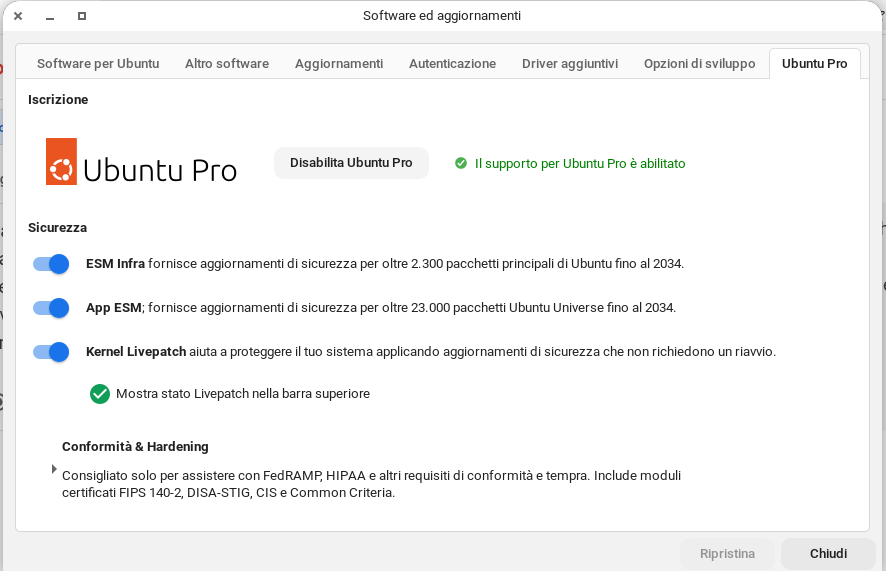
I tried updating the operating system, but there were no updates. I’d like to point out something I’d forgotten. I enabled Ubuntu Pro support and a livepatch kernel. This means it’s possible it will receive updates from livepatch.

In the /etc/fstab file, there are only these two lines:

overlay / overlay rw 0 0
tmpfs /tmp tmpfs nosuid,nodev 0 0

The last twenty lines of the “journalctl -xb” log:

"dic 05 22:37:26 MyName-MacBookPro expressvpnd[2451]: 2025/12/05 22:37:26 [D] NetworkMonitorExtension: network change check tick expired.
dic 05 22:37:27 MyName-MacBookPro expressvpnd[2451]: 2025/12/05 22:37:27 [T] RPC: GetStatus args: &{}
dic 05 22:37:27 MyName-MacBookPro expressvpnd[2451]: 2025/12/05 22:37:27 [T] RPC: GetStatus reply: &{ServiceInfo:{State:ready Activated:true Connected:f>
dic 05 22:37:30 MyName-MacBookPro expressvpnd[2451]: 2025/12/05 22:37:30 [D] Background network check started.
dic 05 22:37:30 MyName-MacBookPro expressvpnd[2451]: 2025/12/05 22:37:30 [T] DetectCaptivePortal: sending http request: http://connectivity-check.ubuntu>
dic 05 22:37:30 MyName-MacBookPro expressvpnd[2451]: 2025/12/05 22:37:30 [W] dialDNS: loopback address ‘127.0.0.53’ is provided, fallback to 1.1.1.1:53
dic 05 22:37:31 MyName-MacBookPro expressvpnd[2451]: 2025/12/05 22:37:31 [T] RPC: GetStatus args: &{}
dic 05 22:37:31 MyName-MacBookPro expressvpnd[2451]: 2025/12/05 22:37:31 [T] RPC: GetStatus reply: &{ServiceInfo:{State:ready Activated:true Connected:f>
dic 05 22:37:31 MyName-MacBookPro expressvpnd[2451]: 2025/12/05 22:37:31 [T] DetectCaptivePortal: has internet
dic 05 22:37:31 MyName-MacBookPro expressvpnd[2451]: 2025/12/05 22:37:31 [D] isNetworkReady: result : {Val:Has Internet Err: Shared:false}
dic 05 22:37:31 MyName-MacBookPro expressvpnd[2451]: 2025/12/05 22:37:31 [D] Background network check finished. state: Has Internet, err:
dic 05 22:37:31 MyName-MacBookPro expressvpnd[2451]: 2025/12/05 22:37:31 [I] Publishing network ready event: has internet
dic 05 22:37:31 MyName-MacBookPro expressvpnd[2451]: 2025/12/05 22:37:31 [T] Firing event {“id”:227,“name”:“WaitForNetworkReady”,“data”:{"WaitForNetwork>
dic 05 22:37:31 MyName-MacBookPro expressvpnd[2451]: 2025/12/05 22:37:31 [T] handleNetworkReadyEvent: &{Result:has internet Reason:Has Internet}
dic 05 22:37:31 MyName-MacBookPro expressvpnd[2451]: 2025/12/05 22:37:31 [T] RPC: GetEnginePreferences args: &{}
dic 05 22:37:31 MyName-MacBookPro expressvpnd[2451]: 2025/12/05 22:37:31 [T] RPC: GetEnginePreferences reply: {ForceVPNDNS:true IsSetForceVPNDNS:true Pr>
dic 05 22:37:32 MyName-MacBookPro expressvpnd[2451]: 2025/12/05 22:37:32 [T] RPC: GetStatus args: &{}
dic 05 22:37:32 MyName-MacBookPro expressvpnd[2451]: 2025/12/05 22:37:32 [T] RPC: GetStatus reply: &{ServiceInfo:{State:ready Activated:true Connected:f>
dic 05 22:37:36 MyName-MacBookPro expressvpnd[2451]: 2025/12/05 22:37:36 [T] RPC: GetStatus args: &{}
dic 05 22:37:36 MyName-MacBookPro expressvpnd[2451]: 2025/12/05 22:37:36 [T] RPC: GetStatus reply: &{ServiceInfo:{State:ready Activated:true Connected:f>
dic 05 22:37:37 MyName-MacBookPro expressvpnd[2451]: 2025/12/05 22:37:37 [T] RPC: GetStatus args: &{}
dic 05 22:37:37 MyName-MacBookPro expressvpnd[2451]: 2025/12/05 22:37:37 [T] RPC: GetStatus reply: &{ServiceInfo:{State:ready Activated:true Connected:f>
~
~
~
~
~
~
~
~
~
~
~
~
~
~
~
~
~
~
~
~
lines 10879-10901/10901 (END)
dic 05 22:37:26 MyName-MacBookPro expressvpnd[2451]: 2025/12/05 22:37:26 [D] NetworkMonitorExtension: network change check tick expired.
dic 05 22:37:27 MyName-MacBookPro expressvpnd[2451]: 2025/12/05 22:37:27 [T] RPC: GetStatus args: &{}
dic 05 22:37:27 MyName-MacBookPro expressvpnd[2451]: 2025/12/05 22:37:27 [T] RPC: GetStatus reply: &{ServiceInfo:{State:ready Activated:true>
dic 05 22:37:30 MyName-MacBookPro expressvpnd[2451]: 2025/12/05 22:37:30 [D] Background network check started.
dic 05 22:37:30 MyName-MacBookPro expressvpnd[2451]: 2025/12/05 22:37:30 [T] DetectCaptivePortal: sending http request: http://connectivity->
dic 05 22:37:30 MyName-MacBookPro expressvpnd[2451]: 2025/12/05 22:37:30 [W] dialDNS: loopback address ‘127.0.0.53’ is provided, fallback to>
dic 05 22:37:31 MyName-MacBookPro expressvpnd[2451]: 2025/12/05 22:37:31 [T] RPC: GetStatus args: &{}
dic 05 22:37:31 MyName-MacBookPro expressvpnd[2451]: 2025/12/05 22:37:31 [T] RPC: GetStatus reply: &{ServiceInfo:{State:ready Activated:true>
dic 05 22:37:31 MyName-MacBookPro expressvpnd[2451]: 2025/12/05 22:37:31 [T] DetectCaptivePortal: has internet
dic 05 22:37:31 MyName-MacBookPro expressvpnd[2451]: 2025/12/05 22:37:31 [D] isNetworkReady: result : {Val:Has Internet Err: Shared:fal>
dic 05 22:37:31 MyName-MacBookPro expressvpnd[2451]: 2025/12/05 22:37:31 [D] Background network check finished. state: Has Internet, err:
dic 05 22:37:31 MyName-MacBookPro expressvpnd[2451]: 2025/12/05 22:37:31 [I] Publishing network ready event: has internet
dic 05 22:37:31 MyName-MacBookPro expressvpnd[2451]: 2025/12/05 22:37:31 [T] Firing event {“id”:227,“name”:“WaitForNetworkReady”,“data”:{“Wa>
dic 05 22:37:31 MyName-MacBookPro expressvpnd[2451]: 2025/12/05 22:37:31 [T] handleNetworkReadyEvent: &{Result:has internet Reason:Has Inter>
dic 05 22:37:31 MyName-MacBookPro expressvpnd[2451]: 2025/12/05 22:37:31 [T] RPC: GetEnginePreferences args: &{}
dic 05 22:37:31 MyName-MacBookPro expressvpnd[2451]: 2025/12/05 22:37:31 [T] RPC: GetEnginePreferences reply: {ForceVPNDNS:true IsSetForceVP>
dic 05 22:37:32 MyName-MacBookPro expressvpnd[2451]: 2025/12/05 22:37:32 [T] RPC: GetStatus args: &{}
dic 05 22:37:32 MyName-MacBookPro expressvpnd[2451]: 2025/12/05 22:37:32 [T] RPC: GetStatus reply: &{ServiceInfo:{State:ready Activated:true>
dic 05 22:37:36 MyName-MacBookPro expressvpnd[2451]: 2025/12/05 22:37:36 [T] RPC: GetStatus args: &{}
dic 05 22:37:36 MyName-MacBookPro expressvpnd[2451]: 2025/12/05 22:37:36 [T] RPC: GetStatus reply: &{ServiceInfo:{State:ready Activated:true>
dic 05 22:37:37 MyName-MacBookPro expressvpnd[2451]: 2025/12/05 22:37:37 [T] RPC: GetStatus args: &{}
dic 05 22:37:37 MyName-MacBookPro expressvpnd[2451]: 2025/12/05 22:37:37 [T] RPC: GetStatus reply: &{ServiceInfo:{State:ready Activated:true>”

I don’t see anything in your post above that would indicate a problem with starting the OS but maybe others will. One significant thing is that you are using a Macbook which is something you should always indicate in your initial post as methods will vary with Apple devices.

The fstab you posted is incorrect as it is from the ‘live’ USB so you need to mount /dev/sda3 first then navigate to the /etc/fstab file on sda3 and copy/paste it here. Since there are already countless of sites explaining this I won’t repeat it. The link below is one such site.

https://askubuntu.com/questions/1397950/how-do-i-access-a-mounted-partition-on-a-bootable-usb

I had a doubt. I use a yubikey as a smartcard to authenticate when logging in to my laptop and for every time I use “sudo”. Could this error be generated by an external attempt to force this block?

The messages you posted from the logs all seem to refer to internet connectivity and your VPN and the last line indicates "Activated:true so that doesn’t seem to be a problem.

Did you make any changes to the system just prior to encountering this problem and if so, what were they?

I don’t think the yubikey is the problem as I don’t see any messages relating to an authentication problem. I’m not sure what you are asking about an ‘external attempt’, someone trying to hack your machine? Unlikely.

You forgot to post the content of the fstab file though I’m not sure it will help, it might eliminate potential problems.