Software Updater time control specification

tl;dr; More finessed time control for software updater according to human time

Problem I am facing

My work gets often interrupted by Software Updater, and especially recently when there are daily and loads of updates on Ubuntu Noble (Dell G5). Id start working and mid work it would ask for upgrades, and hinder the work if i dont upgrade. Then it would require restart, and if i dont restart it would start producing subtle interactive Haisen bugs - especially when I use system calls.

For example, lets say I am performing unit tests on simple memory register using gcc’s __builtin_* for scanning user input and assigning it to register. When i run unit tests before software updater , they all pass. But moment software updater starts, request restart and I dont restart it, they start randomly failing. Often in terms of something stupid like didnt read 3rd character right and interpreted single nibble from 0xF to 0x6. Then when i restart it, it all goes back to regular.

It has became quite a bore to start working, work for 2 h and then have to restart or all my work is in vain.

Solution that would benefit me

I couldn’t find any time slot setting on Software Updater to schedule it during lunch (for example) when I am off my computer and eating. I tried to find cron jobs tied to Updater but I couldn’t find them.

Proposition

Now, all i can do is guess at this point, but i suspect that there is some either time zone management synchronization feature missing or not exposed to user. So id suggest 2 possible solutions:

Base premise:

  1. Every human on earth has fixed time that they are busy and relaxing. Those time slots tend to be roughly evenly distributed in Nx2-3 hours per 16 h increments ( 24 - 8 = 16, in 2 -3 shifts : 6-8 hours, across time zones that is 2-3 ‘ticks’ roughly every 2h and 30 min ) - all in local time.
  2. Machines dont have to have time that they are busy or relaxing, or if they do its highly randomized and enthropic. Machine can go and do some automatized jobs while user is away and so on.
  3. Therefore human time != machine time, however for updates human interaction is required.

Humans gotta sleep, eat, and do human things. Its clear that machine time isnt same as human time especially for long running systems such as servers. So the problem arises about users information, machine availability and whole series of possible interactions. So we have 2 extremes here:

  • Machine specific : with little or no user interaction due to system automation - ie servers.
  • User specific : with little system automation due to frequent user interaction - ie desktops.

This can easily be summed in few logic gates:

  • XOR where interaction happens when those extremes overlap (full machine control and full user control are considered the same). So specific care is required when system transfers from machine to user specific extreme - required user interaction.
  • NAND : focusing on automation, where user input is only presaved state and machine does upgrades when it needs to.
  • NOR : focusing on non active time where system is powering off or powering on.

Id prefer NAND version to be honest, but I am aware that there are plethora of people with different uses and needs, and Id strongly advise against NOR since whole idea of FOSS is “user is not an a baby”.

Finessed time control for any updater would highly benefit user and machine work flow, while keeping information to when its convenient, allowing for ease of user navigation.

Proposals:

Force push updates and upgrades on local machine time intervals.

Let say that upgrades are pushed onto server, and then redistributed in random time intervals. Then moment my machine IP matches time stamp, it would force an update check (via some internet protocol) and updater will automatically start on that.

Instead of that, translate NTP check to local time, and its safe to assume next:

  1. Moment updater prompts user for upgrades, save the prompt state. Save Servers Push Time in Local Prompt time.
  2. Start tick incrementer ( ever 2 h 30 min ) and track user interaction every 5 minutes for 15 minutes before 2 ,5 H and after 2.5 h.
  3. Check for conditions to met: User interaction is false for last 10 minutes (went to eat, toilet and so on) and job load decreases → implement user prompt. Trigger restart.
  4. If conditions arent met, wait for another tick.
  5. Notify user about changes.

Allow for time slot increments

Allow in software updater for user to specify time they wish to upgrade and restart entire stuff. Not on poweroff, not on login. They can specify time slot (around 30 ish minutes) where entire upgrade/restart cycle must be finished. This might require more detailed priority in upgrades, perhaps some UI/UX that can formualate queue ( for example, system first, security second, apps third and so on) and do them in batches.
In what way specifically? I have never been hindered by delaying an update.

Given that you have a specific requirement to decide when updates are run, I suggest that you turn off automatic updates. This is what I have done.

Instead, as part of your daily routine, run the updates manually. Again, that’s what I do — my morning routine explicitly starts with running updates, so the machine is up-to-date before I start any work. If a restart is required, it’s not a hassle. I do this on both my desktop and my laptop.

If you want to automate this, you can write a simple script along with either a cron job or an anacron job, although that’s probably going overboard.

Topic moved to Support and Help.

Project Discussion is for discussions not technical support.

1 Like

This is poor advice.

There are many new and inexperienced users who frequent this forum who will not know or understand the ramifications of taking such an action.

It exposes your system to security and stability vulnerabilities and is not the recommended course of action.

What you do on your own system is entirely up to you but please do not make general recommendations as if this is the way to deal with such situations.

At the very least, please make such comments with the caveat mentioned above about security and stability.

Again, I would not recommend this.

If a user is looking for fine-grained control over specific processes including with logging then the recommended approach is to use systemd units and timers.

1 Like

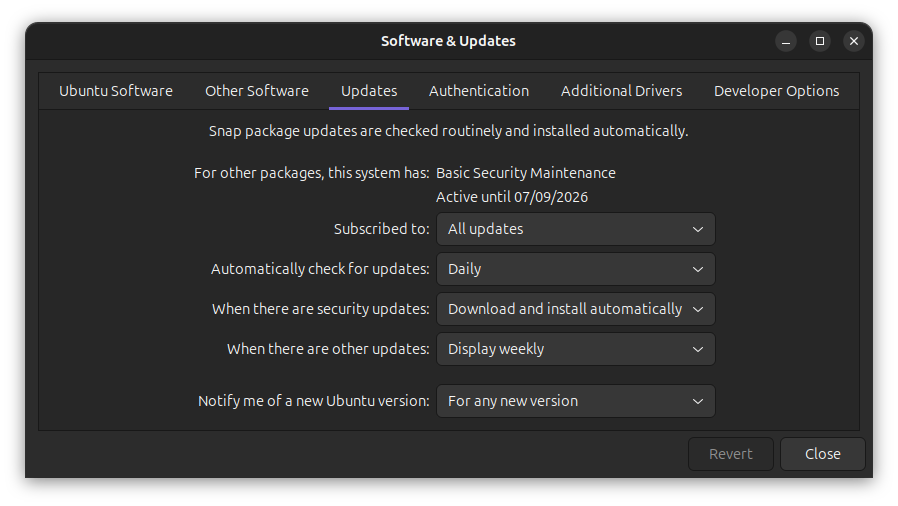
That is why Software and Updates>Updates tab allows the user - any user - the option to set Never as the frequency to Automatically check for updates. There is in fact a range of options.

It should be noted that the setting of “Never” does not apply (I think) to security updates. There the option is: Display immediately; Download automatically; Download and install automatically.

Of course, this is on Ubuntu with the Gnome desktop environment. I cannot say anything about other desktop environments.

Oh, I almost forgot. Software Updater always gives me the option to re-start later.

Regards

Apt uses systemd timers apt-daily.timer and apt-daily-upgrade.timer to update package lists and to install package upgrades (if so configured)

Never heard that one before. Who is the quote from?

Why would you restrict upgrading during shutdown, booting, or login? The shutdown instance in particular eliminates user interaction and thus solves your requirement of not being interrupted with a software update notice while you’re logged into a session. It also eliminates the need to restart services after the upgrade. They’ll simply be restarted on the next boot.

Anyway, you’ll need to file some Wishlist bug reports against update-manager, software-properties-gtk, and maybe a few others in order to get the features your seeking.

1 Like

I don’t even know why this is a discussion. Occam’s Razor here:

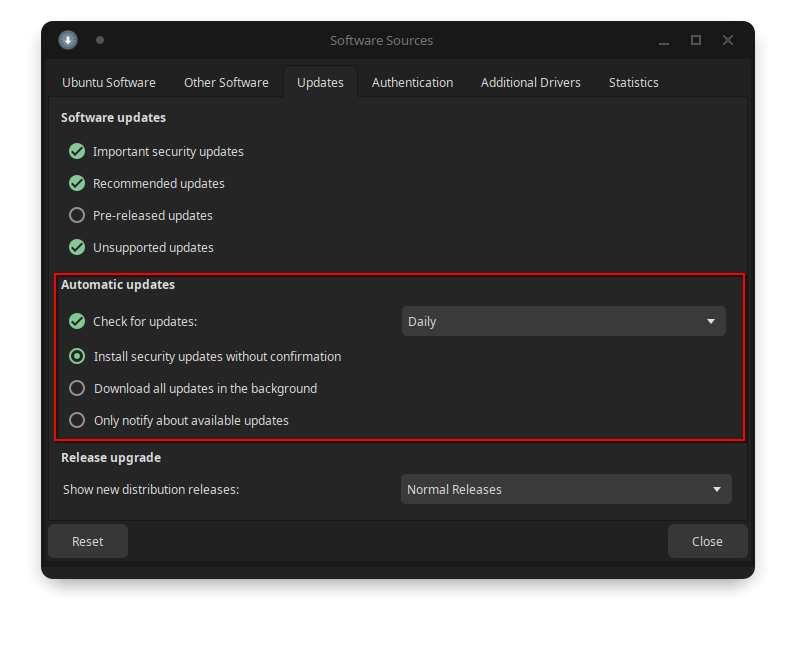
You can completely customize these options in “Software & Updates”.

In a way to produce hisenbugs and compile time inconsistencies. Misinterpretation of memory and bytes. Why? I dont know. I just know that basic string manipulation suffers pseudo racin condition when upgrade is delayed (not update, upgrade and specifically restart after upgrade).

Id prefer not to turn off security updates for safety reasons. I manage 2 servers and my personal machine, and wouldnt want for my machine to be weak link.

Cronjob was originally my idea, but whole apt system goes trough independant timers. So assigning crone jobs might not do anything in overall for specific phase that bothers me.

Apt timers - noticed. Saw them in systemctl, couldnt find service files. To be quite honest its not that i have went into deep directory dive, just find (ls + grep on some directories) and whereis.

“User is not a baby” Not a quote but general sentiment. FOSS doesnt hide its functionality from user like its a baby proof room. User is free to tinker and play, change and break stuff if they wish. Its a mess, but its an open mess.

Id restrict on boot because if some “whoopsie” happens there goes morning and possibly delay in work if upgrade is faulty. Id restrict on shutdown if any upgrade has inconsistencies and becomes nasty suprise in the morning. In my own personal opinion, upgrades are best done with user interaction in case something went wrong user can imedieatelly revert it back.

Not quite sure feature request is something im aiming for - albeit, if its path i must walk on ill try to gather logs. My hope was to start discussion, this is my first post, so i am a bit self conciouss about probable solutions hiding in ill form question. Discussion can help clear things out.

There is no time slot. Thus ocams razor becomes hickams dictum. Apt manager doesnt use crons schedualling but its own set of timers. It would be nice for them to be exposed in UI.

So far only option is weekly that can leave work days (womewhat 2/7 chance) free. But that in turn piles up updates - especially in bottle neck time as new version update.

I appreciate time you took to screenshot and post images, thanks <3

Fair enough, to be quite honest didnt notice it was technical support. I appreciate help tho. Thanks <3

I dunno, I’d rather deal with a “whoopsie” before I begin work than in the middle of workday. No matter when a problem happens, it’s still going to time to resolve. I don’t see it being any more convenient to stop whatever real work you’re doing to address an upgrade problem than dealing with it before you get started working proper.

Fortunately, I can’t remember when I’ve had to devote any time to solving an upgrade problem so I think for me the objection is moot.