Improper Ubuntu setup / partition of system disk is causing issues

This topic has gone off topic. Let us clarify the answer to the original question.

We do not do that. There are reasons the Linux directory structure is the way it is. Application developers have to fit in with the Linux way of doing things. Otherwise, their applications will not run on the Linux operating system.

Microsoft Windows does things differently. I have not used Windows since Win98. But I do run one Windows application through Wine. And the install options are still the same. I can choose a folder to install the application in.

That is not the way things are done in Linux. Every Linux Distribution has to follow the pattern. The Snap software packaging method is different from the Debian package management (deb) method. But it is still has fit in with the Linux way of doing things.

So, open the file manager and select other locations. Then select Ubuntu. Then select Snap and we will see folders/directories for any snap applications that we have installed. We are now looking at a directory under the Root directory.

Snap applications are not suppose to access anywhere outside of their declared area of interest. So, even if it was possible to install a snap packaged application on a separate partition to the Home directory it most likely would not be able to access it.

Debian packaged applications have the potential to access everywhere on the drive, Even system directories. Does a music application need that freedom?.

A Snap packaged music application is severely restricted as to what it can access. Only the Music folder from my experience. This is inconvenient if we want all our music files on a partition set aside for data. That is just the way life is.

Regards

What do you mean by /root/efi?

You can actually use Gparted in a live session to copy complete partitions to another device e.g. copy /dev/nvme0n1p2 (or /dev/nvme0n1p3 etc) to a USB

I figured /boot/efi was the intention

This resembles a classic trap that a lot of Windows power-users fall into when trying their first Linux install.
The common symptoms are old online advice, over-partitioning, unnecessary complexity, and a reluctance to reinstall.

The best proven setup for most first installs, power-user or neophyte, is the installer’s default settings. That’s why it is default.

Steel yourself for a reinstall or two: Some power-users wind up re-partitioning and reinstalling several times until their systems are “just right”. It’s a lot easier after you have a few months of experience, so you can decide which assumptions were valid and which assumptions need to be revisited. There are ways to make a reinstall almost painless: Notes, backups, preparation, a sandwich.

  • Separate /home partitions went out of style 15 years ago when disks became much larger. Backups are better and safer anyway.
  • Separate /swap partitions on single-user Desktop systems went out of style almost 10 years ago.
  • Installing to user-chosen places in the filesystem was a support nightmare that was stamped out by Debian over 25 years ago when they created standardized packages and package management, and it was a good decision. Let that dream go.
4 Likes

Yes… “boot/efi” Inexperience and lack of familiarity leads to many mistakes.

I learned about GParted this morning from one of our contributors… didn’t know that’s one of it’s functions.

I might have to explore that as after several hours, I’m still transferring files and backing up the /root less partitions and directories under /home/[user] and /boot/efi. I had no idea it would be that volume of information as the whole partition (30Gb, most of it free) doesn’t seem to take up that much space.

If you are considering a fresh installation to allow the creation of suitably sized partitions, you only really need to backup personal files.

This is ideal advice.
A single large partition for System including User folders would not have created a situation where snap packages needed to be moved.

2 Likes

20/20 hindsight isn’t going to help solve the problem gents (and/or ladies if present).

The fact is, I looked up sources online for “how to install Ubuntu” and the most reliable looking sources lead me to create four (4) partitions as stated above. That’s before I knew or remembered where to find Ubuntu forums and apparently did not see Ubuntu forums solutions anywhere near the top of the search results.

As for being “off-topic”, if solving the stated topic means I have to shovel shit to get down to what causing the problem, shoveling is then step one of the solution.

Problem 1: I have a system disk that is setup improperly (shocking, I know… I’ve been informed by several)

Solutions pursued: GParted live running in tandem with a bootable USB Ubuntu 20.04 distro is elusive as “UNetBootin” recommended on GParted creates another 20.04 bootable Ubuntu partition (which I already had), but doesn’t lead me to a live GParted as the instructions seem to relay.

I looked for “how to use GParted to copy or backup data”, a suggestion offered by someone earlier in this topic and didn’t find good answers online.

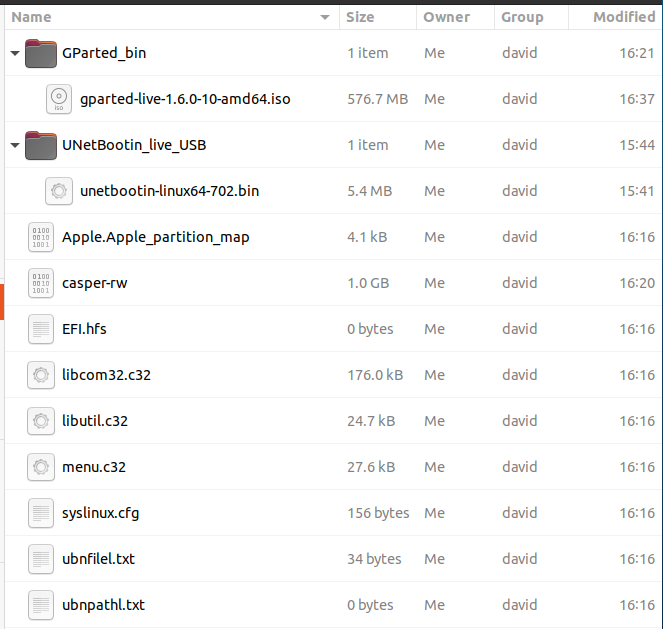
presently: downloaded “gparted-live-1.6.0-10-amd64.iso” from https://gparted.org/download.php to Ubntu_20_GP partition on my 16Gb USB drive. I have no idea how to get GParted installed on a bootable Ubuntu USB, but I put the iso into a folder on the USB just in case I could install and run it from a USB boot.

Here’s what’s on that bootable USB partition:
241208_Ubuntu_20_bootable_GParted

So, once again I’m down a rabbit hole, alone in the dark, no light, and no string that leads me out the way I came… Oh yeah, and running the UNetBootin to create another bootable Ubuntu on the 16Gb flash drive got me another “you’re running out of disk space” message.

So, restating the obvious to which I’ve confessed, “I don’t know what I’m doing and learning as I go” is less than encouraging. But thanks for your input. If you’re patient enough to stick around and help, I’ll throw in some more self-deprecation and try to at least keep it entertaining.

Well, you’re not alone.
And kudos for sticking with it.
It’s hard to learn some new things!

Tip: The Ubuntu LiveUSB installer is super-handy. Hang onto it. It’s more than an installer. It’s your bootable multitool. The “Try Ubuntu” environment is a complete system that runs in RAM only. You can install packages…like gparted. You can re-partition, repair, test, and more.

  • You don’t need to create a separate gparted USB.

Tip: Don’t resist reinstalling: Installing the first time is scary. Reinstall a couple more and the fear is gone. Now you’re ready for anything Ubuntu can throw at you.

  • You can reinstall Ubuntu onto bare metal, reinstall all your applications, and restore all your data from a backup…all in about one hour. A few notes, an install USB, and a backup.
2 Likes

Understand your frustration but if one of the hang up is how to install the ISO you downloaded to a USB drive in order to use it.
Might I be so bold to recommend this tutorial
cheese on a string or rather create bootable ISO on USB (Ubuntu)
you will be using a app called Startup Disk Creator now the tutorial is showing 18.04 LTS but it is the same on the newer releases.
A ISO is a ISO, even though the guide shows a Ubuntu iso it’s the same step if you want to do a Windows boot usb, a gparted boot usb, or a install iso to install ubuntu.

partitioning schemes guidelines or wiki concerning most used… I’ll throw a pointer to ubuntu documentation wiki…
turning on a flashlight… or rather the Docs on Ubuntu
There used to be a well thought out guide on UF before the shift to here. But sadly I can’t access it but I can provide a hyperlink in the hopes you can
Ubuntu forums

But to be absolutely clear and honest if it was me … I’d back up my files I wanted to keep to a drive. Make a list of what snap apps I wanted to keep in a notebook.
Reinstall Ubuntu accept the defaults overwriting everything and start over with the apps install (copy) my files that I wanted to keep from the back up drive. (although I am not the first to recommend this).
Now would I proceed with creating a Gparted bootable USB —Yep for later use
Simply put it’s faster … to reinstall.
But if you rather fix the existing setup it is your choice. Although it’s not advised by me I do understand the desire to do so.
but another source of information for the rabbit hole is here
I’ve been down that road and in your shoes, in my top dresser is a quite a few “Been there done that” T-shirts worn out.
Don’t Think I’ve not done the same or worse errors, so yes I do understand your frustration.

Just to clear this up for you …

partition 1 is your swap partition this assist your ram in intensive memory uses - Leave this alone
partition 2 / is root drive that is where snap will write to and all the data for the OS is written to.
partition 3 /boot/efi is where the UEFI data is stored to to boot the computer - Leave this alone you mess around here you will not boot again easily.
partition 4 /home that is where your home files are wrote to In other words what you write not the OS, or what you download , But what YOU write or copy, the OS is stuck with what is available on partition 2.
_________________________________________________________________________________

Now could you stop snap / snapd services etc etc copy all the files in the /var/lib/snapd/snaps to a drive delete all files under that directory, struggle with resizing of partition 4, effectively creating another partition , then formatting and mounting it, the newly created partition 5 to the /var/lib/snapd/snaps location copy back the files to /var/lib/snapd/snaps . Edit fstab to automatically mount by uuid of the newly created partition5 to the /var/lib/snapd/snaps location so that it available on reboot. and Oh yes almost forgot re enable all the services you will have to stop in order to create a partition copy and mount the new partition.
(I only mention this method is because it is honestly the stupidest workable solution I could think of, and proves that sometimes what is said on the internet is not sound and good advice)

Trust me this method will be worse than what you have currently.
OR
A more elegant solution use Gparted to resize (shrinking them) the partitions, Such as your /home partition, and possibly one other or two, then increasing the size of partition2 . But even here I would advise stopping all snapd services while performing this.

Going out on the limb one possible solution is reduce /boot/efi to 1GB size in total and hope it doesn’t crash on reboot (honestly only would crash if the files got corrupted during re-size 1Gb is plenty for the /boot/efi partition). Reduce linux-swap partition to double your installed ram amount (although I actually prefer half the amount of installed Ram, but then again I usually install the max amount of ram). Reduce the /home partition by 100 gb or 200gb you choose. Then resize your ./ root partition using the available space. That should get you by for a bit maybe IF it doesn’t crash. And if it does guess it will be re-install time. But definitely back up stuff you want to keep

OR
just re-install with defaults.

Which will automatically combine your partitions 2 and 4. Resize your /boot/efi partition to something sensible like 1gb or 2gbs MAYBE. and More than Likely resizing your /swap partition in half the size. Leaving you with three partitions. a /boot/efi, /swap (only if needed, let the OS make that choice), and a ./ (root with home combined under the root)
Effectively accomplishing the exact fix I just stated in 1/10th of the time. Without worrying how much space to allocate for your exist /home partition. Because Honestly I can’t tell you how much to shrink that partition to in order to met your needs.
This is why many here are saying re-install and use the defaults It is the absolute best choice. even if no one likes to hear it

Because if you use the defaults and run out of space the answer is simple buy a bigger drive.
Here is a sample of my Boot Drive Nvme on a headless Ubuntu server. Which I chose the defaults.

nvme0n1     259:0    0 238.5G  0 disk
├─nvme0n1p1 259:1    0     1G  0 part /boot/efi
└─nvme0n1p2 259:2    0 237.4G  0 part /

Because I have 96GB of Ram the installer decided I don’t need a swap partition…

Sgt-Mike removes his Brown round Drill Instructor Campaign Hat gently places it on his desk. In hopes everyone appreciates the stab at humor.

Thank you @sgt-mike for the obvious effort and time you put into a great deal of relative information.

It sounds as if, by several accounts, the easiest and most elegant solution is a reinstall and reformat of Ubuntu on the m2 system drive, after having backed up the personal data at /home in particular which includes the settings which makes Ubuntu system look like “my Ubuntu” system.

Let me know if this sounds like the right game-plan:
Ubuntu install will format and prepare:

  • preparation involves: * backing up /home as critical /user files for Ubuntu settings
  • one main / (root) partition into which ALL system files are entered
  • there is no need for /boot, efi, /home or any other partitions
  • SWAP is likely created by system install, size 1-2Gb as system RAM = 32Gb (maxed)

Q: What of the applications which I’ve already installed and have running as intended?

I’ll be looking into properly backing up /home. I’ve run Backups (included with Ubuntu Applications/Utilities) but have never reset anything I’ve backed up. It is mentioned in this topic that GParted (located and installed presently) can be used to backup, but I’ve found no valid documentation (even in the GParted online manual) for that specific use.

GParted: the “Copying and Pasting a Partition” chapter makes the most sense, but that precludes an unmounted partition (which are being used) and/or GParted running from the USB while the m2 system disk is NOT being used… and I’ve yet to figure out how to run GParted from the USB.

NOTE: the label for the discussion and topic is changed as the original “disk space” issue is rather a result of the underlying setup and install mistakes.

I’ll be back later this morning… I have clients that are in need of my attention this morning. Thanks all for your consideration, attention, and efforts.

You will need /boot/efi because your PC is already UEFI compatible

After you have booted into the live session, open a terminal and double check that you are in UEFI mode:-

[ -d /sys/firmware/efi ] && echo "UEFI" || echo "Legacy"

Also, before starting the installer, check that your disk is GPT via Gparted > View > Device Information
The installer will automatically create an ESP (boot/efi) and a System (root) partition together with a swapfile.
Your user folder(s) will be contained within the System (root) partition

2 Likes

EXACTLY as Tea for one says.
Honestly you only need the files you created or picture , wallpapers such thing as that, and a List of the snap aps you have and just re-install them after a fresh install of the OS.
What you will see after that is what @tea-for-one describes for your partitions.

Nearing the point of “overwhelmed and in need of bourbon” flashpoint. ;-D

In attempting to catch up and digest the LOAD of information that @sgt-mike and @tea-for-one tossed my way this morning (much appreciated, pay no attention to the gagging trying to digest it) I’ve bumbled over several points for which I seek clarity and some making headway updates. This is where efforts have left me at present:

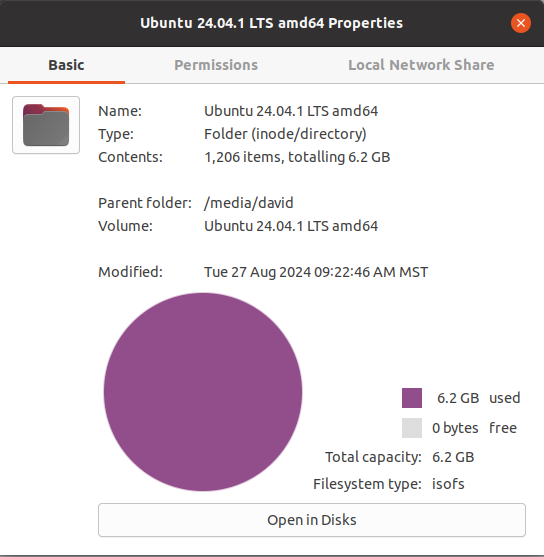
[1] bootable Ubuntu 24 USB formatted and in-hand;

BTW, the instruction that the USB device need be “4Gb or larger” seems to be off by 50%… [see step 2, Requirements] The result looks like 6.2Gb. Thankfully my 16Gb USB and chronic trust issues save the day! :smiley:

241209_Ubunto_24_boot_USB_properties

[2] I’m still looking for “how to backup files and directories” on the Linux system with different people recommending their favorite solutions, which, often leads me to consider downloading and learning a new application and its functions; something that I’d like to keep as simple as possible at present. The glut of info is already considerable. A backup method needs solved prior to attempting a reinstall fix. (the present effort)

the ‘rsync’ command sounds intriguing… though I’ll have to learn to use it first.

What to backup has gotten lost in a glut of information… currently re-reading to see if I can list the necessary targets:

  • /home (user files and preferences?)
  • /Documents (others); is on a separate SSD device [2Tb_ExFat],
    • not involved in OS install,
    • referenced by symlink
  • No backup needed, a new install will reconfigure (?) for each:
    • / (root)
    • /boot/efi
    • /swap (to be resized, if prompted)
  • ? others to backup ?
    • /etc/fstab file recommended to backup (reference of present mounted devices)

[3] Several well-meaning people, and several of the sources recommended continue to cite cases where additional partitions are a valid way to proceed… I’m getting conflicting recommendations. And with the number of web pages I’ve reviewed recently, I’m losing track of where I read what.

  • Apparently a standard install is / (root) with no other partition? older partitions deprecated.
  • The SWAP file is [1] far too large at 40Bg and wastes space OR… [2] should be “left alone”;
    • with 32 Gb of RAM on the machine, I’m thinking SWAP at 2 to 4Gb.
  • “A /home partition is useful to separate user files from any new system install…” (revisits the original question it seems; prior to discovering the underlying issues of improper disk partitions)

[3] Does the following inference mean that I can copy data from /var/lib/snapd/snaps , reinsert it into the same directory for a new install, and have the programs I have set up presently for my use look like “my programs and preferences” without having to jump through days of setup app by app?

→ “Note that it’s relatively easy to move all snap files to a different location, by just mounting /var/lib/snapd/snaps elsewhere. The data will typically live in /var/snap.” a quote from [Canonical SnapCraft Forum] @niemeyer

…or perhaps I’m dreaming. If that’s possible, I’m curious how that’s done, and if it causes rather than solves issues.

[4] With a new install, reformatting vs. “fixing” the m2 system drive on the goal sheet, this is a curiosity… but:

Is the GParted live ISO actually a Linux distro which has GParted available upon boot-up? Nobody has expressed that clearly if so, and the term “ISO” doesn’t convey that to us “mere mortals” until it is clearly specified. If that’s the case, I’ve been confused over nothing… because I’m destined to reinstall and reformat the m2 system drive rather than “fix” the mess it is currently. (sorry, typing/thinking aloud… feel free to ignore that)

As you might see, I’m getting lost in a sea of information. Presently working to learn a system for reliable backup…
Plan upon all data and applications being erased during reformatting.

If you installed applications from the Ubuntu Software application, apt, or snap, then simply do so again. One of the main reasons folks choose Ubuntu is the big selection, easy application install, and sensible default application set included.
…or you can wait and install applications as-needed later. Your preference.

If you installed applications from elsewhere on the internet, then that’s a can of worms not recommended for beginners. Keep notes about what you installed, from where, and how. You will need those notes.

  • Don’t fall for “you must run the latest XYZ version 3 direct from the developer website.” It’s opinion, not fact. Version 2.8 in the Ubuntu repositories has been tested for compatibility, the bugs have been ironed out, vulnerabilites (CVEs) have been patched, and it will be much easier to install. Unless you really need a feature from Version 3, stick to the Ubuntu garden.

Generally, you DON’T need to backup files that you don’t recognize or that you didn’t make yourself. You certainly don’t need to backup default settings for applications that will simply be regenerated on the newly-installed system.

  • Keep notes on what you decide to backup.
  • Go into your /home directory and simply look through all the subdirs. What did you create or download that is worth keeping? Maybe everything. Maybe very little.
  • Backup your web browser profile. If you use a browser password manager, backup that database. ALSO print yourself a local copy, just in case.
  • Backup your email profile. If you use IMAP, then the server should already have your email backup. If you use POP, backup your entire email database. ALSO print yourself a local copy of your account server/username/password/ports so a mistake doesn’t lock you out of email.

A backup can be as simple as manually copying your /home onto some other media. Or it can be complex, requiring a whole application. The only metric for the BEST backup method is: Can you use it on a very bad day, when everything else has gone wrong, to restore your data?

  • For the first time, it doesn’t hurt to try an easy method like simple copying. Less to go wrong.
  • You can also use Virtual Machines (or the “Try Ubuntu” environment) to test backup/restore instead of experimenting on your installed system.
  • You can make multiple backups using different methods. Try a few. See what you like. See what makes sense to you.
  • Take notes on the restoration procedure. People think they will remember, but they don’t.

No, but only because data and settings should typically not be stored there.
Most of your data and settings for snap applications should be in your /home/<username>/.snap/ directory.

You do not need Gparted live ISO because the Gparted utility is included in the Ubuntu ISO.
Boot into a “Try Ubuntu” live session > Show Apps > Gparted

However, after a successful installation, Gparted is removed automatically (for reasons of safety, I imagine).

1 Like

That’s the first I’ve heard that specified… or the first time I caught it. Thank you…

You can add a GUI to rsync - I use it daily for backups

sudo apt install grsync

Plenty of tutorials on the internet such as https://linuxhint.com/backup-ubuntu-system-using-grsync/
Please be aware of the trailing slash
A trailing slash on a source path means “copy the contents of this directory”.
Without a trailing slash it means “copy the directory”.

Present status report:

[1] Ubuntu 24 bootable USB in-hand, @tea-for-one tells me “GParted included”
[2] rsync backup (copies) of the following to separate HDD:

  • /home/[user] (and everything in that dir)
  • /root/efi (needing “$ sudo rsync…” to access in order to copy)
  • browser info backed up with bookmarks and passwords
  • personal files on drives separate from m2 system device (SSD, HDD, USB)
    • otherwise likely included with /home/[user] dir (for those that follow)
  • and I have copious notes on programs sought, installed, etc…

Any reason I shouldn’t dive in and attempt re-install?

@tea-for-one ; here is the command string I used with rsync… it copied as expected. Do you recommend an edit for next go-round? For those that follow: -a option for “archive” (sync dir recursively, transf block devices, preserve symlinks, groups, owners, permissions), -P for progress of action (% and time)

for syntax: rsync [options] [source] [destination]
$ rsync -a -P /home/[user] /mnt/[device name]/[directory name]/[directory name]

rsync resources:
https://linuxize.com/post/how-to-use-rsync-for-local-and-remote-data-transfer-and-synchronization/
https://linux.die.net/man/1/rsync