I am fairly new to Linux Ubuntu and have enjoyed the learning curve. How ever I am stuck in as much I have Waterfox 6.6.2 installed on Ubuntu 25.4.2 Plucky Puffin latest. Now I tried to use the About Waterfox (check new version) but it just shows 6.6.2 and no path update to latest version 6.6.3.
On Waterfox downloads page it says new version can only be installed by downloading ‘tar’ version.
I have downloaded the Waterfox ‘tar’ and extracted it to a folder in my downloads folder.
Can you advise what terminal command I must use to update to 6.6.3. I have tried various ‘sudo’ commands but don’t get any where. (inexperience). I tried the Flatpak method but the new version does not appear. Only old version 6.6.2
– Relevant System Information:
Acer 5750 repurposed laptop to experiment with Linux prior to move from Win11 on main PC. Intel i5 ,6g ram
Only Ubuntu on installed SSD. (No dual boot)
Hello gozitan -
Edit: Never mind this post — g-schick’s link above with the correct options.
///
Though Waterfox is not an Ubuntu package, we can offer a bit of guidance.
I do expect this to be installable via a lower level package command; dpkg.
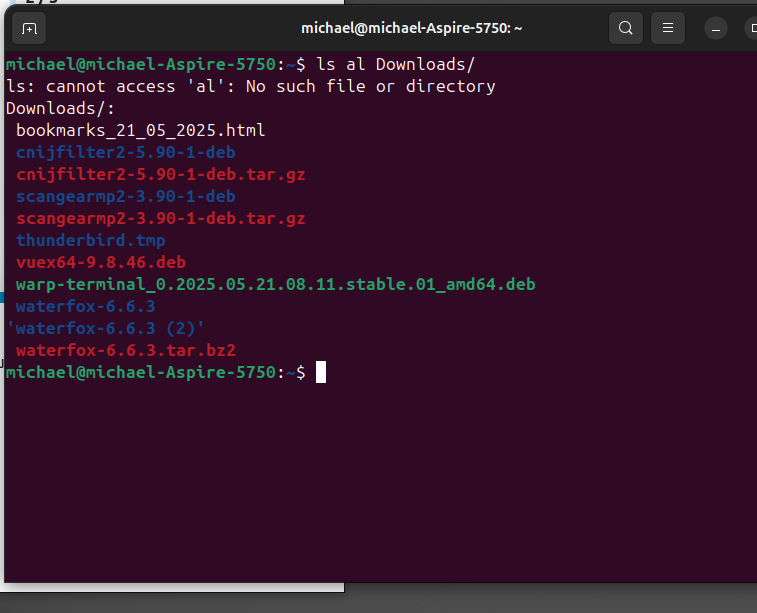
Please paste back the results of terminal command:
ls -al Downloads/
so we know the exact file name to address. We can then give the exact commands to run.
-I too run an out of tree browser; I expect the commands to update are the same-
Looks like you are getting in deep - installing 3rd party packages is not with out its hazards - “There be dragons!”
But here to look about Waterfox.
To be on the safer side to know what we may encounter,
Please provide - between code tags - highlight the text and then use Ctrl+E to wrap with code tags – the output of terminal command
I feel obligated to point out that installing from a tarball is NOT recommended for new(ish) users.
Additionally, it is unlikely that we could provide support post-installation and you would probably need to look for help on the Waterfox website or forums (if they have one).
Is there a reason you need this browser rather than something more standard that could be installed from the official repositories or as a snap?
Waterfox as already stated is 3rd party software.With that being said it can be installed via the unofficial Waterfox apt repository though I don’t believe this method is supported in 25.04 yet.Or you can install it as a Flatpak which will certainly work.
After doing some research it would appear neither of the above methods seem to offer the lastest version of Waterfox as neither has been updated in several months.
Thanks to ALL who advised me. Problem solved, just needed to wait for the auto update. Apologies for time wasting…but I did learn something from all your comments. Now better informed and learnt more about Ubuntu. RESULT.
Great that there is resolution - so long as you have learned something it is not in the least a waste of time (or effort).
please mark this topic as solved - check mark in the box at end of the post’s solution,
this aides others seeking the solution,
helps keep Discourse forum clean, and
precludes others miss-directing efforts to aid.