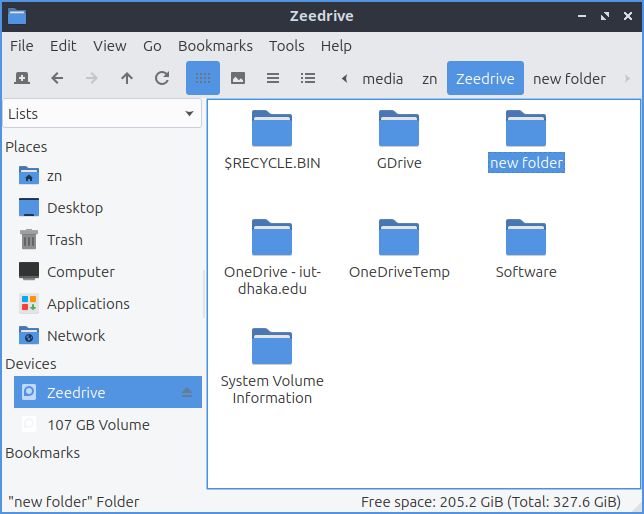
I accessed my HDD partition with PCManFM-Qt. I can create new folder upon entring the partition where I can see the all first-level folders of that partition. But when I open or enter into a sub-folder of any of the folder of that partition, I found that the create new folder option is disabled everywhere: from the menu, in the context menu, etc.
I’m dual booting Lubuntu with Windows 10. I know that having the fast boot turned on in Windows may cause it not to properly shut down and may cause the Linux system to have issues while accessing partitions. But I have the fast boot and hibernate options turned off long ago.
Also, I tried to see whether this issue persist in other DEs, and I didn’t find such issue with Linux Mint Xfce. Then I thought to try another distro with LXQt, and so I tried Debian 13 with LXQt 2,1.0, and found the same issue. But I didn’t try Plasma, to see whether the issue is with LXQt or just the Qt toolkit.
Anyway, anyone knows what’s happening here or what may have caused the issue? Is it solvable from my end or requires a code change?
Linux systems don’t ‘have issues’ mounting windows partitions which are hibernated, that is a deliberate decision made as there is a high likelihood of data loss when mounting a hibernated system. Also, that you turned off hibernation in the past doesn’t matter as some windows updates will turn it back on again and of course, will not ask nor inform the user.
I tried and it worked. Turned out, the issue is with my Google Drive and OneDrive sync folder only. For other folders and sub-folders, I can create folders inside them. But not inside the Google Drive and OneDrive folders.
I’m not sure about the file system. I’m talking about Google Drive and OneDrive sync folders from Windows mounted on Linux. On my Lubuntu, they’re mounted as ntfs3.
About the method, I just opened them using PCManFM-Qt, the default file manager of LXQt.
Only the Owner permission for both Microsoft OneDrive and Google Drive.
I agree. But So far, I tried Xfce based Xubuntu and Linux Mint Xfce, and they didn’t have this issue. But I faced this issue with Lubuntu and Debian LXQt. So, maybe it’s a package or some settings that need to be tweaked to make it a default behavior for the convenience of the users?
Well, yes. I would’ve avoided them if I could. But gotta use them in some personal/professional purposes.
Anyway, it’s solved now. But, as it works out of the box on some other distros, I’d be happy, and I’m sure others would be, to have it work out of the box. Please consider this.
At least, let me know what package or settings make it work out of the box?
That’s true. Lubuntu comes with ntfs-3g pre-installed. However, ntfs-3g is a userspace FUSE driver, whereas ntfs3 is an in-kernel NTFS driver. So even though ntfs-3g is installed, ntfs3 gets preferred and being used, unless ntfs-3g is explicitly being used.
For Lubuntu’s case, though it comes with ntfs-3g pre-installed, ntfs3 gets used for mounting ntfs drives as the later is the in-kernel driver.
zn@lubuntux:~$ mount | grep -i ntfs
/dev/sda5 on /media/zn/Zeedrive type ntfs3 (rw,nosuid,nodev,relatime,uid=1000,gid=1000,iocharset=utf8,uhelper=udisks2
As you can see, ntfs3 is used here instead of ntf-3g.
Also,
zn@lubuntux:~$ lsmod | grep ntfs
ntfs3                 348160  1
Being an in-kernel driver, ntfs is faster and it’s also newer. Whereas, ntfs-3g is a userspace driver, so it’s slower than ntfs3 but it’s mature and reliable.
So, I guess Lubuntu could explicitly use ntfs-3g until ntfs3 becomes more mature.
Manual mounting actually defaults to ntfs-3g;
mount /dev/sda5 <some_dir>
Unless you force specify a type
mount -t ntfs3 /dev/sda5 <some_dir>
udisks2 on the other hand, has it’s own defaults,
(see /etc/udisk2/mount_options.conf.example)
You can change the ordering if you want,
/etc/udisk2/mount_options.conf,
(ntfs is linked to ntfs-3g)
(to reload udev - sudo udevadm control -R)
__
Before 23.04 udisks2 used to default to ntfs-3g because
of another issue, But Paragon (the driver people) fixed it
and there was a 2 year backlog pressure from geeks who craved for speed. Hence the default for today.
If you get NTFS issues, it can be useful to run a full CHKDSK in Windows to make sure the file system is complete and consistent. Unfortunately, Microsoft don’t want to share their NTFS spec so the access you enjoy in Linux is a best effort. Only Microsoft truly know how it works.