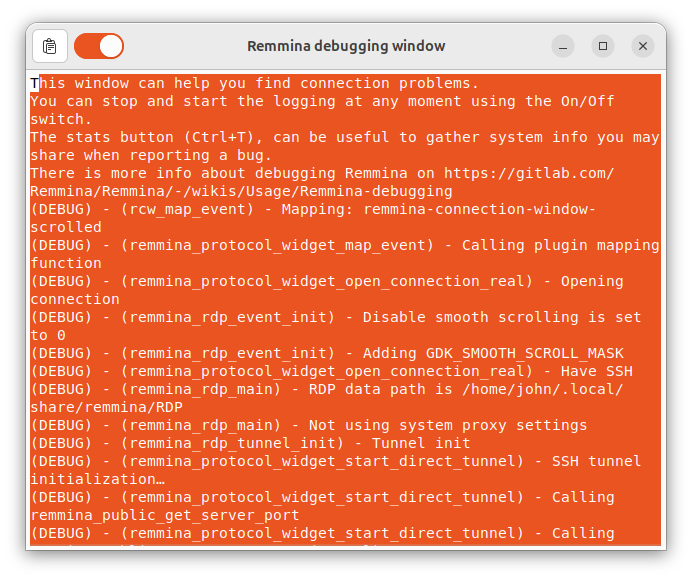
I have 2 laptop PCs, both upgraded from Noble to Resolute this week. I have set both to do Desktop Sharing and Remote Control (in Settings). Both have ports 3389 & 3390 open. Both are on the same network. One (a 10 year old one) works for connection by RDP using Remmina on my desktop PC; the other (a 2 year old one) doesn’t work for connection by RDP using Remmina on my desktop PC: it says “Failed to connect…”.
Relevant System Information
I suspect that there’s something else that I have to do on my newer laptop that I’ve previously done on my older laptop. I’m baffled! Any ideas what the problem and solution might be?
Not able to copy text from “Remmina debugging window” to here: just wouldn’t go on the Clipboard.
What I’ve Tried
Installed xrdp (even though it wasn’t installed on the ‘working’ laptop (measure of my desperation!) but the service refused to start:
john@Desktop:~$ sudo systemctl start xrdp
[sudo] password for john:
Job for xrdp.service failed because the control process exited with error code.
See “systemctl status xrdp.service” and “journalctl -xeu xrdp.service” for details.
‘Status’ gave:
Oct 06 17:27:54 Desktop xrdp[586125]: [ERROR] g_tcp_bind(7, 3389) failed bind I>
Oct 06 17:27:54 Desktop xrdp[586125]: [ERROR] trans_listen_address failed
Oct 06 17:27:54 Desktop xrdp[586125]: [CORE ] Failed to start xrdp daemon, poss>
Oct 06 17:27:54 Desktop systemd[1]: xrdp.service: Control process exited, code=>
Oct 06 17:27:54 Desktop systemd[1]: xrdp.service: Failed with result 'exit-code>
Oct 06 17:27:54 Desktop systemd[1]: Failed to start xrdp.service - xrdp daemon.
I noticed in the Debugging window a reference to ssh. I checked and the working Server PC has port 22 opened with openssh-server package installed. So installed openssh-server package onto the non-working Laptop PC, opened port 22, and checked the status of the ssh.service & ssh.socket using systemctl. Failed but nothing in the Debugging window.
Just tried copying the working Server PC and then amending it to the Laptop PC’s parameters. Failed the same way.
Tried to attach the ufw.log from the non-working Laptop PC but no option in ‘Reply’ for attach a file. So here’s the tail of the ufw.lod:
Apologies for not replying to your last post on this thread. I haven’t quite got used to Discourse and can’t see your post even though I got the email about it from Discourse! I’ve had a problem before with attaching files to my posts, which I’m still having: I don’t see the paper clip icon on the list of icons for this post!
So I’ve put a copy of the Terminal output for ‘ufw status’ and the ufw log’s tail below:
Status: active
Logging: on (low)
Default: deny (incoming), allow (outgoing), disabled (routed)
New profiles: skip
To Action From
3390 ALLOW IN Anywhere
3389 ALLOW IN Anywhere
631 ALLOW IN Anywhere
22/tcp ALLOW IN Anywhere
137,138/udp ALLOW IN Anywhere
139,445/tcp ALLOW IN Anywhere
3390 (v6) ALLOW IN Anywhere (v6)
3389 (v6) ALLOW IN Anywhere (v6)
631 (v6) ALLOW IN Anywhere (v6)
22/tcp (v6) ALLOW IN Anywhere (v6)
137,138/udp (v6) ALLOW IN Anywhere (v6)
139,445/tcp (v6) ALLOW IN Anywhere (v6)
3390 ALLOW OUT Anywhere
3389 ALLOW OUT Anywhere
631 ALLOW OUT Anywhere
3390 (v6) ALLOW OUT Anywhere (v6)
3389 (v6) ALLOW OUT Anywhere (v6)
631 (v6) ALLOW OUT Anywhere (v6)
PS I removed the two xrdp packages beforehand. I also did ‘sudo systemctl ufw restart’ after I checked the ‘ufw status’ just in case. BTW I use GUFW (with preconfigured rules) rather than ufw directly as I’ve never really got to grips with using ufw directly! Also, the laptop (an 10 year old one with an Ethernet port) that works with Remmina is wired to the router whereas the non working laptop (it is a 1 year old one with no Ethernet port) is connected by wireless to the router.
If ufw is preventing access via remmina, perhaps temporarily disable it and see if your connection works?
Otherwise, try a simple test?
Boot into a “Try Ubuntu” live session using version Ubuntu 26.04 on your target device (newer laptop)
Open remmina on your Desktop
Create a brand new connection
Run grdctl status on the laptop that fails, logged in as the user who turned on Desktop Sharing. It shows whether RDP is enabled and which port it uses, and that port has to match the one in your Remmina profile.
Then check that something is listening on that port:
ss -tln | grep -E ':3389|:3390'
If nothing is listening, read why the sharing service didn’t start with journalctl --user -u gnome-remote-desktop -b.
Also open the SSH Tunnel tab in the Remmina profile and turn the tunnel off if it’s enabled, since GNOME’s RDP server doesn’t need it.
Sorry for delay in replying. Here is grdctl & ss commands output:
judith@Laptop:~$ grdctl status
Overall:
Unit status: active
RDP:
Status: enabled
Port: 3389
Authentication methods: credentials
TLS certificate: /home/judith/.local/share/gnome-remote-desktop/certificates/rdp-tls.crt
TLS fingerprint: 56:4f:12:4c:ad:f6:71:53:2d:1e:e0:45:c1:50:c0:65:88:24:6b:93:45:f7:a1:de:56:6f:02:6f:d9:34:b3:a3
TLS key: /home/judith/.local/share/gnome-remote-desktop/certificates/rdp-tls.key
Kerberos keytab:
View-only: no
Negotiate port: yes
Username: (hidden)
Password: (hidden)
judith@Laptop:~$ ss -tln | grep -E ‘:3389|:3390’
LISTEN 0 5 *:3390 :
LISTEN 0 5 *:3389 :
Here is journalctl output:
journalctl --user -u gnome-remote-desktop -b
Oct 07 15:06:45 Laptop systemd[4706]: Starting gnome-remote-desktop.service - GNOME Remote Desktop…
Oct 07 15:06:45 Laptop systemd[4706]: Started gnome-remote-desktop.service - GNOME Remote Desktop.
Oct 07 15:06:47 Laptop gnome-remote-desktop-daemon[5225]: Cannot load libcuda.so.1
Oct 07 15:06:47 Laptop gnome-remote-desktop-daemon[5225]: Cannot load libnvidia-encode.so.1
Oct 07 15:06:47 Laptop gnome-remote-desktop-daemon[5225]: [HWAccel.Vulkan] Initialization of Vulkan was success>
Oct 07 15:06:47 Laptop gnome-remote-desktop-daemon[5225]: RDP server started
Oct 12 15:41:49 Laptop gnome-remote-desktop-daemon[5225]: RDP server stopped
Oct 12 15:41:52 Laptop gnome-remote-desktop-daemon[5225]: Cannot load libcuda.so.1
Oct 12 15:41:52 Laptop gnome-remote-desktop-daemon[5225]: Cannot load libnvidia-encode.so.1
Oct 12 15:41:52 Laptop gnome-remote-desktop-daemon[5225]: [HWAccel.Vulkan] Initialization of Vulkan was success>
Oct 12 15:41:52 Laptop gnome-remote-desktop-daemon[5225]: RDP server started
Both ports are listening, and with Negotiate port: yes GNOME’s desktop sharing moves to the next free port when another service already holds 3389. It’s likely Remmina is reaching that other service on 3389.
Check which program owns each port:
sudo ss -tlnp | grep -E ':3389|:3390'
If gnome-remote-de is the one on 3390, set the port in the Remmina profile to 3390.