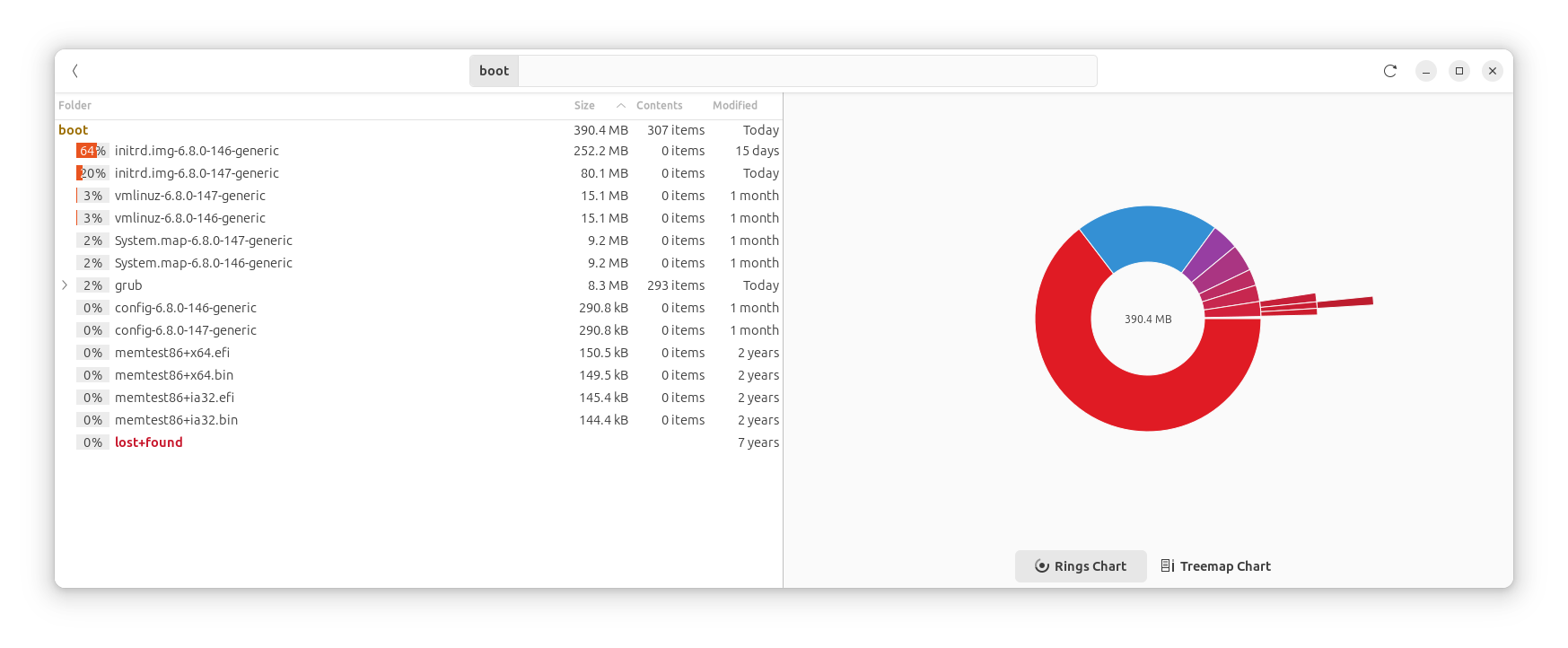
What’s with that huge initrd.img-6.8.0-146-generic file? I know it’s a pre-built file system for use at boot time, but why was it so big for 146, then back to a reasonable size for 147.
Was extra stuff stuck in there for 146? Are others seeing this? Is it safe to delete that? It’s the current backup boot time file system. I’d lose the ability to back up to a previous kernel.
Relevant System Information
Rebooted once, and now I’m running the 147 kernel, rather than the 146 kernel.
Synaptic package manager says 0 broken packages, so the system is in a reasonably sane state.
Sunds like it tried to be created and failed halfway. This will rebuild it for you and it should be smaller. If this fails due to space, you may need to move the larger file out of /boot then create the initrd file. This is done with:
It is not pre-built, that would defeat its purpose of providing exactly what your system needs … it actually gets built after each kernel update from the exact modules and libraries on disk …
The original purpose of an initrd/initrmafs is that your kernel can find your disk by having all modules this requires in an early and very minimal filesystem living in memory … With that design you can actually move your HDD from one machine to the other and it should still boot without problems.
Historically that minimal filesystem was only up to a few megabytes max … then disk encryption got invented …
To unlock your disk you need to type in a password so keyboard handling (including multiple keymaps for all possible languages) needed to be added to the initrd and it grew …
Now … typing a password in a text UI wasn’t pleasing enough for the eye, so a graphical environment needed to be added for that one-line input filed which dragged all the graphics drivers and their libs into the initrd… If you have nvidia drivers that pulls the whole dependency chain into the initrd (that dependency chain of drivers and libs was indeed created to run a whole desktop (and probably even accelerated movie playback and whatnot), not just a single line of password prompt) …
The initamfs-tools that are responsible for creating these initrd images do actually have a few config options you can find in /etc/initramfs-tools/initramfs.conf particulary the MODULES= option allows you to tailor the size by only loading specific modules … You can change the setting in that file and run sudo update-initramfs -u to generate a fresh initrd.img file (only play with this when you have a safely booting older kernel to fall back to though, in case you make a mistake !!)
OK. I understand that. What may have bloated the previous initfs was that I switched graphics cards a few months back, which meant different drivers. The current graphics setup uses the driver Ubuntu picked and works, but I had to switch graphics cards because the old NVidia 610 was no longer supported. Now I have an NVidia 1030 on this older machine.
Then, overnight, I got a popup that /boot was full. It’s not.
/dev/sda2 481642 381262 75395 84% /boot
But overnight, in syslog, there’s a record that something filled it:
2026-10-26T14:00:08.581497-07:00 Nagle-LTS dbus-daemon[1638]: [system] Activating via systemd: service name=‘com.canonical.UbuntuAdvantage’ unit=‘ubuntu-advantage-desktop-daemon.service’ requested by ‘:1.13278’ (uid=1000 pid=1516517 comm=“/usr/bin/python3 /usr/bin/software-properties-gtk” label=“unconfined”) 2026-10-26T14:00:08.611099-07:00 Nagle-LTS systemd[1]: Starting ubuntu-advantage-desktop-daemon.service - Desktop service for Ubuntu Advantage… 2026-10-26T14:00:08.661378-07:00 Nagle-LTS dbus-daemon[1638]: [system] Successfully activated service ‘com.canonical.UbuntuAdvantage’ 2026-10-26T14:00:08.661777-07:00 Nagle-LTS systemd[1]: Started ubuntu-advantage-desktop-daemon.service - Desktop service for Ubuntu Advantage. 2026-10-26T14:00:46.219078-07:00 Nagle-LTS update-notifier.desktop[1517069]: localuser:root being added to access control list 2026-10-26T14:00:59.571254-07:00 Nagle-LTS dbus-daemon[1517138]: [session uid=0 pid=1517136] AppArmor D-Bus mediation is enabled 2026-10-26T14:01:10.949083-07:00 Nagle-LTS update-notifier.desktop[1517065]: ERROR:root:Not enough free space: [‘/boot’] 2026-10-26T14:01:23.341702-07:00 Nagle-LTS update-notifier.desktop[1517065]: nvidia-driver-580 2026-10-26T14:01:26.271806-07:00 Nagle-LTS zeitgeist-datah[3755]: zeitgeist-datahub.vala:210: Error during inserting events: GDBus.Error:org.gnome.zeitgeist.EngineError.InvalidArgument: Incomplete event: interpretation, manifestation and actor are required
So “Ubuntu Advantage”, the paid subscription to which I don’t subscribe, tried to insert something overnight and overflowed /boot. WTF?
Did Ubuntu try to force some huge update I never asked for? Or what?
And do I dare remove the backup initfs file? The bloated one is 146, and I’m running on 147 now.
The instructions above on rebuilding initfs apply to the current initfs file. That’s not helpful. It’s the previous initfs file that’s the problem. The tools seem to assume you want to rebuild the current one.
There is no such thing anymore (this is a legacy name from the old tool, it has just not been renamed at the very low level yet) …
The feature is called “Ubuntu Pro” nowadays and is completely free for endusers (so everyone can receive the extra security updates for universe) and it does neither occupy any extra disk space nor does it touch your /boot.
OK. So I deleted initrd for kernel 146 in /boot, after making a copy in another file system. Running kernel 147.
That worked. Tried to run software updater, and it complained that some packages were broken and would only do a partial update. Synaptic package manager said all packages were OK. Rebooted and ran software updater again, and more packages were loaded. Rebooted again. Ran software updater again, and this time, got the “up to date” message.
/boot is only 30% full now, without the 146 initrd. So I think I’m in a good state. Unless the next kernel comes with a bloated initrd, much bigger than 147, I should be good. I suspect that somewhere upstream, the 146 bloat problem was detected and fixed.
Run dkms status and nvidia-smi on the 147 kernel before deleting anything. The 147 initrd has no updates/dkms/nvidia*.ko files, so it’s likely the NVIDIA module never built for 6.8.0-147 and you’re running without the driver.
If dkms status doesn’t show nvidia as installed for 6.8.0-147-generic, build it, reboot, and confirm nvidia-smi works:
Once 147 runs with the driver, removing 146 is safe. Do that before rebuilding the 147 initrd. The rebuilt one will be about 250 MB again and two of them won’t fit in your 450 MB /boot:
Future kernels will include the NVIDIA files too, so the next kernel update will fill /boot the same way unless you trim the initrd with the MODULES= setting ogra described or give /boot about 1 GB.
I don’t know. I can’t remember seeing anyone else (here, Launchpad bugs, Mint forums, etc.) complaining about -146 kernel or corresponding nvidia modules being uncompressed.
If you had a larger /boot partition, or boot was from a bigger file system, no one would notice. But this is an older system from when /boot was a separate small partition.
Yes. Purchased in 2017. I also have a newer, bigger machine that doesn’t have this problem. It’s about time to replace this one, except that RAM and GPU pricing and supply is awful right now.