where a quick look will show you why the upgrade isn’t seen; ie. upgrades to the release are NOT yet supported or open, no entry for the release there, let alone a “Supported: 1” entry for it.
The -d option can be used to FORCE upgrade, as that’s the method used by Quality Assurance testers, the -d option will cause the following meta changefile to be used instead
which if you examine you’ll note the release mentioned as being available (thus can be seen by the upgrade tool), but also note the “Supported: 0” warning you that that upgrade isn’t yet supported.
The actual release that has happened thus far is ISO/images for new installs, with no date set for release-upgrades except that it’s AFTER the ISO/image release.
Do note: Issues are usually hardware specific (ie. impacting those running specific hardware) OR more commonly package specific (only impacting those with specific package(s) installed); whilst anyone can search the [launchpad] bug tracker & do there own homework (or look for the easy clues in Ubuntu 26.10 Release Notes), those wanting a smooth upgrade are best waiting what is commonly just a few weeks.
The earliest that is normal for AFTER is early in the week following ISO/image release, but more common is a 2-3 weeks after image release. The Ubuntu Release team assess the status and any bugs reported by those who force upgrade or just did some QA testing, then only change the file meta files when all issues discovered have been resolved or mitigations provided in release notes (which can still be updated)
The Ubuntu Release team are meeting to assess status somewhat regularly, however if when they decide it’s ‘safe’ to turn the ‘taps’ (ie. edits to the meta change files I mentioned), they tend to do that only EARLY IN THE WEEK when the team are all (or most anyway) around working and ready to deal with any reported bugs after release is open… ie. don’t expect it on a weekend or approaching a weekend.
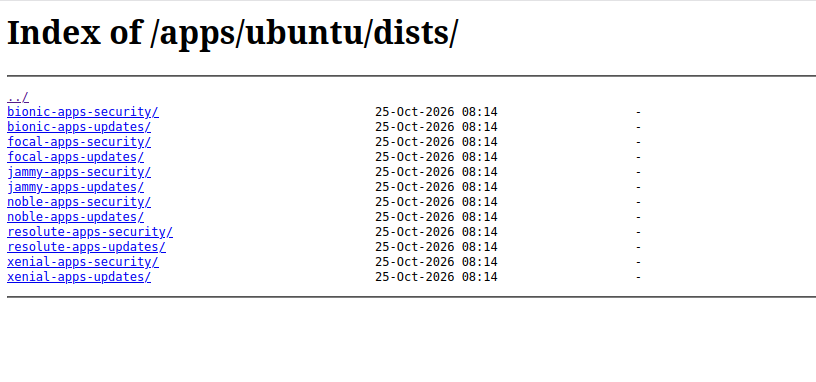
I am trying the forced upgrade (-d), but it fails because stonking is missing on Index of /apps/ubuntu/dists/. Is something wrong there? Am I missing something?
If you notice the releases that are there, they’re all LTS releases as ESM only provides support for LTS releases, 26.10 is an interim release without LTS support, so has NO ESM apps as they don’t apply.
You should not have ESM/Pro active if you plan to release-upgrade, as the next release with ESM/Pro support won’t be released until 2028-April (Ubuntu 28.04 LTS).
The upgrade is NOT yet open; so there is some risk involved currently, when it’s deemed stable the Ubuntu Release team will mark it as such in the meta change files
You’ll find no entry in the first file, as we’re still at the ‘point’ where it’s supported ONLY for new installs, and not release-upgrades as represented in the second file with the “Supported: 0” line
Dist: stonking
Name: Stonking Stingray
Version: 26.10
Date: Thu, 15 October 2026 00:26:10 UTC
Supported: 0
Description: This is the 26.10 release
Release-File: http://archive.ubuntu.com/ubuntu/dists/stonking/Release
ReleaseNotes: http://archive.ubuntu.com/ubuntu/dists/stonking/main/dist-upgrader-all/current/ReleaseAnnouncement
ReleaseNotesHtml: http://archive.ubuntu.com/ubuntu/dists/stonking/main/dist-upgrader-all/current/ReleaseAnnouncement.html
UpgradeTool: http://archive.ubuntu.com/ubuntu/dists/stonking/main/dist-upgrader-all/current/stonking.tar.gz
UpgradeToolSignature: http://archive.ubuntu.com/ubuntu/dists/stonking/main/dist-upgrader-all/current/stonking.tar.gz.gpg
As for ESM/Pro; as that is provided ONLY for LTS releases, you either have the option of removing ESM/Pro (so as to allow upgrades now), OR waiting until Ubuntu 28.04.1 LTS has been released, as that will be the supported upgrade path for those wanting to remain as ESM/Pro users.
There has been no changes to those options recently.