Been trying to get wifi up on the X1E Samsung Book4 Edge, but no dice so far. I’m using the ath12k firmware from the latest concept ISO, as well as a custom board-2.bin as described here. While the firmware does seem to load, and I can see the adapter and entry in NetworkManager, seems neither scanning nor connecting to a network works. Not much in dmesg, except these lines on repeat:
Really cool to see the activity ongoing here. I know there have been many issues, which we hope are solved. For me that would be power issues (suspend without power loss leaks), and audio. I’m on a T14s and just wanted to throw a couple tips out there.
For audio, I tried messing UCM configurations. I later read that wrong configurations could damage the speakers and possibly board. I then blacklisted the audio drivers to make sure this didn’t happen. In my sound output settings, I see “Dummy Output”, which is expected not because of the blacklist, but the issues with firmware. The workaround I use is to just use a bluetooth audio device. Slightly annoying, but at least there is sound.
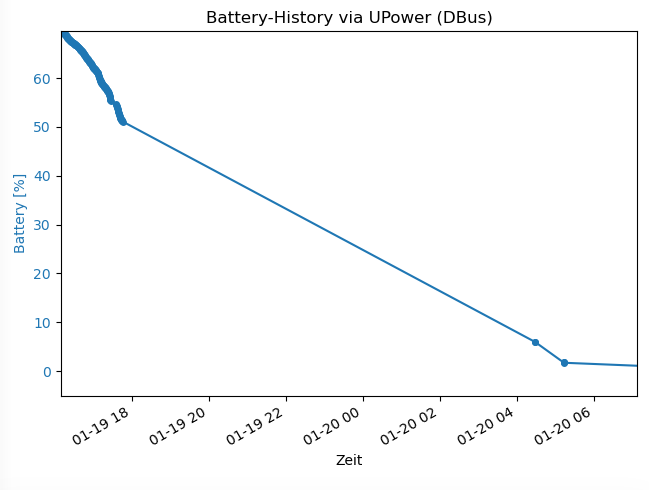
Concerning power issues, I do notice extra battery drain on suspend. And threshold doesn’t seem to always work. It did for awhile, but then eventually stopped. To get it initially to work, I went into Windows and set it. Then rebooted into Ubuntu. I think it’s a good idea to keep the Windows partition for various reasons, even though I don’t use it. Another reason I just discovered is that if you shutdown from Ubuntu, I noticed that the laptop would drain after a day or so. This didn’t make sense since it was powered off. I did a little research and apparently shutting down from Ubuntu with the incompatible power issues doesn’t cause certain things to shutdown. The tip/solution is to reboot into Windows, then shutdown from there.
Anyhow, hope these few things help someone out there.
I’ll try that kernel version and see if it’s any better. 6.18.2 had random kernel lockups while web browsing with chromium or sometimes would freeze during boot. No graphical issues on my end
ath12k seems to have some issues, yes. It struggles to connect to the UniFi Express 7 with WPA3 (which it selects itself). Once that worked its okay. But it can take minutes… Will check with other laptops that have ath12k, but T14s seems to be a bit special.
I was using wpa_supplicant with NetworkManager, though I have switched to iwd and put in that setting, I’ll see if it’s more stable over the coming days.
Yep same here. I don’t think the system is actually fully asleep as the red dot on the lid doesnt pulse like it does on windows. I have resorted to fully shutting down my system when I know it will be unused for many hours, it sucks but its a workaround.
Is it me or is the Adreno X1-85 quite a slow GPU? I do not have an WoA partition to compare to, but testing with the latest mesa-git, games run poorly and I have to assume its because it’s the nature of it being tile-based? Though it feels like it’s running at a low frequency but I have not verified that yet. I’m GPU limited in the game’s I’ve tested so far and performance heavily relies on the resolution rather than graphical settings.
Simple stuff like Minecraft with shaders @ 800p only give me 30-50fps. I’ve also tested various games on Proton and it’s a similar experience (Half-Life 2 Deathmatch 64-bit, ULTRAKILL, PEAK, etc).
Development continues based on 25.10, there is a new ISO available in the usual place. The questing PPA has also received an update to kernel 6.19, so make sure to give that one a try.
In order to make Microsoft Surface 11 and 12 devices work out of the box we need some help collecting device information from both OLED and LCD models. There is a new helper script available in the stubble github repo which generates all the data we need including EDID information.
Please leave a comment or open a github issue/PR with a dump from your machine if you own any of those!
It’s been about 24 hours since I switched to iwd, this 100% fixed my issue. I had to add these to the iwd config to fix secrets issues with NetworkManager though. Also added these to the NetworkManager config to fix autoconnect not working
maybe you or someone else is able to help me. I have a T14s as well and tried to fix my sleep drainage issue with iwd as well. For me it didn’t fix the issue but now I have a new problem. After closing the lid, the wifi card sometimes doesn’t come back. Most of the time I have to restart the laptop.
And my sleep seems to work from the outside, the led fades on and off but the fan keeps spinning, or it at least still has coil wine and drains the battery at a normal rate.