I think the problem is that the firmware needs to be in /lib/firmware/qcom/x1e80100/LENOVO/ 91B6 rather than in /lib/firmware/qcom/x1e80100/LENOVO directly to work on your device.
The path comes from the device tree.
it is definitely possible that one of them just doesn’t work yet. @glathe I think you have one of those, any idea?
1 Like
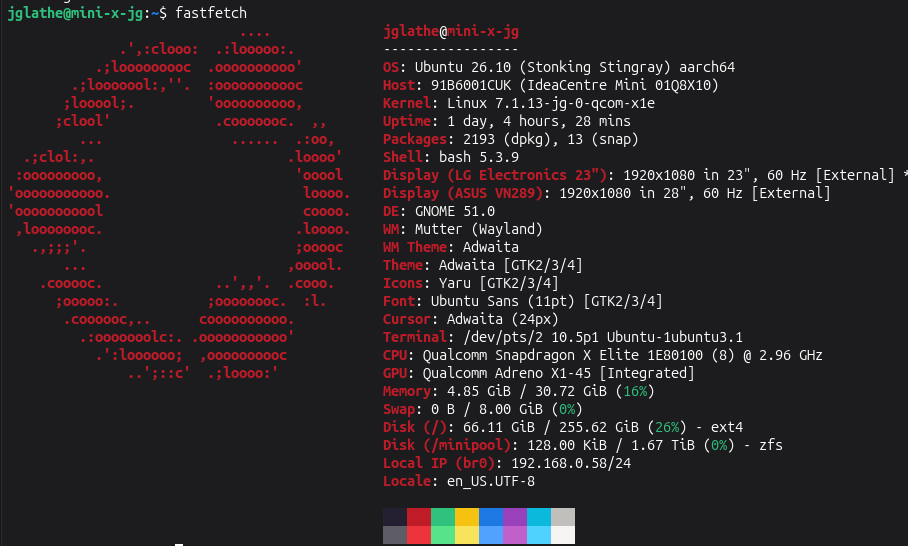
Yes I have one of those, also 91B6. I have populated slot 1, although after the install was through (and it was resolute extended ISO). Never bothered to leave slot 0 empty, however. There have been some minor tweaks, and I need to do v2 of the upstreaming patchset. But generally support for the 2nd m.2 slot on PCIe3 is in there, with an additional startup delay. @fox maybe it is an idea to try the latest Resolute extended ISO and install from there, and after success upgrade to 26.10.
please can you provide url? i have tried 2 versions https://cdimage.ubuntu.com/ubuntu/releases/resolute/release/ubuntu-26.04.1-desktop-arm64.iso and https://cdimage.ubuntu.com/ubuntu/resolute/daily-live/20261102/resolute-desktop-arm64.iso but booth has finished during boot to liveCD with black screen and with reboot… i also tried copy drivers to 91B6 but its did not help.
OS: Ubuntu 26.10 (Stonking Stingray) aarch64
Host: 91B6001KMK (IdeaCentre Mini 01Q8X10)
Kernel: Linux 7.3.0-31-qcom-x1e
Uptime: 9 mins
Packages: 1657 (dpkg), 11 (snap)
Shell: bash 5.3.9
Display (LEN T24d-10): 1920x1200 in 24", 60 Hz [External]
DE: GNOME 51.0
‘WM: Mutter (Wayland)
WM Theme: Yaru
Theme: Yaru [GTK2/3/4]
Icons: Yaru [GTK2/3/4]
Font: Ubuntu Sans (11pt) [GTK2/3/4]
Cursor: Yaru (24px)
Terminal: Ptyxis 50.1
Terminal Font: Ubuntu Sans Mono (11pt)
CPU: Qualcomm Snapdragon X Elite 1P42100 (7)
GPU: Mesa llvmpipe (LLVM 22.1.8, 128 bits)
Memory: 3.03 GiB / 30.10 GiB (10%)
Swap: 0 B / 8.00 GiB (0%)
Disk (/): 16.94 GiB / 87.98 GiB (19%) - ext4
Disk (/run/media/adminko/517C4CD26AAA26B1): 1.40 GiB / 385.94 GiB (0%) - ntfs3 ----- only diferent partition in same NVME drive.
Local IP (wlP4p1s0): xxxx
Locale: en_US.UTF-8
this is weird because it should be X plus, not elite
1 Like
fastfetch has its issues, too. Image directory is here on Google Drive.
Only hamoa version has detected next slot, purwa which should be my pc, it did not detected another slot in installer. but after installation hamoa did not start system, installation of purwa has same issue .. not start after installation. I have also tried installation with enabled wifi network for download updates during installation but it looks there is kernel version 7.0.0-41 and i think i need newer version. Note, i will have access to this computer next week (holiday)
i have downloaded 2026-08-31 iso
Hello
I just bought a Zenbook A14, knowing that there might be issues. But they start earlier than I expected.
First I tried to normal graphical install. It hangs when it comes to selecting language.
Then I tried to run textually - replace “quiet splash” with “3”
This stopped after “Finished casper-md5check”
Command line tricks like these didnt help either:
3 clk_ignore_unused pd_ignore_unused nomodeset
3 initcall_debug devtmpfs.mount=1 acpi=force
I have not seen anyone report the same issue. I can’t say for certain since I don’t have the same device here to test but maybe you could try a different USB drive and see if that works better?
I am planning to refresh the ISO with our latest kernel next week. There is a chance that the newer kernel works better but I don’t remember any Zenbook specific fixes in there.
3 Likes
which a14? I’m on an a14 with x1e78100 and it’s working really well.
which a14? I’m on an a14 with x1e78100 and it’s working really well.
I am assuming this is about the X2 ASUS Zenbook A14 mentioned in the original post
OK, this is embarrasing, when I was going to burn a modified iso image, i searched my history and found that I had burned my stonking image to a SD card that failed, but the SD card was still in my PC. So my USB stick with the original ARM Ubuntu was unchanged.
When I tried with the correct image it worked.
Sorry to disturb You.
1 Like
No worries, happened to myself before. Thanks for confirming it works!
A hardware test result for the 15.6-inch Samsung Galaxy Book4 Edge (NP750XQA-KB2BR, Snapdragon X Plus) on Ubuntu 26.10 ARM64. These tests used the custom 7.2.0-np750xqa-usbc-test1 kernel.
QAIRT initially failed to initialize the HTP device. With the FastRPC shells and Hexagon C++ libraries from the Samsung driver package matching CDSP.HT.2.9.c1-00078-HAMOA-1, the QAIRT HTP backend ran an ElementWiseAdd graph directly on the accelerator in four tests.
The llama.cpp Hexagon backend reached buffer allocation but stalled before the first token. Applying the queue-monitor portion of Derek Parks’s patch to libcdsprpc enabled the queue_monitor call, and the model generated text with Hexagon acceleration in four runs. The patched library was loaded only for the test process.
I posted the firmware version, test setup, and results in Qualcomm FastRPC issue #377. The Galaxy Book4 Edge hardware test topic has the model-specific Ubuntu notes.
Hi, tomorrow i will be able to test that device, so please do you have any newer version with kernel 7.3.0-31 and also with modifications for purwa version for disk drive detection which are worked only for hamoa version?
IdeaCentre Mini 01Q8X10
The official Ubuntu 26.10 works fine here, also the stonking-desktop-arm64+x1e-20261026.iso boots but takes a while.
There is new bios O6NKT4BA 24 Sep 2026 and firmware on Lenovo website that can be used to extract the blobs ( Qualcomm platform Driver package for Windows 11 (64-bit)(25h2) - IdeaCentre Mini 01Q8X10 12 Jun 2026 ) I used those.
Newest on Google Drive is 7.3.3-jg-0, working well here. Its on Google Drive.
Hi, i that url what did you shared with me, i see there iso only from 31.8, and it was 7.0. So please can u send new url?
No, the ISO is still from 31.08. You can replace the kernel after install. https://drive.google.com/drive/folders/1Lps5o3FXroAJFDiKj18vutJbC1uld49s
hi there,
could this draft dtb, could it be added to the latest latest glave concept image?
would be able to give a more indepth test since a gui interface would be displayed?
this is for the aspire 14 ai a14-11m.
I presume that sir glave’s images use gnome by default?
thank you for considering my request.
since I have usb-c output I could test what is detected and what’s not.
thank you for considdering my request
and for birk skyum’s help with all of this.
and mr glave’s help.
note I’m blind hence me mentioning the usb-c output
orca would talk through my btw6.
Majid