Ubuntu Version
Ubuntu 26.04 LTS Flavors
Desktop Environment (if applicable)
KDE Plasma
Problem Description
Hi there guys.
I was hoping that you could help me with an issue that I’m experiencing.
Background / History:
I’ve recently upgraded my HDD to a very nice and very fast M.2 drive
and also upgraded my OS to the new Ubuntu version 26.04.1 LTS.
(Which is running Wayland as the display server).
I’m also using (what appears to be) the newest drivers for my GFX card =
GPU: NVIDIA GeForce GTX 1070=
NVIDIA Driver Version: 580.178.04
Issue:
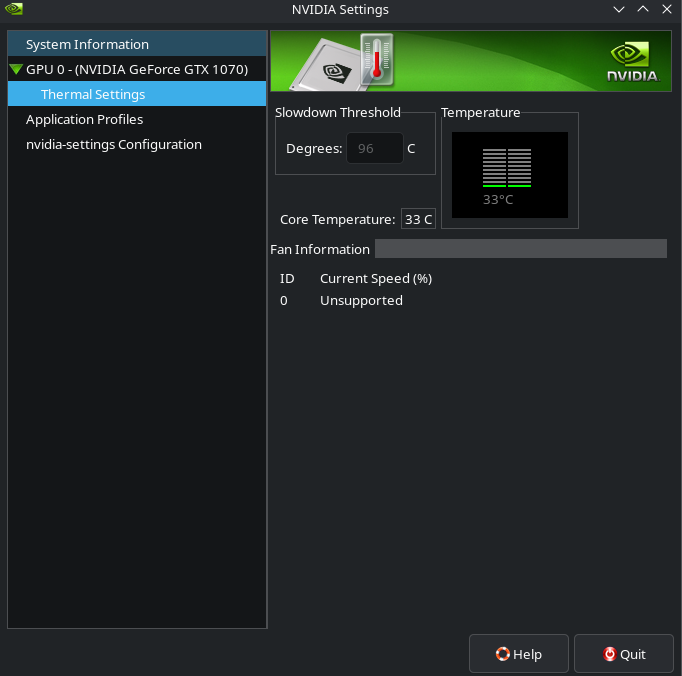
I cannot select / change the fan speed on my GFX card (via the NVIDIA GUI app).
The “slider bar” is visible on the NVIDIA GUI but it is blank / greyed out
with no button to move along the slider bar or input the fan speed manually
Nor can I manually input the desired fan speed or percentage.
(Which I was able to do on the previous version of the software).
[See attached screenshot]
The reason I want to be able to select / set the GPU fan speed is that I’m
starting to play some demanding games (via Steam / Proton)
Things like Spider-Man 1, Star Wars: Squadrons, etc
When playing those games on my old SSD / and OS
I had to chose a high GPU fan speed, as the GPU was hitting 80+ °C
Troubleshooting:
1). I believe that I have most / all of the relevant sensor packages installed
to monitor / alter the speeds of the various fans on my PC.
2). (No particularly scientific) but - I’ve played a couple of demanding games
and the GPU fan speed did not increase when the GPU hit 80+ °C
3).
Temps (At idle)
CPU = 50 °C
GPU = 33 °C
Temps (Playing Spider-Man 1 - Approx)
CPU = 65-75 °C
GPU = 75-82 °C
4). The main case fans are ramping up / down with CPU usage during normal operation (and when gaming)
But the GPU fans don’t appear to be ramping up significantly (again during gaming usage).
5). I’ve discovered that if I run an X11 session / DE (using XFCE-4 as an example), that the Nvidia drivers app
now shows all of the options (that were available on my previous Ubuntu OS installation).
Notably the manual GPU fan speed settings.
6). (When playing Spider-man 1, via steam on X11 (via XFCE-4) and running the GPU fan at 75% speed
Then I was getting a significant drop in GPU temps
E.G. When playing the game in -
6.1). Wayland = 80 °C
6.2). X11 = 65 °C
Which is great, however I did notice a lot of screen tearing when playing the game in X11.
Questions:
1). Is there any way / how can I select the fan speed for my GPU ?
2). Are there any other NVIDIA drivers available that would allow me to do this ?
3). Can I run KDE Plasma via X11 on Ubuntu LTS ?
(Without incurring issues) ?
4). Is there any news of Nvidia supporting Wayland ?
TIA for any help or advice.
Relevant System Information
Details:
HD / M.2 Drive: Micron/Crucial Technology P310 NVMe PCIe SSD
OS: Kubuntu 26.04.1 LTS (Resolute Raccoon) x86_64
Kernel: Linux 7.0.0-38-generic
DE: KDE Plasma 6.6.6
WM: KWin (Wayland)
CPU: AMD Ryzen 5 5600X (12) @ 5.28 GHz
GPU: NVIDIA GeForce GTX 1070
Memory: 32 GB