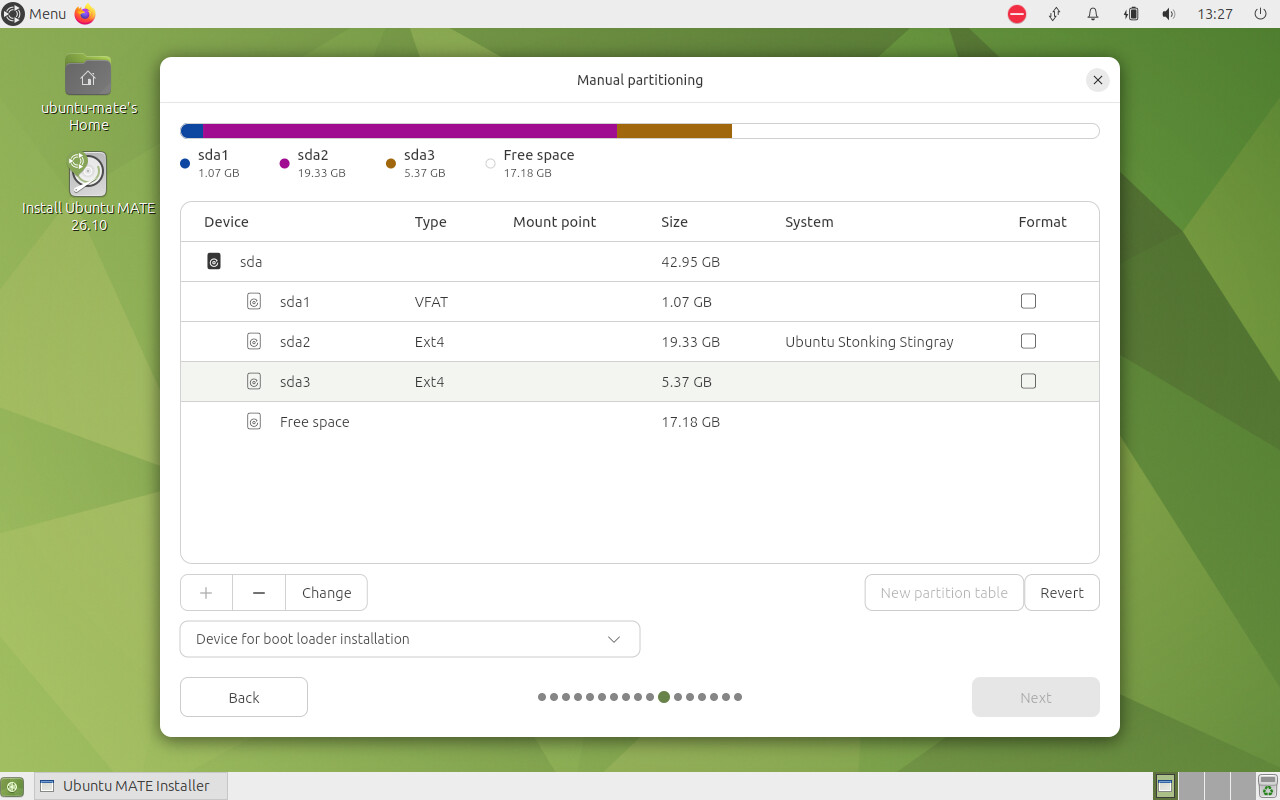
I was waiting for the ubuntu-mate dailies to include the ethernet connection, which the 10/2/26 .iso does seem to now include. Today I walked into the installation process, took a couple tries to find the “manual” option in the menu and then the installer seemed to not offer the capacity to either set up or use a partition for /home and another for /??
It just seemed to allow selecting a /boot/efi partition and then a partition for / and then the install would be “automatic”?? Haven’t been following any discussion, but it seems like this isn’t Calamares anymore, where selecting “custom” would essentially open the GParted window and we could select the drive or partition and/or create a new partition for the various aspects?
I prefer to have / and /home in different partitions, but it appears that either it can’t be done, or I didn’t figure it out?? Running a multi-drive, multi-boot machine which does add to the “complexity” but I have run many many installs, usually I can assess the capacity fairly quickly . . . like the Fedora 46 installer couldn’t do “custom” . . . it was “install in whole disk” or . . . nothing, etc.
Is that sort of where U-MATE installer is set up, to install / and /home in the same partition?
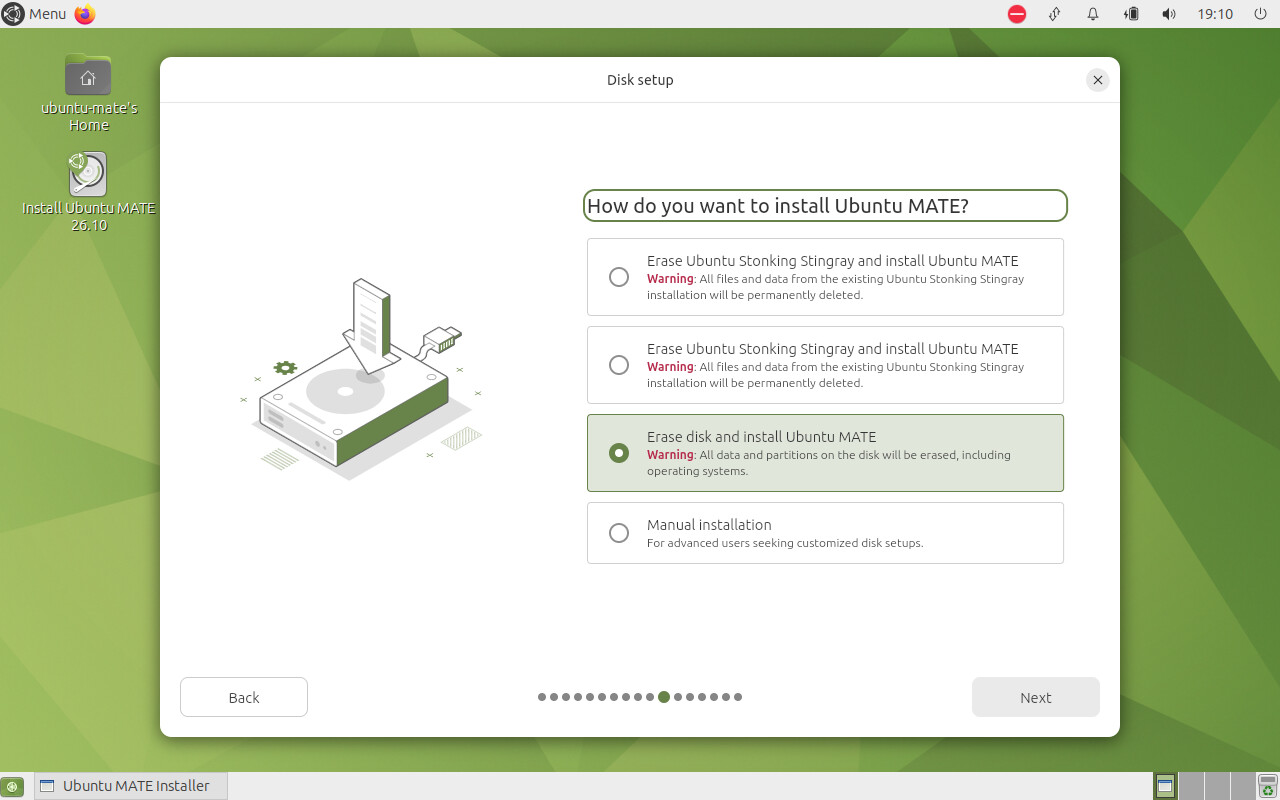
If it is the case, then it could have been either ‘Erase disk…’ or ‘Install … alongside’ option. ‘Manual installation’ option works.
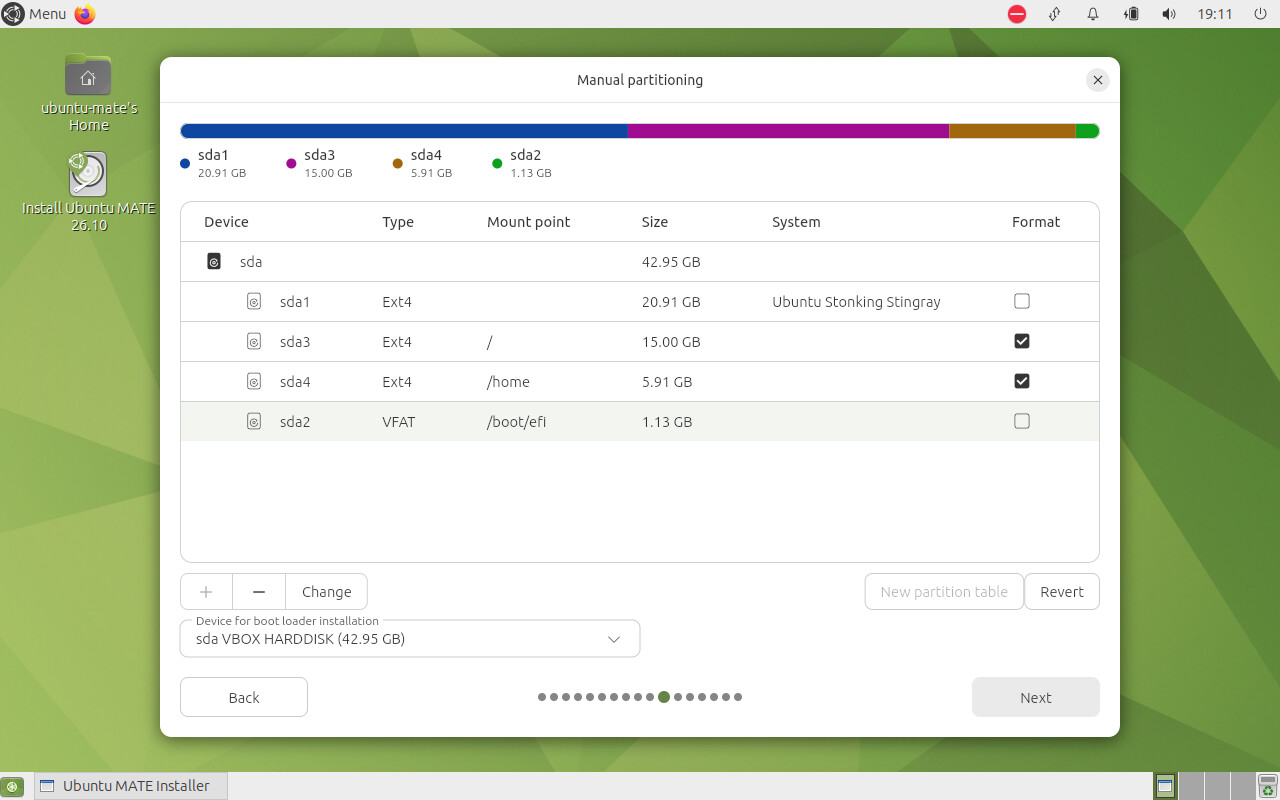
For manual set up, no. We do have choice to create ‘/home’, ‘/usr’, ‘/tmp’, ‘/srv’, ‘/opt’ etc. What we don’t have is (which to me is a bug), the ability to manually create a ‘/boot/efi’ partition. That is done automatically by the installer no matter what. I have recorded this in beta release announcemnt post.
Thanks for the reply on it. The screenshots provided do look very similar to what I saw, except that “erase disk” generally means it will wipe the drive and then perhaps we could create our own partitions. In my case I had existing distro installs on the drive, and I was able to select an existing vFAT partition for “bootloader” . . . buut then in “manual installation” I couldn’t select a partition on which I had my Lubuntu /home directory, which I wanted to use for my U-MATE /home . . . it seemed like I could only select one place to put the installation.
I wanted to add a partition for / and possibly bootloader and then put /home in an existing partition w/o formatting it. I’ve done this numerous times with Calamares installer and others that do “advanced” or “custom” installs . . . .
But, good to know that the installer will add its own bootloader partition . . . in this case I use my TW install as the grub controller and everyone else is the “slave” . . . .
I’ve not tested the ubuntu-desktop-installer recently, but I’ve always been able to do whatever I want with it.
But I do tend to do things just as I did back in the days when ubiquity was the installer (pre-24.04 for Ubuntu MATE); boot the ISO/image in TRY or live mode, and run gparted first so I can explore the disks partitioning in a tool I use more frequently than installers & thus know better. I usually fish out an old envelope or piece of paper from a bin (that isn’t emptied as it only gets stuff I may find re-use for) note down partitions AND/OR modify/create whatever I’ll want/need in that tool, then ensure partitions are unmounted, exit gparted and finally start the installer. I’m mostly just pointing out to the installer what partitions to use, as I’ve already got them ready to go (I’m assuming no encryption here).
I personally just feel ‘safer’ if it’s my own system, using tools I know best.
Sure in Quality Assurance testing I maybe using the installer to do this (and I’ve always found it can achieve what I want), but we have options.
Sure, there is always another way to get something done. Back in my Linux on Mac days I would use OSX’s Disk Utility to do what you are suggesting, to cut the drive in the native system before running the linux installer . . . until I found out that GParted could do it just as well, so no need to do it twice.
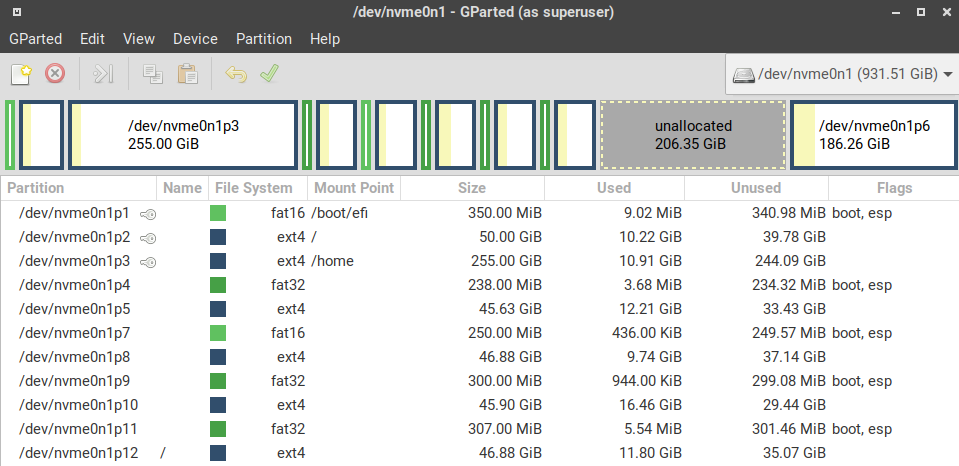
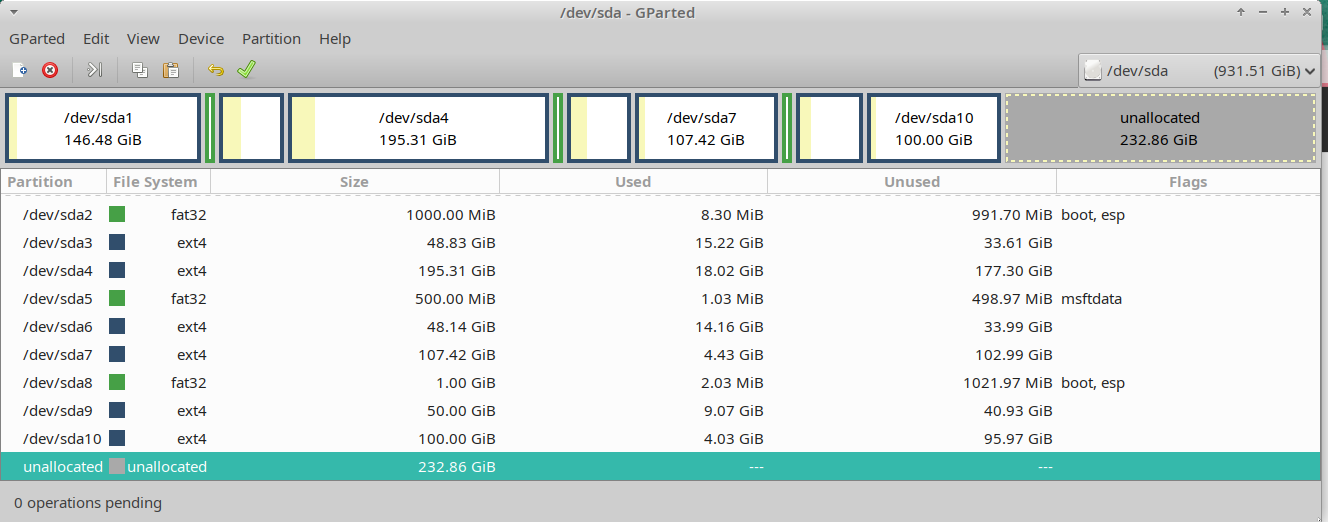
In the case of today’s attempt I wanted to use an existing partition for the /home in “sda4” but it didn’t seem like the installer was willing to do that. I would have to take the “unallocated” space and then perhaps I could set that up “manually” with the “bootloader,” “/” and “/home” partitions. Except @suivue said that the installer would set up its own bootloader, which would then mean there would be two of them, etc.
Posting the screenshot of the drive just for kicks, it’s not like I actually need another system running on this machine, I think there are 8 or 9 now . . . but, if I am going to do it I don’t want to chew up all of the unallocated space just for U-MATE, I want to put /home in sda4 where there is plenty of room to share with the other Ubuntu system . . . . Right now it seems like I could cut up the unallocated space using this installer, but not set up a fresh formatted partition for / and install /home into an existing partition, unformatted . . . .
the ‘Erase disk’ option erases the disk and then does automatic partition. (one partition for EFI and one for /).
‘Install along side..’ option allows us to resize the existing partition (has nice slider) and reuses the EFI partition. This in theory is very risky (we may loose our main OS) but so far has not failed in my tests. But I must admit those tests were always other GNU/Linux distros or Ubuntu flavors; I have never tried installing alongside Windows.
‘Manual partition’ is, well, manual Except the automatic EFI partition issue.
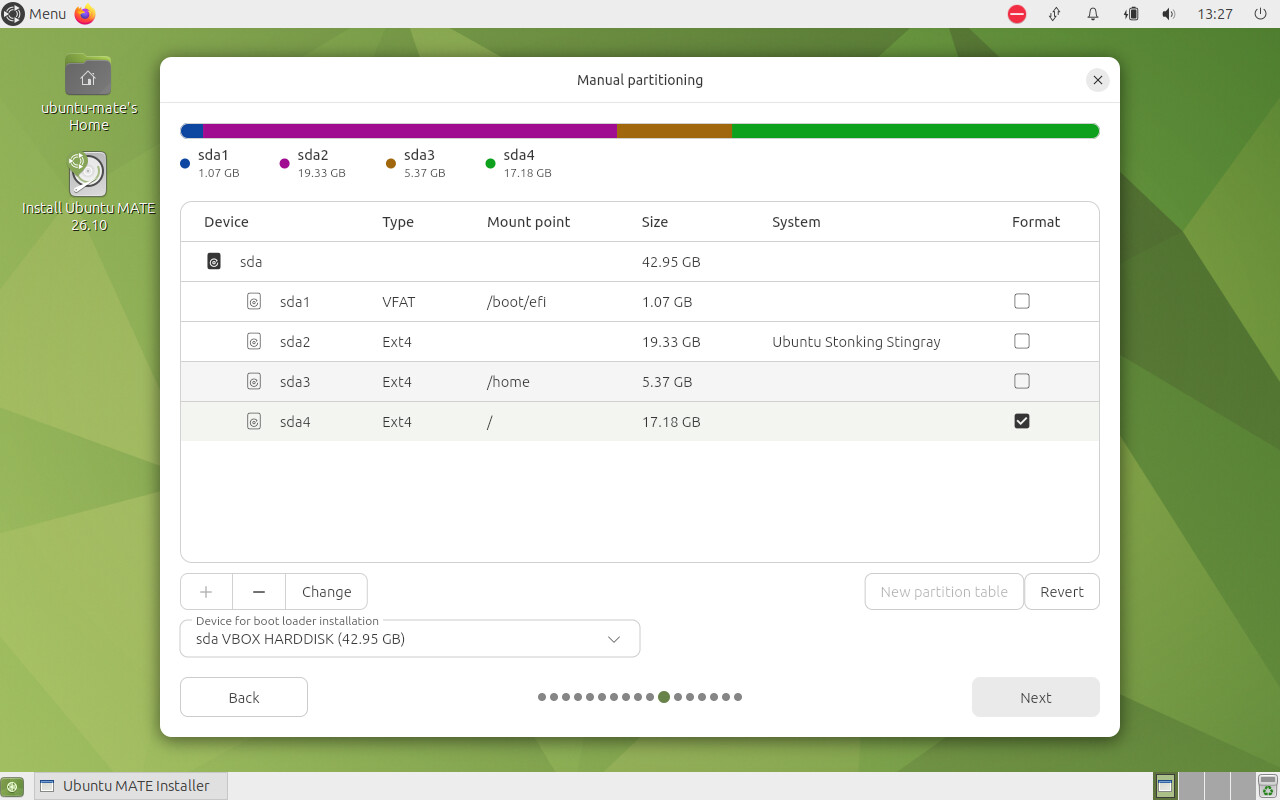
Although I showed you a separate ‘/home’ is possible, I haven’t actually shared ‘/home’ between different distros in a long time. If you insist it does not work, it is worth testing. I’ll get back to you.
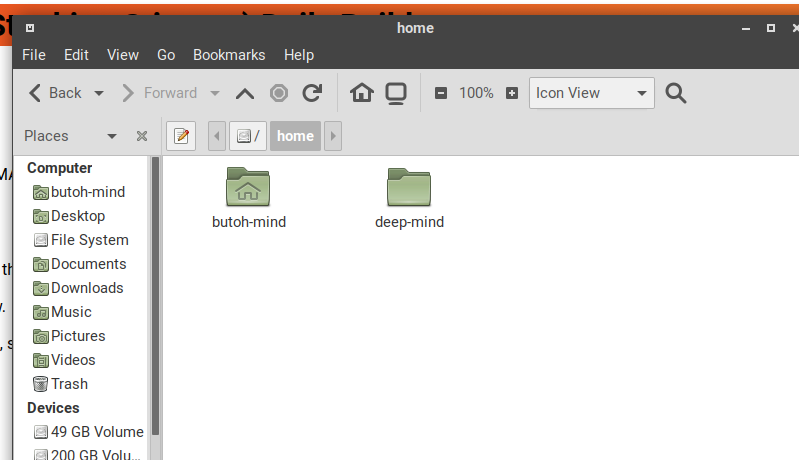
Well, I am not “insisting” on anything, just pointing out what I found . . . in my case I wanted to use sda4, not to share the same /home directory that I use for Lubuntu, although perhaps I could have, but to have another user name for U-MATE /home . . . in that sda4 partition. That I could not seem to do in several attempts. On my older multi-boot I have had up to 4 /home directories in one partition, from installs say that were wiped in the / partition.
That is “custom” or “advanced” . . . . “Install alongside” has gone back to forever as the easiest option to set up a linux install next to Windows or OSX . . . but that method the installer sets up new partitions.
In this recent case the installer gave me the option to erase most of the partitions where I have an install already, but I didn’t want to wipe them out. It will be a few days before I could try it again, but pretty sure that I couldn’t add a /home directory into sda4 . . . where I wanted it to go, etc.
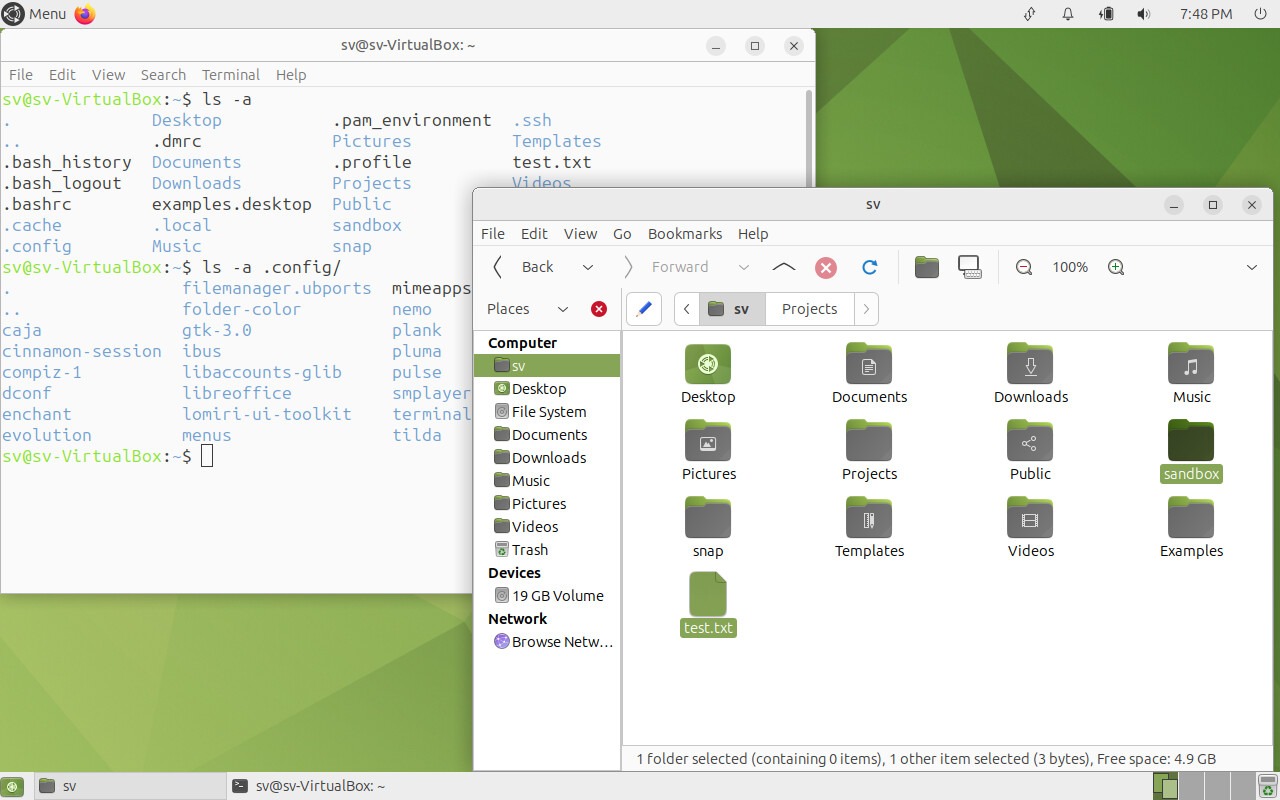
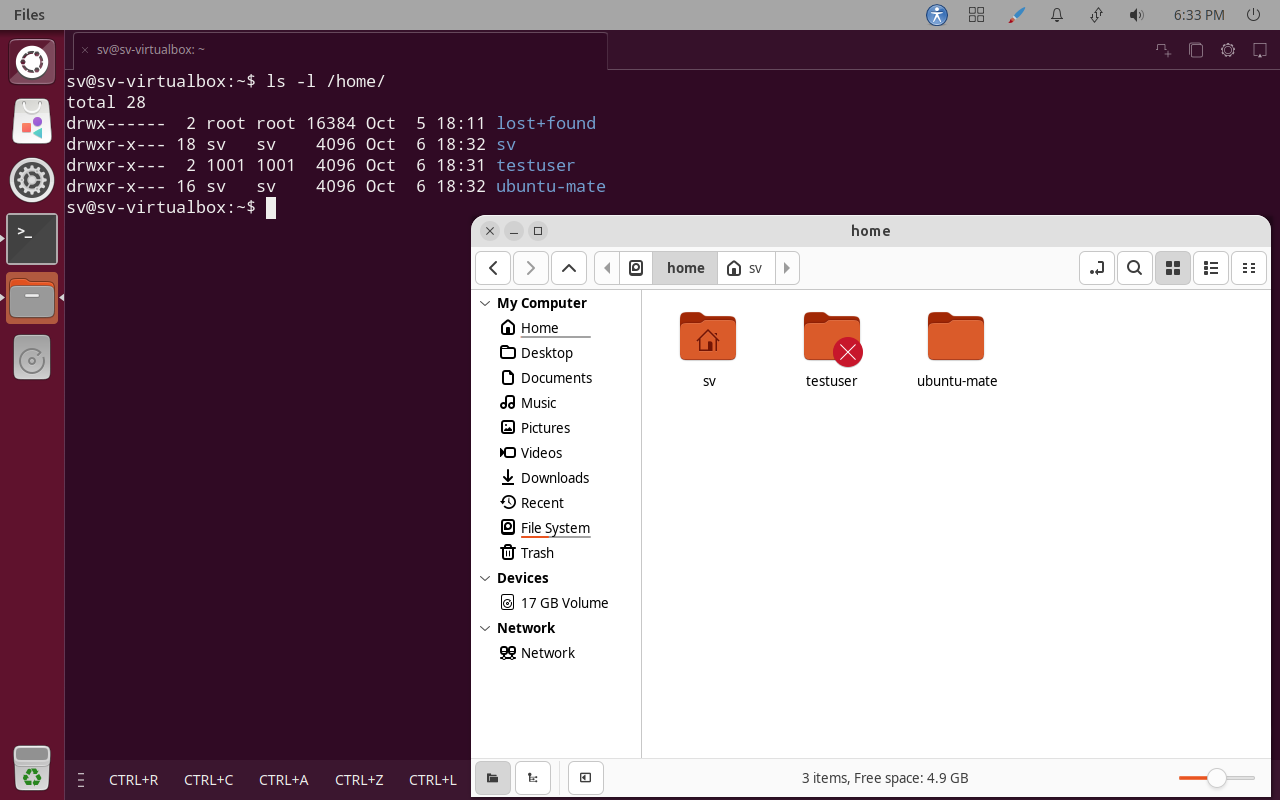
In the last screenshot, ‘sandbox’ folder and ‘test.txt’ file was created by me (on the other distro, UbuntuUnity) and folders named Projects, lomiri-*, unity, *-ubports cinnamon-session etc., are from the UbuntuUnity install.
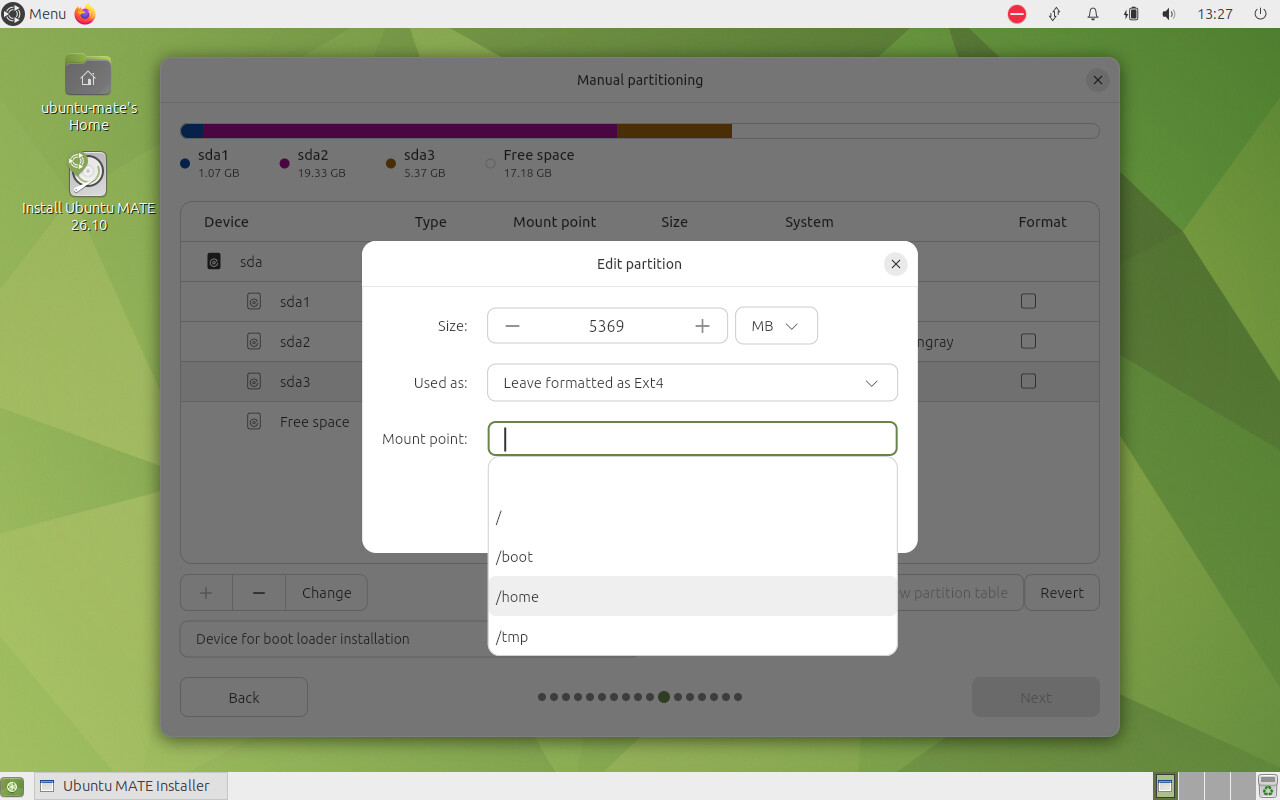
OK, thanks for showing those steps . . . I wasn’t able to get that drop down menu to label it as /home . . . .
My only question is, in your case it looks like you literally re-used the existing /home user with same user name, correct? You didn’t create a new user name directory in the existing partition?? Many times over the years the folks on the forums have said, “don’t share a user name” from one system to another, due to “permissions” issues in doing that. From one Ubuntu to another might not be a problem . . . but not sure if this is doing the same thing that I am talking about??? Be awhile before I can test it out . . . on my end. Still running the 10/2/26 daily on the usb drive.
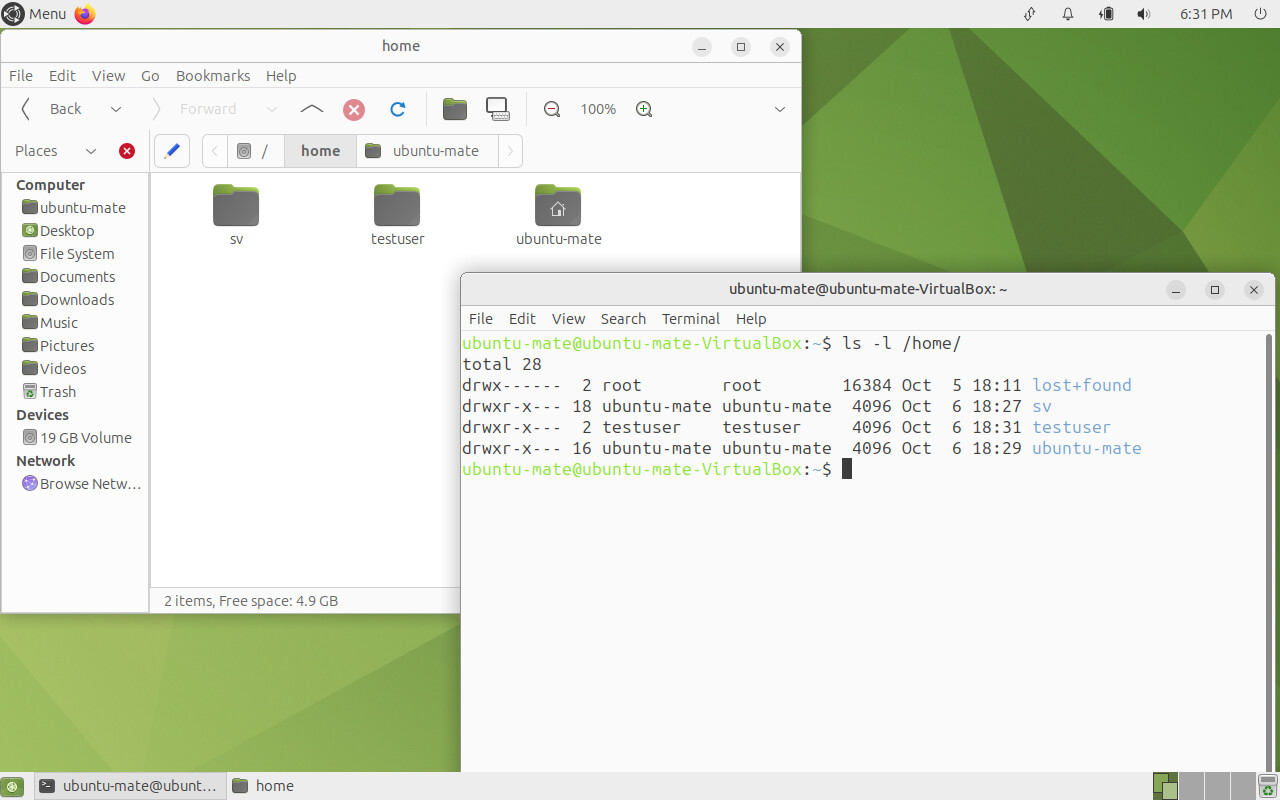
Correct. This is what I did initially. But I also used different username on latest test; ‘sv’ on first install and ‘ubuntu-mate’ on second. When we check, both folders show up as owned by the logged-in user.
To further test, I created a second user on one distro. On the other distro, second user’s home directory shows as owned by 1001:1001, because that distro does not have the second user.
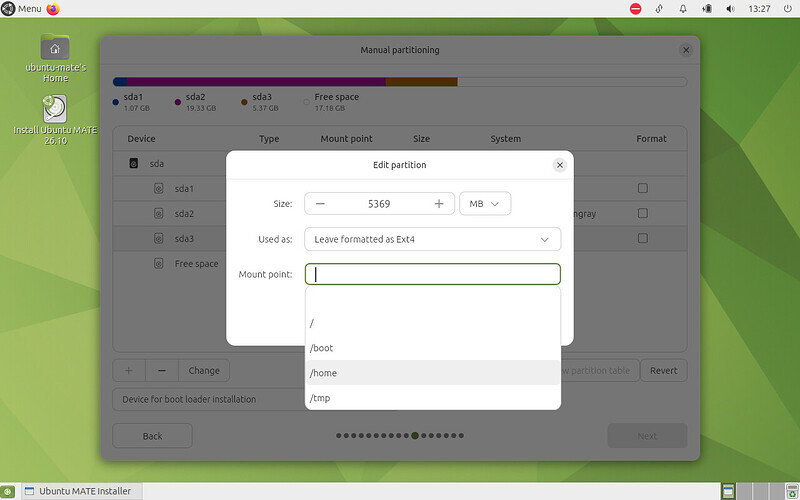
OK, going back to this step, how did you get that drop down menu to appear? Clicking on “change”?? I tried right-clicking on that similar line and that didn’t seem to work to “edit” the partition or label it? I think the traditional term used was “edit” to select a partition for formatting or not formatting of it?? Possibly the word “change” was something that got in my way of clicking on it for the re-use of the /home directory??
Otherwise it looks like it does use “manual partitioning” as the entry point to get to that window.
Yes, select the partition (row gets highlighted) and click on ‘Change’ button. In the ‘Edit partition’ window, when you just click on 'Mount point: ’ text box, it automatically shows the drop-down list. We can also start to type and it shows the partition (the ones like /var, /opt etc that are not visible in the drop-down list).
I think UM installer always had the same buttons ‘+’, ‘-’ and ‘Change’ on the lower left and ‘New partition table’, ‘Revert’ on the lower right (I could be wrong). The ‘edit’ button, I think, is from ‘Calamares’ installer with ‘New partition table’ on lower left and ‘Create’, ‘Edit’ and ‘Remove’ buttons on the lower right.
OK, thanks for the reply on it . . . it has been a while since I ran a “ubuntu-mate” install, so I can’t recall if it was also using the Calamares installer at that time, or not. But I have a fair number of other distros that I am using the MATE DE as the daily driver . . . using other installers.
Some are quite complicated to use and/or figure out and others very simple . . . all for the same purpose . . . . Sometimes the meaning of a word will throw the process off into the weeds . . . .
I’ll post back with the results from my next attempt at it, “success” or “fail” . . . .
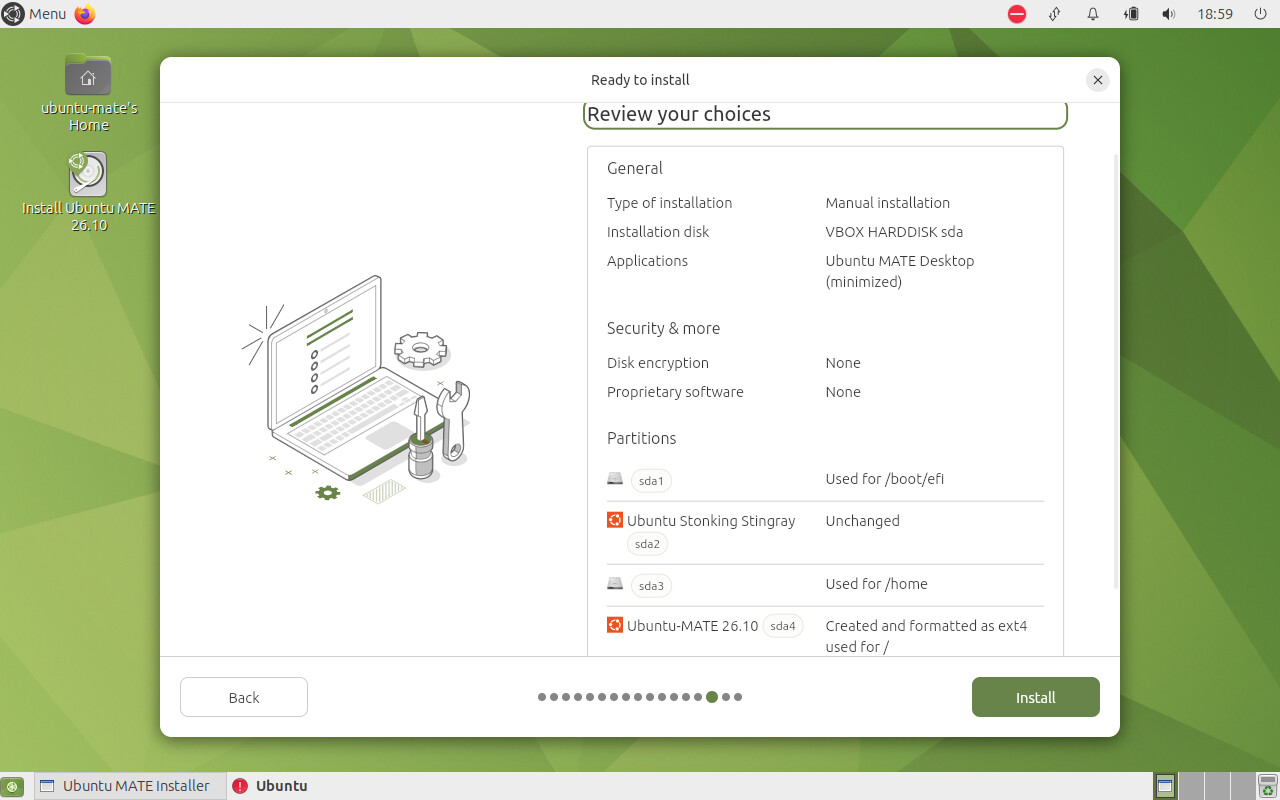
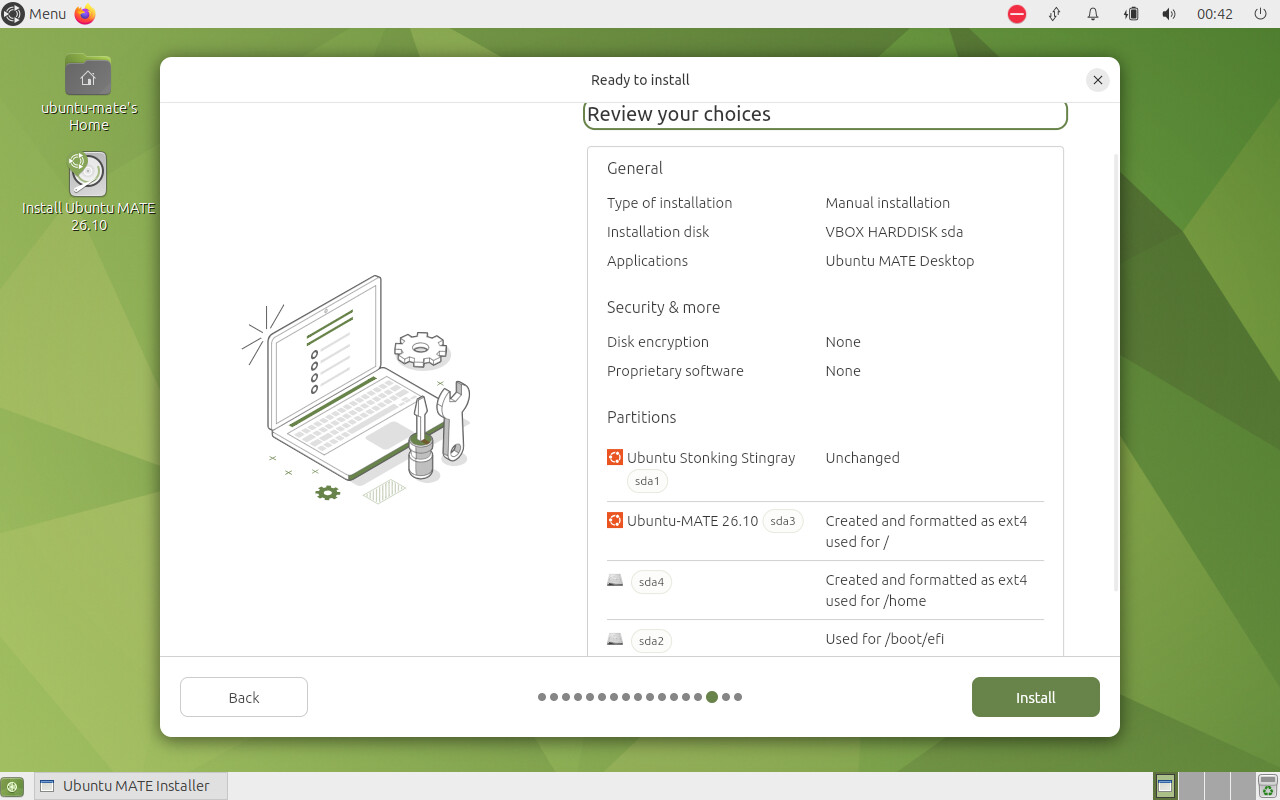
OK, ran the installer for a successful installation . . . not entirely “intuitive” but I did get the manual install done and I am typing this from U-MATE stonking.
All seems to be well . . . I set up the / partition to be 50GB, but GParted shows it as “46.57” which I remembered @suivue saying the installer sets up its own /boot partition, but installer ran an update on itself before I ran the install, and since I used the same partition for /home as I did for the Lubuntu stonking install the installer seemed to pick the existing FAT32 that I set up for that system.
And it ran through OK . . . . So, thanks for continuing the support for U-MATE. Ah, yes, on cold boot there was an error on the “blueman applet” which I think goes back in time. I don’t have a bluetooth card in this machine, but I sent the bug report in and just added myself to “affects me as well” of existing bug report.
[edit] There was something that might relate to the “installer makes its own /boot/efi directory” that I did discover, and that was when I tried to format my own exFAT partition, the installer said, “the partition must be formatted as ext4” . . . so I couldn’t format that partition, I could only set up the / and then I reused the partition for the /home . . . and somewhere in that process the installer picked an existing FAT32 partition for the bootloader. I didn’t want to have the system handling grub, but I didn’t try to “install w/o bootloader” as it was possible a few years ago to do. It installed grub and then disabled it in the /etc/default/grub file. [/edit]
 Except the automatic EFI partition issue.