Try Myna speech-to-text on Ubuntu Desktop

We’ve just released Myna, our new local speech-to-text solution for Ubuntu Desktop, as a technology preview! Myna lets you dictate text directly into your applications, with speech recognition running entirely on your machine. It’s still early days, but the core experience is ready for the community to try.

Myna is available for Ubuntu 24.04 LTS, 26.04 LTS and 26.10 on GNOME with Wayland. You can learn more about Myna, how to install it, and what to expect in our Ubuntu Blog announcement.

We’d love to hear what you think! Give Myna a try and share your experience in the comments below. We’re particularly interested in transcription accuracy, language support, responsiveness and how well it works with your everyday applications, but all feedback and suggestions are welcome.

15 Likes

Been using it for a while now on 26.10, works well and easy to use

Great work!

Thank you for this. I’ve installed it on Ubuntu 24.04.

EDIT: I am using X11, not Wayland, so maybe that is significant?

Several questions

  1. I see that this is a snap! What is the purpose of having a PPA? Couldn’t I just install via snap without adding a PPA?
  2. You say that you support NVIDIA GPU. Are you intending to support other GPUs, such as Intel?
  3. When models are updated, does Myna update them automatically, or do we need to regularly check and manually update?
  4. If I wish to uninstall, how do I uninstall fully including the extra downloaded segments?
  5. When I press Super+J, a notification pops up. When the text starts at the top of the screen (which it does for me), it hides the text, so I can’t see what’s going on. Is there a way to disable the notification (except for when there is an error)?
  6. The model is particularly sensitive to background noise; in my case it’s a consistent quiet hum. I wonder if that’s something that can be solved in future?
  7. I notice that it does a pretty good job of inserting punctuation automatically. Something that would be good is if it could understand basic punctuation commands such as “comma”, “full stop” (or “period” for the US), “question mark”, “colon”, “semicolon”, etc.
  8. Are there plans to add meta commands such as “undo” (undo, say, the last phrase), “new paragraph”, and “new line”?

You asked for…

  • Transcription quality: It’s good! I wasn’t expecting this. Sometimes it writes something incorrectly, but as I continue to speak, it revises what it wrote and fixes it. That’s the experience that I get with another product (specifically Gboard on the Android Pixel), and it makes sense because human speech is “messy”. The fact that it can make those corrections is pretty good.

  • Responsiveness: Fast, responsive. I have no trouble.

  • Language and accent support: I’m in the UK, but I don’t have a particularly strong accent, so I’m unsure if that’s helpful.

  • Application compatibility: What I’ve tried so far seems to work. Gedit; this forum; LibreOffice; Emails.

  • Setup and onboarding: Dead easy. No problems whatsoever.

  • Anything that feels awkward or unexpected: Pressing a key on the keyboard is inconsistent; it depends on which app I’m using.

    • In Gedit, when I press Enter, it adds the Enter key before the paragraph instead of after!
    • In my emails, pressing Enter confusingly deletes the transcription.
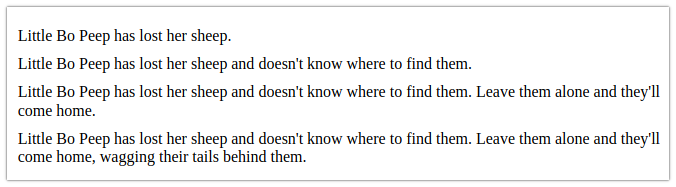
    • In LibreOffice, it starts a new paragraph. Then, when I continue to dictate, Myna continues, but it duplicates what it has already transcribed. I’ve attached a screenshot; I’ve added a new paragraph (i.e. pressed Enter) after the end of each line in the poem.
    • On this forum, Myna removes the new paragraph and continues from where it left off, as if I hadn’t pressed Enter.
    • I’ll have to get used to stopping Myna each time I need to make a manual correction and then restarting it. But, I must be able to remove the notification at the top, because it’s awfully distracting. Maybe have an option to show the notification only when there is an error.

In summary

For a beta product, I am impressed. The model is fast, responsive and accurate. Ubuntu has badly needed this, so well done and thank you! I can see myself using it often.

AFAIK the ppa holds the frontend that checks your system (language, space, possible hardware acceleration for the models) and then decides what snaps are needed…

While you could install the snaps on your own you would have to figure these bits out yourself then…

1 Like

Thanks for that. I submitted my feedback in GitHub as part of the beta :slight_smile:

I tried Parakeet and consumed about 3GB of VRAM. My laptop has an NVIDIA GPU with 6GB of VRAM, so didn’t work. Should Parakeet consume that much VRAM or maybe there is some kind of memory leak?

1 Like

Myna was easy to install and runs well even on my oldest, slowest machine. All told, pretty impressive debut.

Quibbles: I’d prefer if it let me dictate the punctuation rather than depending on Myna to figure it out (which is not working well at this point). I’d also like to have some commands for cursor control such as “new line”.

1 Like

I’d like that to be an option, because it’s not bad for me. Having it auto-punctuate while still being able to use commands for the punctuation.

I agree. It would be especially appreciated when you want to write a question with its question marks.

@paddylandau Thanks a lot for your questions and feedback!

EDIT: I am using X11, not Wayland, so maybe that is significant?

It is, X11 is not officially supported. GNOME/Wayland is the official target. Our focus will be there for the near-term, although the long-term goal is to iron out any other desktop environments.

  1. I see that this is a snap! What is the purpose of having a PPA? Couldn’t I just install via snap without adding a PPA?

The Settings app performs various privileged operations: managing other snaps, and running commands like modelctl that require root. snapd-control didn’t feel right for a random application settings app. Ideally, App Center and/or a new system component, will become the de facto manager of inference snaps and their settings, and Myna Settings will defer to that.
In this world, Myna Settings would indeed be a strictly confined snap too. A classic snap was also considered, but you can’t use the gnome extension from a classic snap, and this in turn creates packaging headaches having to bundle GTK and friends for cross-LTS support.

  1. You say that you support NVIDIA GPU. Are you intending to support other GPUs, such as Intel?

We are, the more the merrier, on more than only x86-64, too.

  1. When models are updated, does Myna update them automatically, or do we need to regularly check and manually update?

They are updated automatically via snapd. Although see myna snap can't auto-update due to myna-hud lifetime · Issue #38 · canonical/myna · GitHub - there is a snapd limitation we are hitting currently regarding auto-updating Myna itself. Inference snaps not effected.

  1. If I wish to uninstall, how do I uninstall fully including the extra downloaded segments?
sudo snap remove --purge myna myna-parakeet myna-whisper myna-funasr myna-audio8
sudo apt purge myna-config
sudo apt autoremove --purge

We use this in development to clean a target:

# See what it'll remove
curl -fsSL https://raw.githubusercontent.com/canonical/myna/main/dev/purge.sh | bash -s -- --deb --dry-run
# Remove it
curl -fsSL https://raw.githubusercontent.com/canonical/myna/main/dev/purge.sh | bash -s -- --deb --yes
  1. When I press Super+J, a notification pops up. When the text starts at the top of the screen (which it does for me), it hides the text, so I can’t see what’s going on. Is there a way to disable the notification (except for when there is an error)?

This is likely a quirk of your X11 target. I suggest your first experience be on GNOME/Wayland unless you like debugging. Xfce has had some light testing so far, other desktop environments YMMV. There is currently no such setting to disable notifications. Xfce has a graphical pill at the bottom of the screen for instance. Notification fallback is the worst-case fallback and has UX issues as you noticed.

  1. The model is particularly sensitive to background noise; in my case it’s a consistent quiet hum. I wonder if that’s something that can be solved in future?

The next release will include slightly less naive filtering which should help this case. The mic needs to be well configured to avoid this for now.

  1. I notice that it does a pretty good job of inserting punctuation automatically. Something that would be good is if it could understand basic punctuation commands such as “comma”, “full stop” (or “period” for the US), “question mark”, “colon”, “semicolon”, etc.

Such a feature is on the roadmap :slight_smile:

  1. Are there plans to add meta commands such as “undo” (undo, say, the last phrase), “new paragraph”, and “new line”?

There are ideas here, but no designs yet. IBus is not a great API for all these operations (wasn’t designed for what we’re doing with it). A more general text-injection interface would help with undo for instance. Once the model has decided the last phrase is acceptable, there’s no way we can modify it at the moment by design.

In Gedit, when I press Enter, it adds the Enter key before the paragraph instead of after!

This likely is another side-affect of IBus. The “partial” transcription should have a different chrome, normal underlined. When you hit enter, there isn’t actually any text inside gedit at the moment. Once you let it “finalize” the partial text (normally the underline disappears) and hit enter, you will get a line break as expected. Bad UX, we need a better text injection API in the platform to support this more naturally.

In LibreOffice, it starts a new paragraph. Then, when I continue to dictate, Myna continues, but it duplicates what it has already transcribed. I’ve attached a screenshot; I’ve added a new paragraph (i.e. pressed Enter) after the end of each line in the poem.

On this forum, Myna removes the new paragraph and continues from where it left off, as if I hadn’t pressed Enter.

This is also the IBus preedit quirks, I expect. You’ll find different behaviour depending on the app in question. Not ideal.

I’ll have to get used to stopping Myna each time I need to make a manual correction and then restarting it. But, I must be able to remove the notification at the top, because it’s awfully distracting. Maybe have an option to show the notification only when there is an error.

Thanks for the feedback, you’re the first I’ve heard asking for such a setting. It would be easy to add, and then you could rely on just the audio cues with no visual clutter.
2 Likes

I’ve noticed that when I say a year number, such as 2015, Myna will usually mis-transcribe it as “twenty fifteen” instead. This and mistranscribing Myna as “Mina”, “MINA”, etc. are about the only two regular issues I see. I’m using the Parakeet model on an NVIDIA 4070 system.

Also, this Discourse post should probably be linked in the blog post, because otherwise people may file bug reports for transcription quality issues, like I almost did before remembering this existed.

Quibbles: I’d prefer if it let me dictate the punctuation rather than depending on Myna to figure it out (which is not working well at this point).

Is this with Parakeet in English? Any examples would be handy. I’ve not see many mistakes here.

I’ve noticed that when I say a year number, such as 2015, Myna will usually mis-transcribe it as “twenty fifteen” instead. This and mistranscribing Myna as “Mina”, “MINA”, etc. are about the only two regular issues I see.

We have some early ideas in the pipe to address cases like this. “Vocabulary” and “Pipelines”. Vocabulary would take word lists the users define, and potentially surrounding app context (nearby sentences / words), and use those to “bias” uncertain words towards the prescribed ones. It’s probabilistic though, so you won’t get perfect results. “Pipelines” should allow user-configurable pre and post-processing. So you might have a pipeline audio->parakeet->numerals->inject that can post-process “twenty fifteen” → 2015, perhaps via another local model. Just a random example. Some models support a prompt in addition to the audio you feed them, so you could say “always use numerals when the user says a year” or similar.

because otherwise people may file bug reports for transcription quality issues

Bug reports for any issues found are warmly received. While we likely won’t be able to fix some them ourselves (some depend on the model), it is good to know where they struggle for
different people.

1 Like

I tried Parakeet and consumed about 3GB of VRAM. My laptop has an NVIDIA GPU with 6GB of VRAM, so didn’t work. Should Parakeet consume that much VRAM or maybe there is some kind of memory leak?

Yes, that’s expected for the fp32 parakeet export on NVIDIA, not necessarily a memory leak.
Longer inputs can use more VRAM. In streaming mode, the window’s maximum length is configurable.

The next release has more graceful fallback for memory exhaustion, it will fallback to the CPU soon rather than bailing.

For now, you can force the CPU engine on your card,

sudo myna-parakeet.parakeet use-engine cpu

Charles, thank you for your replies — and you and your team’s hard work!

My computer is due to upgrade from 24.04 to a fresh installation of 26.04 later this year, and I’ll see how Myna performs under Wayland instead of X11.

1 Like

I understand. What about other, lighter, versions of Parakeet, like fp16, or even fp8?

A prior contributor said he hadn’t seen many punctuation errors. Here’s an example of the problem when I dictate on my laptop.

My friend and I have been discussing audio equipment. Myna got all the words correct but the punctuation has errors, as does the capitalization.

“The difference in sound quality is astonishing. The phone sounds terrible when played. through the stereo system. Tinny and just generally anemic. The same music played. Through the computer sounds much better. This is certainly an extreme example. Of the issues of integrating various pieces of equipment. It was pretty instructive though.”

I’ve just tried it on my machine, reading your words with the intended cadence. Myna got it perfectly:

The difference in sound quality is astonishing. The phone sounds terrible when played through the stereo system. Tinny and just generally anemic. The same music played through the computer sounds much better. This is certainly an extreme example of the issues of integrating various pieces of equipment. It was pretty instructive though.

I speak UK English, with myna-parakeet. It says “components [1/3]”, but I don’t know how to tell which component it is.

Name           Version  Rev  Tracking     Publisher  Notes
myna           0.2.4    24   latest/edge  charles05  -
myna-parakeet  0.2.4    10   latest/edge  charles05  components[1/3]

What language accent and model are you using?

Try:

snap info --verbose myna-parakeet

That should list the installed components (most likely the proper driver for your GPU setup)

1 Like

Thank you, Oliver.

$ snap info --verbose myna-parakeet
name:    myna-parakeet
summary: Parakeet TDT speech-to-text inference snap (Myna)
health:
  status:  unknown
  message: health has not been set
publisher: Charles (charles05)
store-url: https://snapcraft.io/myna-parakeet
license:   AGPL-3.0-or-later
description: |
  Local, offline speech-to-text service exposing the Myna session API on a
  Unix domain socket. Wraps NVIDIA's Parakeet TDT 0.6B v3 (25 languages,
  punctuation) as ONNX served via onnxruntime, int8 on CPUs and fp32 on
  NVIDIA GPUs, with chunked progressive commit (pause-delimited chunks
  decoded once and committed while the user keeps speaking).
  
  The service receives PCM audio pushed by clients; it has no access to the
  microphone or any audio hardware.
commands:
  - myna-parakeet.parakeet
services:
  myna-parakeet.server: simple, enabled, active
components:
  +model-parakeet-int8: 0.2.4 2026-10-19 (9) 729MB –
  +gpu-nvidia:          –     –          –   –     not installed
  +model-parakeet-fp32: –     –          –   –     not installed
notes:               
  private:           false
  grade:             devel
  confinement:       strict
  devmode:           false
  jailmode:          false
  trymode:           false
  enabled:           true
  broken:            false
  ignore-validation: false
base:         core24
snap-id:      KAhS3MFXHSvvp5xo7jeU6ctvweA0Xq79
tracking:     latest/edge
refresh-date: yesterday at 14:10 BST
channels:
  latest/stable:    –                            
  latest/candidate: –                            
  latest/beta:      –                            
  latest/edge:      0.2.4 2026-10-19 (10) 46.9MB -
installed:          0.2.4            (10) 46.9MB components[1/3]