Snap-store dock icon does not show when there are updates

Ubuntu Version

Ubuntu 26.04 LTS

Desktop Environment (if applicable)

GNOME

Problem Description

When there are new updates pending on snap-store, the user cant see this
on the dock icon, unless they launch snap-store

is there an existing bug out there for this?

1 Like

I had a look around and couldn’t find an open bug that matches this exactly. Worth filing one on ubuntu/app-center I think.

From what I can tell the dock doesn’t know anything about snap updates on its own. It only shows whatever count the app sends over D-Bus (com.canonical.Unity.LauncherEntry), and when there’s no count it falls back to the GNOME notification count. So either App Center isn’t sending anything, it’s sending under a desktop ID the dock doesn’t match for the snap, or the dock loses the badge on lock/unlock. That last one got reported on 26.04.1 for another app (hyprlab/hylki #353), the dock gets disabled when the screen locks and forgets every badge.

Easy way to tell which one it is, run this while an update is actually pending:

snap refresh --list

dbus-monitor --session type=signal,interface=com.canonical.Unity.LauncherEntry

then open and close App Center, and also try a lock/unlock. No signals at all means App Center isn’t sending. Signals but no badge means the dock side or the desktop ID. Keep in mind snapd refreshes in the background so the pending window can be pretty short.

Post what you get plus gnome-shell --version and the ubuntu-dock package version and we can narrow it down..

Also worth confirming a dock extension is actually running (gnome-extensions list --enabled | grep -i dock), since stock GNOME Shell doesn’t draw these badges by itself. Ubuntu Dock and Dash to Dock both do.

2 Likes
lotuspsychje@r00tb0x:\~$ snap refresh --list
Name        Version         Rev   Size    Publisher   Notes
snap-store  0+git.d7d3fbe8  1447  12.5MB  canonicalâś“  -
lotuspsychje@r00tb0x:\~$ dbus-monitor --session type=signal,interface=com.canonical.Unity.LauncherEntry
signal time=1791647669.527896 sender=org.freedesktop.DBus → destination=:1.140 serial=2 path=/org/freedesktop/DBus; interface=org.freedesktop.DBus; member=NameAcquired
string “:1.140”
signal time=1791647669.527925 sender=org.freedesktop.DBus → destination=:1.140 serial=4 path=/org/freedesktop/DBus; interface=org.freedesktop.DBus; member=NameLost
string “:1.140”

gnome-shell version: 50.1-0ubuntu1.3

ubuntu dock version 105: https://micheleg.github.io/dash-to-dock/

lotuspsychje@r00tb0x:\~$ gnome-extensions list --enabled | grep -i dock
ubuntu-dock@ubuntu.com

Maybe also worth mentioning or related, is we used to have a snapcraft

updating dock icon, not sure if that was for snap-store or snapd?

and i haven’t seen that icon for long time

Actually it is the task of update-notifier to inform about updates. There was a bug which is fixed. https://bugs.launchpad.net/ubuntu/+source/update-notifier/+bug/2159587

1 Like

my update-notifier: has version 3.207.2 on Ubuntu 26.04

but snap-store still doesnt show when updates are available

Please check gnome-settings notifications if it is enabled there.

yes, all notications are ON in gnome settings

could it be related to the snapd or snap-store version/channel?

as during 26.04 development there were tons of snapd issues

around locked versions and channel swaps

snapd version: 2.78+g159.c91399a

snap-store version: 0+git.d402afd5

snap info snap-store
installed: 0+git.d7d3fbe8 refreshed 4d ago

snap info snapd

installed: 2.77.1 refreshed 7d ago

In my output your snapd version is tagged as

latest/edge: 2.78+g159.c91399a

I don’t see your snap-store version in my output neither there snap-store

i changed the snap-store version to yours

i have the same snapd version as you, but on the list

it doesnt show that version, so weird…

latest/edge: 2.78+g171.9c63760 2026-10-13 (28585) 37.4MB -

and not on the list: installed: 2.78+g159.c91399a (28577) 37.4MB snapd

To see all versions try

snap list --all

With the revision number you can revert a snap guide to manage updates

snap-store 0+git.d402afd5 1427 latest/stable canonicalâś“ uitgeschakeld
snap-store 0+git.d7d3fbe8 1447 latest/stable canonicalâś“ -
snapd 2.78+g150.6232998 28572 latest/edge canonicalâś“ snapd,uitgeschakeld
snapd 2.78+g159.c91399a 28577 latest/edge canonicalâś“ snapd

Do you get/see notifys GUI if let’s say firefox or snapd updates are pending?

if yes, can you make a screenshot of that?

You will only get such notifications for actively running apps (i,.e. firefox) but not for daemons that are set up to simply automatically restart (i..e. snapd) … and that notification will not be in some counter on the dock, it will only be a normal desktop notification asking you to close the app

2 Likes

I get notifications for e.g. chromium or firefox from the top bar. Since the upgrade to 26.04 once of each.

Currently there is a firefox update in management, but I didn’t get a notification yet.

1 Like

i dont get notifys for firefox anywhere

snap info firefox
tracking: latest/stable
refresh-date: vor 6 Tag, um 12:11 CEST
channels:
latest/stable: 158.0-2 2026-10-15 (9057) 298MB -
latest/candidate: 158.0-2 2026-10-14 (9081) 298MB -
latest/beta: 159.0b2-1 2026-10-14 (9086) 297MB -
latest/edge: 160.0a1 2026-10-16 (9090) 317MB -
esr/stable: 153.5.0esr-1 2026-10-13 (9048) 270MB -
esr/candidate: 140.17.0esr-1 2026-10-14 (9083) 248MB -
esr/beta: ↑
esr/edge: ↑
installed: 157.0.1-1 (9036) 275MB

snap list firefox
Name Version Revision Tracking Herausgeber Hinweise
firefox 157.0.1-1 9036 latest/stable mozilla

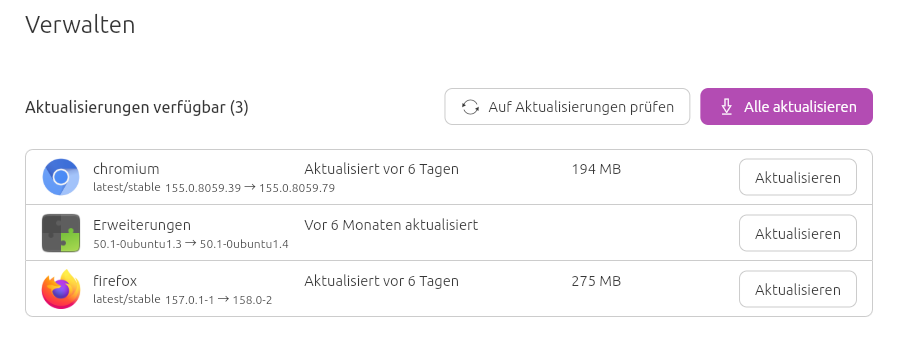
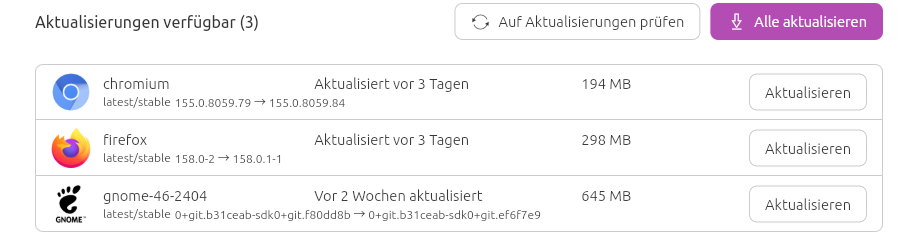
When opening app-center it now shows three updates, but there were no notifications

Before it displayed five updates, two were installed in the meantime.

snap changes
ID Status Spawn Bereit Zusammenfassung
43 Done heute um 17:16 CEST heute um 17:16 CEST Snaps automatisch auffrischen: “canonical-livepatch”, “cups”

Both have been installed automatically in the background

snap refresh --time
timer: 00:00~24:00/4
last: heute um 17:16 CEST
next: heute um 19:45 CEST

snap refresh --list
Name Version Rev Size Publisher Notes
chromium 155.0.8059.79 3559 194MB canonicalâś“ -
firefox 158.0-2 9057 298MB mozillaâś“

Opened a new topic about not showing update notifications in general. Again app-center does not display notification although management shows updates for firefox and chromium.
1 Like

This topic was automatically closed after 30 days. New replies are no longer allowed.