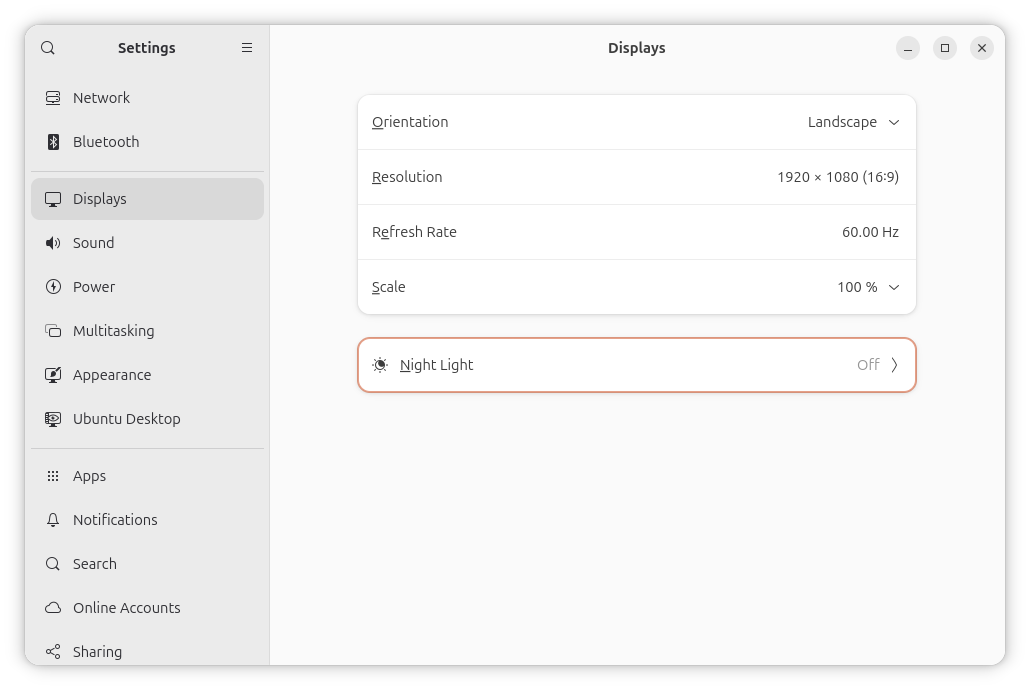
Having two monitors I experienced one monitor (the right one) not working. I had the left connected using Displayport, the right one HDMI. I bought myself a second Displayport cable and connected the right monitor to it, and now the left one does not work.
I viewed my Settings → Displays, and saw no other monitor was available. I also not see a ‘Detects Displays’ button.
My problem is probably caused by the weather, as I had two perfectly working monitors a short while ago.
A two-monitor setup where each one works alone but never both together usually points at the graphics driver or the link negotiation, not the cables. Since your Nvidia driver was just upgraded, reboot first, because the old kernel module can stay loaded until you do and the new driver often only enables both outputs after a restart. Then run nvidia-smi in a terminal to confirm the driver loads, and check Software & Updates > Additional Drivers to make sure you’re on the recommended proprietary version rather than nouveau. It’s also worth running cat /sys/class/drm/card*-*/status to see whether the kernel reports both outputs as connected; if one says disconnected, try swapping which port each monitor uses and fully power-cycling the monitors by unplugging them for a minute. If that doesn’t help, post the output of nvidia-smi and ls /sys/class/drm/ and folks here can narrow it down.
Thanks for your reply. I tried your suggestions, and failed.
$ nvidia-smi
NVIDIA-SMI has failed because it couldn't communicate with the NVIDIA driver. Make sure that the latest NVIDIA driver is installed and running.
$
~$ ls /proc/driver/
rtc
$
s /sys/class/drm/
card0  card0-Unknown-1  version
But also
$ sudo ubuntu-drivers list
nvidia-driver-595-open, (kernel modules provided by linux-modules-nvidia-595-open-generic-hwe-26.04)
nvidia-driver-580-open, (kernel modules provided by linux-modules-nvidia-580-open-generic-hwe-26.04)
nvidia-driver-615-open, (kernel modules provided by linux-modules-nvidia-615-open-generic-hwe-26.04)
nvidia-driver-595, (kernel modules provided by linux-modules-nvidia-595-generic-hwe-26.04)
nvidia-driver-580, (kernel modules provided by linux-modules-nvidia-580-generic-hwe-26.04)
nvidia-driver-595-server-open, (kernel modules provided by linux-modules-nvidia-595-server-open-generic-hwe-26.04)
nvidia-driver-580-server-open, (kernel modules provided by linux-modules-nvidia-580-server-open-generic-hwe-26.04)
nvidia-driver-615-server-open, (kernel modules provided by linux-modules-nvidia-615-server-open-generic-hwe-26.04)
nvidia-driver-595-server, (kernel modules provided by linux-modules-nvidia-595-server-generic-hwe-26.04)
nvidia-driver-580-server, (kernel modules provided by linux-modules-nvidia-580-server-generic-hwe-26.04)