75% of people do not change the default.
A default PostgreSQL installation should avoid data loss.
That’s why, in the postgresql 18 rock, we set the default locale to PG_UNICODE_FAST.
TL;DR
To avoid data loss, call initdb with:
initdb --locale-provider=builtin --builtin-locale=PG_UNICODE_FAST --locale=C.UTF-8
Where locale-aware sorting is desired, use an ICU collation for that specific column or query.
How an index works
PostgreSQL uses B-tree indexes. You can think of this as binary search (that’s optimized for block storage)—each step eliminates half of the remaining values.
Consider this example:
$ docker run -d --name stretch -e POSTGRES_PASSWORD=pass --volume foo:/var/lib/postgresql/data postgres:11-stretch
e79a3b0bf30ca070c5cb923423dc511275cc5b105de665d605832dd12ab2cbe5
$ docker exec -it stretch psql -U postgres
postgres=# CREATE TABLE users (
postgres(#     username text PRIMARY KEY,
postgres(#     age integer
postgres(# );
CREATE TABLE
postgres=# INSERT INTO users (username, age) VALUES
postgres-#     ('serene-slonik', 12),
postgres-#     ('sereneslonik', 15),
postgres-#     ('serene+slonik', 19),
postgres-#     ('serene.slonik', 22),
postgres-#     ('serene_slonik', 29),
postgres-#     ('serene~slonik', 30),
postgres-#     ('serene#slonik', 38),
postgres-#     ('serene@slonik', 41),
postgres-#     ('serene!slonik', 43);
INSERT 0 9

postgres=# SELECT * from users WHERE username = 'serene~slonik';
   username    | age
---------------+-----
 serene~slonik |  30
(1 row)
When SELECT * from users WHERE username = 'serene~slonik'; is executed, PostgreSQL searches using the index that was automatically created for the username primary key constraint.
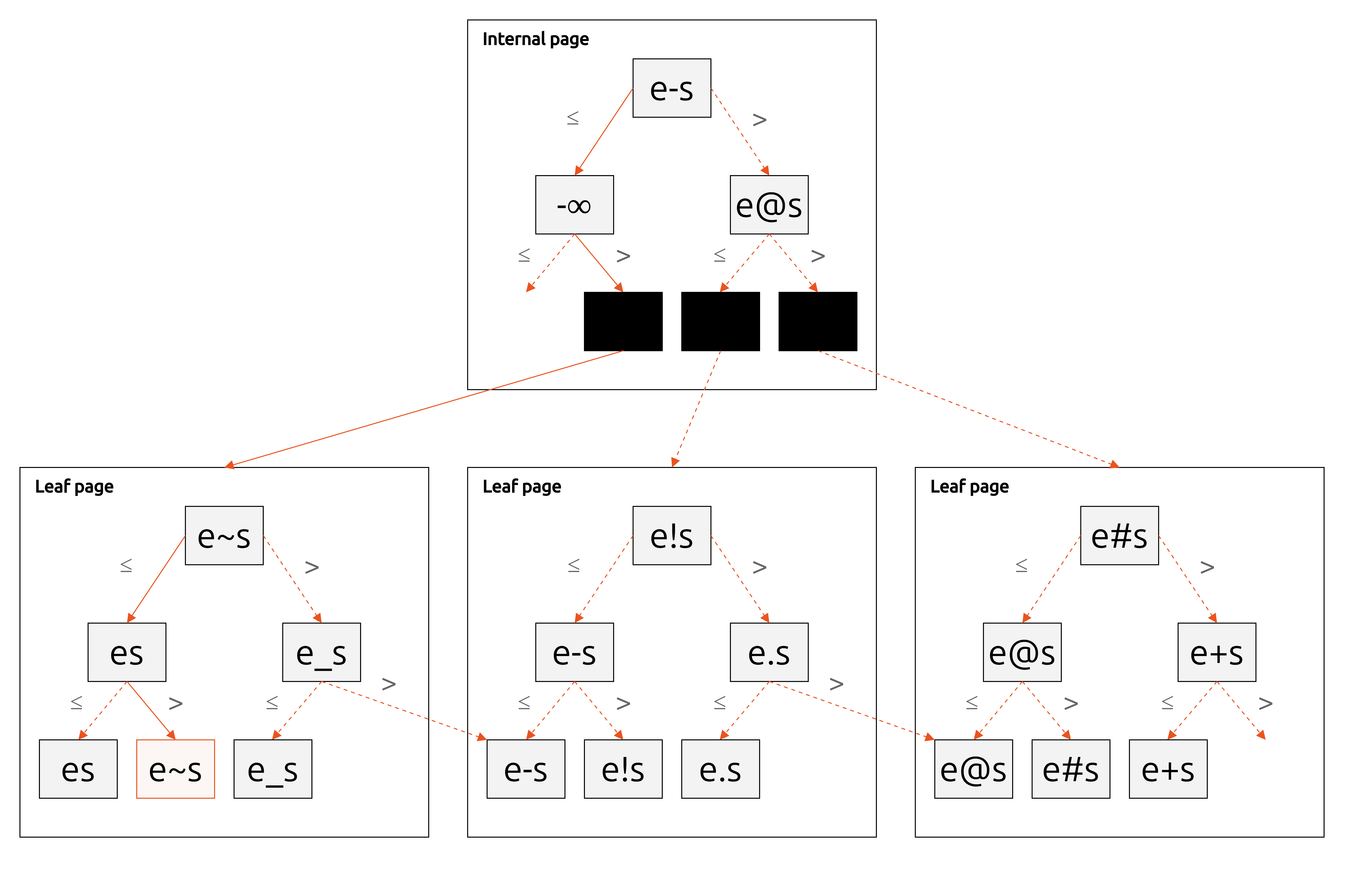
(Pages typically contain significantly more than 3 index entries. The page size is reduced for the sake of illustration.)
For SELECT * from users WHERE username = 'serene~slonik';, these are the index search steps (depicted in the diagram above):
serene~slonikis ≤serene-slonikserene~slonikis > -∞- Index entry found. Points to left-hand leaf page[1]. Go to page
serene~slonikis ≤serene~slonikserene~slonikis >sereneslonik- Index entry found. Points to row
Sort order
In order to compare two strings (with ≤, >), you must be able to order them.
Here is the default sort order for postgres:11-stretch:
postgres=# SELECT username from users ORDER BY username;
   username
---------------
 sereneslonik
 serene~slonik
 serene_slonik
 serene-slonik
 serene!slonik
 serene.slonik
 serene@slonik
 serene#slonik
 serene+slonik
(9 rows)
Silent data loss
If the sort order changes, the index silently becomes corrupt.
Continuing from the example above, let’s upgrade from Debian 9 (stretch) to 10 (buster) (while staying on PostgreSQL 11) and attach our existing data volume:
$ docker stop stretch
stretch
$ docker run -d --name buster -e POSTGRES_PASSWORD=pass --volume foo:/var/lib/postgresql/data postgres:11-buster
a39104b836f7aedbd5959fbe53d926f6d6e3dc835547ecae74d37bc4ceefe6c6
$ docker exec -it buster psql -U postgres
postgres=# SELECT name FROM (VALUES ('serene-slonik'), ('sereneslonik'), ('serene+slonik'), ('serene.slonik'), ('serene_slonik'), ('serene~slonik'), ('serene#slonik'), ('serene@slonik'), ('serene!slonik')) AS t(name)
postgres-# ORDER BY name;
     name
---------------
 serene!slonik
 serene#slonik
 serene+slonik
 serene-slonik
 serene.slonik
 serene@slonik
 serene_slonik
 serene~slonik
 sereneslonik
(9 rows)
The sort order changed! What happens if we query our data?
postgres=# SELECT * from users WHERE username = 'serene~slonik';
 username | age
----------+-----
(0 rows)
And if we insert a row with the same primary key as one of our existing rows?
postgres=# INSERT INTO users (username, age) VALUES
postgres-#     ('serene~slonik', 72);
INSERT 0 1
postgres=# SELECT * from users;
   username    | age
---------------+-----
 serene-slonik |  12
 sereneslonik  |  15
 serene+slonik |  19
 serene.slonik |  22
 serene_slonik |  29
 serene~slonik |  30
 serene#slonik |  38
 serene@slonik |  41
 serene!slonik |  43
 serene~slonik |  72
(10 rows)
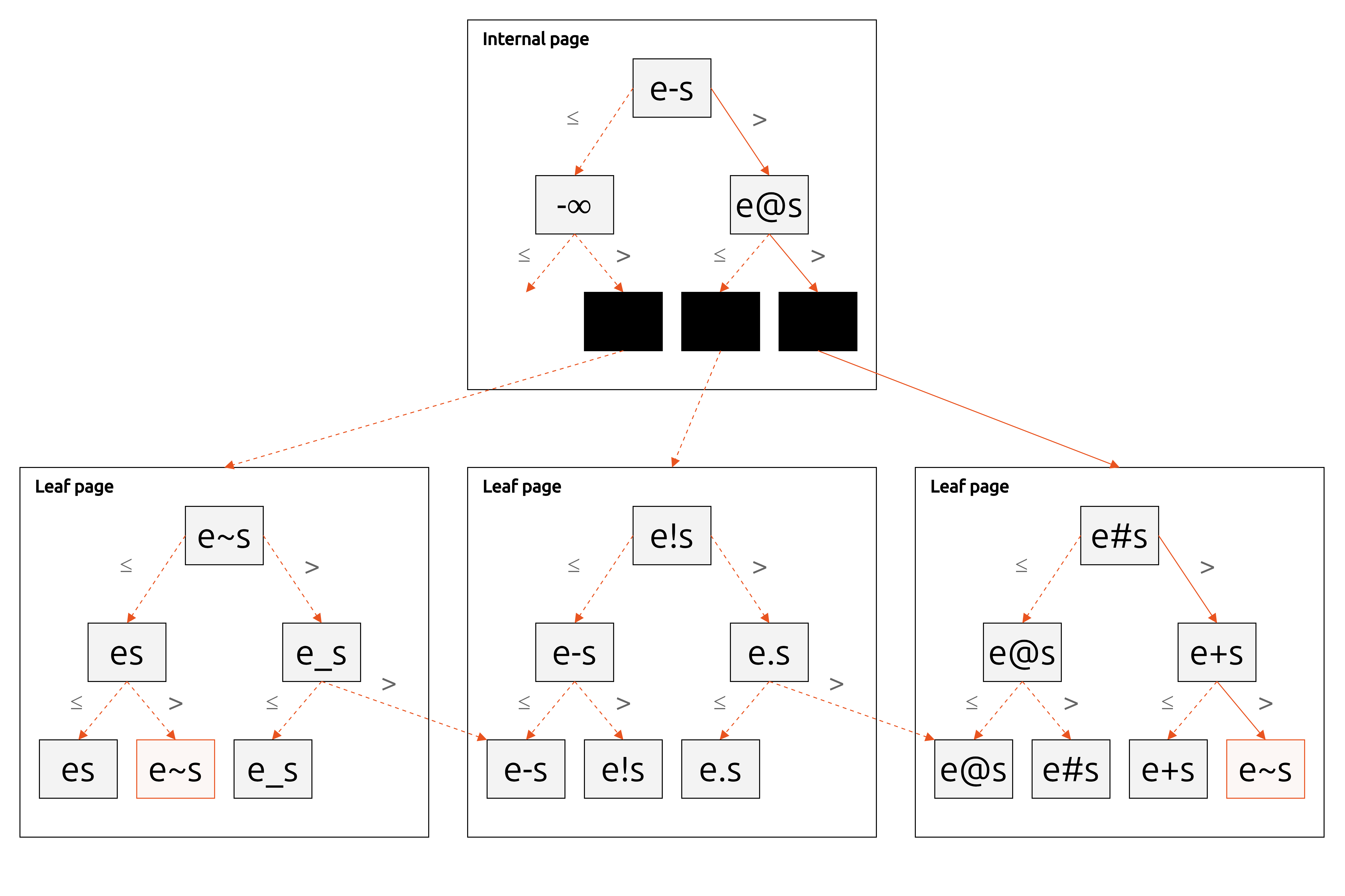
Two rows with serene~slonik? That shouldn’t be possible—a primary key constraint enforces that each row has a unique value for the username column.
This happens because the index was built with the old sort order but is traversed with the new sort order.
For INSERT INTO users (username, age) VALUES ('serene~slonik', 72);, these are the index search steps (depicted in the diagram above):
serene~slonikis >serene-slonikserene~slonikis >serene@slonik- Index entry found. Points to right-hand leaf page. Go to page
serene~slonikis >serene#slonikserene~slonikis >serene+slonik- No index entry found. Row satisfies unique constraint and a new index entry is added
Why does the sort order change?
Debian 9 to 10 updated glibc from 2.24 to 2.28. While the 2.28 update was infamously disruptive, every Ubuntu LTS from 2012 to 2026 has had glibc sort order changes, except for Ubuntu 14.04.[2]
Indexes require a static sort order. But language is continually changing.
Look no further than the Unicode release notes.
I’m not affected by these changes
There are 8 billion people currently living on Earth. Only a small minority of those people use English as their primary language.
Support for Arabic, for example, is notoriously shameful.
Built-in locale provider
To solve this issue, PostgreSQL 17 and 18 introduced built-in locales: C.UTF-8 and PG_UNICODE_FAST.
These locales use Unicode code point as the sort order, so that the sort order never changes.
Furthermore, these locales are shipped with PostgreSQL itself, and Unicode updates are only applied on PostgreSQL major version updates.
(Unicode updates do not change code point order, but can change case mappings [especially for previously unassigned Unicode characters]. This can corrupt indexes on expressions. If the built-in locale provider is used, pg_upgrade can warn about some of these cases.)
Locale-aware sort
Code point sort order is not always desired. For example, if sorted values are shown to a person, they would expect them to be sorted according to the rules of their locale.
In these cases, a collation can be used for that specific column or query.
We recommend ICU locales over glibc locales since ICU locales are versioned—when the sort order changes, the version number changes.
Here is an example of creating a collation and using it for a query:
postgres=# CREATE COLLATION palestine (provider = icu, locale = 'ar-PS');
CREATE COLLATION
postgres=# SELECT * from users ORDER BY username COLLATE palestine;
   username    | age
---------------+-----
 serene_slonik |  29
 serene-slonik |  12
 serene!slonik |  43
 serene.slonik |  22
 serene@slonik |  41
 serene#slonik |  38
 serene+slonik |  19
 serene~slonik |  30
 sereneslonik  |  15
(9 rows)
The postgresql 18 rock includes all ICU locales.
Locale determines more than just sort order
In PostgreSQL, the locale is used for:
- LC_COLLATE: String sort order
- LC_CTYPE: This includes character classification (e.g. which characters are considered letters) and case conversion (e.g. lowercase to uppercase)
- LC_MESSAGES: Language in which messages are displayed
- LC_MONETARY: Formatting of monetary amounts
- LC_NUMERIC: Formatting of numbers
- LC_TIME: Formatting of dates and times
The locale provider is only used for LC_COLLATE and LC_CTYPE. glibc is always used for LC_MESSAGES, LC_MONETARY, LC_NUMERIC, and LC_TIME.
LC_COLLATE and LC_CTYPE
We have already covered LC_COLLATE (sort order) extensively. In this regard, the built-in C.UTF-8 and PG_UNICODE_FAST locales are equivalent. The built-in C locale (officially added in PostgreSQL 17 but has always existed) also achieves the same effect of a stable sort order.
For LC_CTYPE, we chose PG_UNICODE_FAST as the default over C.UTF-8 because PG_UNICODE_FAST uses full Unicode case mapping (e.g. upper('straße') → 'STRASSE') and standard Unicode regular expression character classes. (Built-in C.UTF-8 does not classify all Unicode decimal digits as digits in regular expressions.)
We did not choose the built-in C locale since it only classifies ASCII characters correctly.
To use PG_UNICODE_FAST, call initdb with:
--locale-provider=builtin --builtin-locale=PG_UNICODE_FAST
LC_MESSAGES, LC_MONETARY, LC_NUMERIC, and LC_TIME
We set the default locale for LC_MESSAGES, LC_MONETARY, LC_NUMERIC, and LC_TIME to glibc’s C.UTF-8 locale. (The upstream default, for initdb --locale-provider=builtin --builtin-locale=PG_UNICODE_FAST, is inherited from the environment, which would have been glibc’s C locale in the postgresql 18 rock.)
We did this because the libc locale is still used in some places where you would expect the database locale (built-in PG_UNICODE_FAST in our case) to be used. For example, full text search: tsearch: use database default collation for parsing. · postgres/postgres@e113f9c · GitHub. (That commit fixes full text search to use the database’s locale instead of always using libc. However, it only landed in PostgreSQL 19.)
For example (with PostgreSQL 18):
SELECT to_tsvector('simple', 'a½b');
- Result with glibc’s
Clocale:'a½b':1(½ counted as a letter) - Result with glibc’s
C.UTF-8locale:'a':1 'b':2(½ correctly rejected)
While glibc’s C.UTF-8 locale behaves closer to the built-in PG_UNICODE_FAST locale than glibc’s C locale, it does not behave identically to the built-in PG_UNICODE_FAST locale (obviously, or the built-in locale provider would not exist).
For example:
SELECT to_tsvector('english', '٣running'); -- (٣ is U+0663 ARABIC-INDIC DIGIT THREE)
- Result with PostgreSQL 18 (glibc’s
C.UTF-8locale):'٣run':1 - Result with PostgreSQL 19 (built-in
PG_UNICODE_FASTlocale):'٣running':1
(glibc’s C.UTF-8 classifies ٣ as an alphabetic character instead of as a digit, so ‘٣running’ is parsed as a word and the english_stem dictionary is used. When ٣ is correctly recognized as a digit on PostgreSQL 19 [with PG_UNICODE_FAST], ‘٣running’ is parsed as a numword and the simple dictionary is used.)
Note: glibc’s C.UTF-8 locale behaves differently than the built-in C.UTF-8 locale.
To use the built-in PG_UNICODE_FAST locale for LC_COLLATE and LC_CTYPE and to use glibc’s C.UTF-8 locale for LC_MESSAGES, LC_MONETARY, LC_NUMERIC, and LC_TIME, call initdb with:
initdb --locale-provider=builtin --builtin-locale=PG_UNICODE_FAST --locale=C.UTF-8
The postgresql 18 rock includes all glibc locales (for non-English speakers and for people that want locale-aware formatting of monetary amounts, numbers, dates, and times). For example, call initdb with:
initdb --locale-provider=builtin --builtin-locale=PG_UNICODE_FAST --locale=ko_KR.utf8
As of writing, PostgreSQL translations (LC_MESSAGES) are broken in Ubuntu and the rock because the Ubuntu packaging currently removes the translations without including them in a language pack because PostgreSQL does not ship .pot files. More information: https://web.archive.org/web/20260519144844/https://wiki.ubuntu.com/Translations/TranslationLifecycle. We are looking into this.
Acknowledgements
All credit goes to:
- Jeff Davis for implementing the built-in locales
- Daniel Vérité, Peter Eisentraut, Jeremy Schneider, and the PostgreSQL community for reviewing the implementation
- Jeff Davis, for advocating to change the initdb default and presenting an easy-to-follow and well-reasoned argument in https://www.postgresql.org/message-id/flat/e4ac16908dad3eddd3ed73c4862591375a3f0539.camel%40j-davis.com. This mailing list thread is the reason we changed the default in our rock.
- Jeff Davis and Jeremy Schneider for making this complex topic accessible and straightforward in https://www.youtube.com/watch?v=KTA6oau7tl8
- Matthew Kelly and Bernd Helmle for raising awareness of these issues in https://www.postgresql.org/message-id/flat/BA6132ED-1F6B-4A0B-AC22-81278F5AB81E%40tripadvisor.com and https://www.postgresql.org/message-id/flat/CB4D1C6BAA80CF146CB0D4F2%40eje.credativ.lan
- Peter Eisentraut, Christoph Berg, Jeremy Schneider, and Devrim Gündüz for authoring https://wiki.postgresql.org/wiki/Locale_data_changes
This is a particularly complex topic with no easy solutions and lots of tradeoffs. Many would have accepted the status quo as “good enough” because making things better would be too daunting. Jeff and the PostgreSQL community prioritized the user experience first—recognizing that a PostgreSQL that avoids data loss is a PostgreSQL that becomes accessible to so many more people (who are not PostgreSQL experts). We admire and are inspired by them tremendously.
This is an oversimplification. Technically the index entry that is found points to the middle leaf page and then the previous index entry is used. https://github.com/postgres/postgres/blob/REL_18_6/src/backend/access/nbtree/nbtsearch.c#L453 ↩︎