Nvidia card driver problems due to last upgrade

Ubuntu Version

Ubuntu 24.04 LTS

Desktop Environment (if applicable)

Other

Problem Description

Hello,

I am having the same problem as another user whose video drivers were boxed up during the last system upgrade, except I am using a Dell system and a Nvidia GT 710 card. In my case there are 2 files suspended in Lubuntu update: libnvidia-ifrl-470-server and libnvidia-ifrl-serveri386. I have tried a manual update with “sudo apt full-upgrade” and they still won’t load.

Any recommendations? Beyond that I have a two questions.

I read the email where the 470 version Nvidia drivers are no longer supported. The latest driver for the GT 710 on Nvidia’s website is version 390.157. Will that work with Lubuntu?

The additional drivers screen in Lubuntu lists proprietary drivers for the GT 710 card. The 470 version is listed but blanked out. Is it possible to get that reinstated so I can use the last available driver, etc.?

Thanks

see:

1 Like

Actually 470 is the latest version branch supporting the GT710 and that’s what comes up at Nvidia’s as well. You probably searched for a different, much older, chip.

You need to uninstall ALL Nvidia packages and use the open-source community driver `nouveau` from now on. Or upgrade your graphics card.

1 Like

I’m replying here with information only.

Lubuntu is only a Ubuntu flavor which as that page tells you is

each with their own choice of default applications and settings

ie. Lubuntu uses Ubuntu kernels, kernel modules (aka drivers) etc.

The only difference between Lubuntu is that we (along with all flavors) provide media that will install the GA kernel stack, and other media that will install & use the HWE kernel stack; ie. a different default (this maybe hidden in point release detail & is thus can be missed)

You mention release (24.04) but give no clue as to what kernel stack you’re using, as a Lubuntu 24.04 LTS system using GA will be using the older 6.8 kernel, but a Lubuntu 24.04 LTS system using HWE kernel stack is using the newer 7.0 kernel like a Ubuntu Desktop install will. This GA/HWE difference is set by your downloaded ISO/image that was used to make the install (Lubuntu having released both).

This actual difference is just packages, as its packages that get updated.

You can use the uname -r command to see what you’re using (running at the moment), where I’d expect a default Lubuntu 24.04 LTS install to answer 6.8 or 7.0 (first few digits anyway; the rest is update/security detail) depending on what Lubuntu media you used.

You can find it easier if you’re using the older GA kernel for example, but if using the newer HWE kernel have more limitations due to your newer kernel.

1 Like

This notice is outdated and should have been taken down.
https://bugs.launchpad.net/ubuntu/+source/nvidia-graphics-drivers-470/+bug/2155202/comments/43

The 470 driver has been restored, and is usable with the 6.8 kernel.

2 Likes

It depends on the variant of the GT710. Some had Kepler cores and some had Fermi, because Nvidia played all kinds of games with model numbers during that era, and their driver finder is not smart enough to figure out the difference. I recommend Linux users avoid that site entirely, especially with anything older than Geforce 1000 model numbers.

Thanks for pointing this out, though it should definitely not be taken down but get amended…

The 470 driver is completely unmaintained (only Nvidia has the ability to maintain it (it isn’t open source) and they completely dropped it)…

It will only work with the GA kernel that only users that used the .0 or .1 Image of a release get installed (from .2 image releases onwards the HWE kernel is the default) and it is only available for two older LTS releases…

This definitely demands a good bunch of instructions and explanations …

2 Likes

Typo Oliver; you said .1 where it should be .2

For others wanting to know why… The first .1 point release is released months before the October (.10) release, before kernel freeze has happened (for .10 release), with .2 the first ISO/image getting the backported kernel from the next interim release.

Should anyone need further proof; a Lubuntu manifest can be seen here which has the linux-generic kernel package (ie. GA kernel package), and not the HWE kernel package. The Ubuntu 26.10 (7.3) kernel still hasn’t reached even linux-image-generic-hwe-26.04-edge let alone the HWE kernel package found on released ISO/images.

2 Likes

Whoops, thanks for pointing that out …
(corrected)

1 Like

Thank you for the help on this issue. When I first consulted the Nvidia website for drivers I used the search feature in the Nvidia website for my specific card – GT 710 – and it came up with the 390.157 as the latest driver. However when I search in my browser using Nvidia and Unix as a search it does find the 470.XXX driver mentioned. I’ve downloaded it and am ready to update. Uname –r came back with the 6.8.0-147-generic so it looks like I have the right GA kernel.

Celtic Warrior recommended that I remove all Nvidia packages from my machine and manually reload the 470 package. The APT function generates a substantial list of packages with Nvidia in their name as shown below.

linux-firmware-nvidia-graphics/noble-updates,noble-updates,now 20240318.git3b128b60-0ubuntu3.1 all [installed,automatic]

nvidia-compute-utils-470-server/noble-updates,noble-security,now 470.256.02-0ubuntu0.24.04.5 amd64 [installed,auto-removable]

nvidia-compute-utils-535/noble-updates,noble-security,now 535.309.01-0ubuntu0.24.04.2 amd64 [installed,auto-removable]

nvidia-compute-utils-580/noble-updates,noble-security,now 580.178.04-0ubuntu0.24.04.1 amd64 [installed,automatic]

nvidia-dkms-470-server/noble-updates,noble-security,now 470.256.02-0ubuntu0.24.04.5 amd64 [installed]

nvidia-dkms-535/noble-updates,noble-security,now 535.309.01-0ubuntu0.24.04.2 amd64 [installed,automatic]

nvidia-dkms-580/noble-updates,noble-security,now 580.178.04-0ubuntu0.24.04.1 amd64 [installed,automatic]

nvidia-driver-470-server/noble-updates,noble-security,now 470.256.02-0ubuntu0.24.04.5 amd64 [installed]

nvidia-driver-535/noble-updates,noble-security,now 535.309.01-0ubuntu0.24.04.2 amd64 [installed,automatic]

nvidia-driver-580/noble-updates,noble-security,now 580.178.04-0ubuntu0.24.04.1 amd64 [installed,automatic]

nvidia-firmware-580-580.178.04/noble-updates,noble-security,now 580.178.04-0ubuntu0.24.04.1 amd64 [installed,automatic]

nvidia-kernel-common-470-server/noble-updates,noble-security,now 470.256.02-0ubuntu0.24.04.5 amd64 [installed,auto-removable]

nvidia-kernel-common-535/noble-updates,noble-security,now 535.309.01-0ubuntu0.24.04.2 amd64 [installed,auto-removable]

nvidia-kernel-common-580/noble-updates,noble-security,now 580.178.04-0ubuntu0.24.04.1 amd64 [installed,automatic]

nvidia-kernel-source-470-server/noble-updates,noble-security,now 470.256.02-0ubuntu0.24.04.5 amd64 [installed,auto-removable]

nvidia-kernel-source-535/noble-updates,noble-security,now 535.30.01-0ubuntu0.24.04.2 amd64 [installed,auto-removable]

nvidia-kernel-source-580/noble-updates,noble-security,now 580.178.04-0ubuntu0.24.04.1 amd64 [installed,automatic]

nvidia-prime/noble,noble,now 0.8.17.2 all [installed,automatic]

nvidia-settings/noble-updates,now 510.47.03-0ubuntu4.24.04.1 amd64 [installed,automatic]

nvidia-utils-470-server/noble-updates,noble-security,now 470.256.02-0ubuntu0.24.04.5 amd64 [installed,auto-removable]

nvidia-utils-535/noble-updates,noble-security,now 535.309.01-0ubuntu0.24.04.2 amd64 [installed,auto-removable]

nvidia-utils-580/noble-updates,noble-security,now 580.178.04-0ubuntu0.24.04.1 amd64 [installed,automatic]

xserver-xorg-video-nvidia-470-server/noble-updates,noble-security,now 470.256.02-0ubuntu0.24.04.5 amd64 [installed,auto-removable]

xserver-xorg-video-nvidia-535/noble-updates,noble-security,now 535.309.01-0ubuntu0.24.0

xserver-xorg-video-nvidia-580/noble-updates,noble-security,now 580.178.04-0ubuntu0.24.04.1 amd64 [installed,automatic]

Am I reading this correct and I have 3 different versions loaded: 470, 535 and 580? Do I need to remove them all or only the 535 and 580 packages?

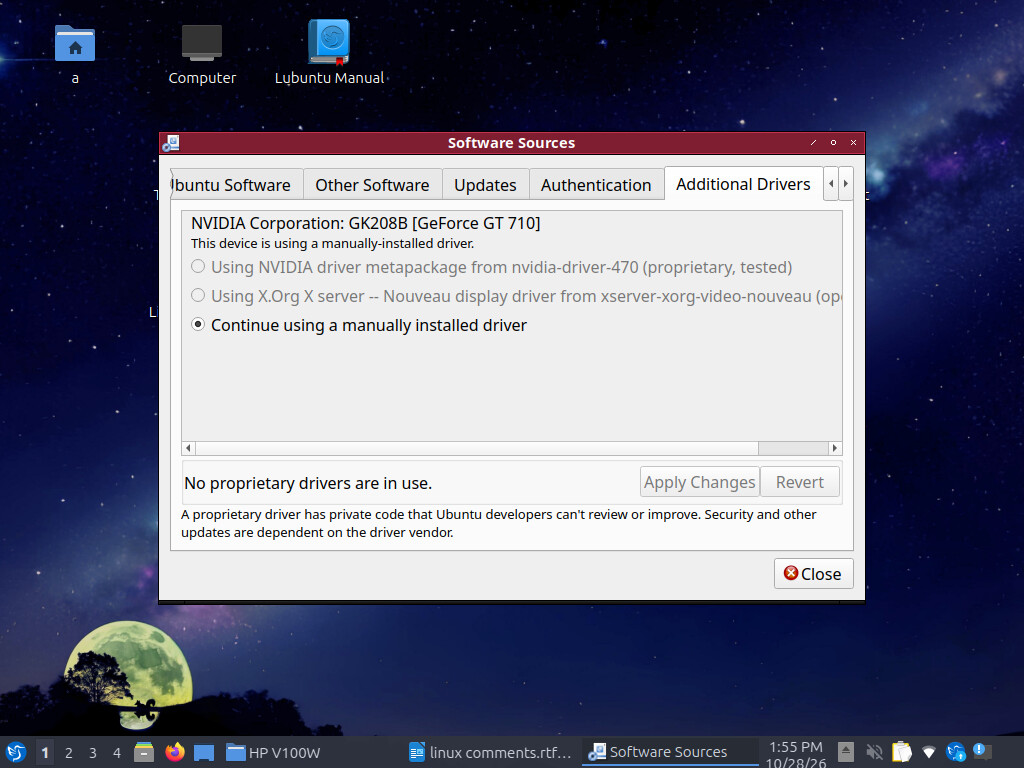
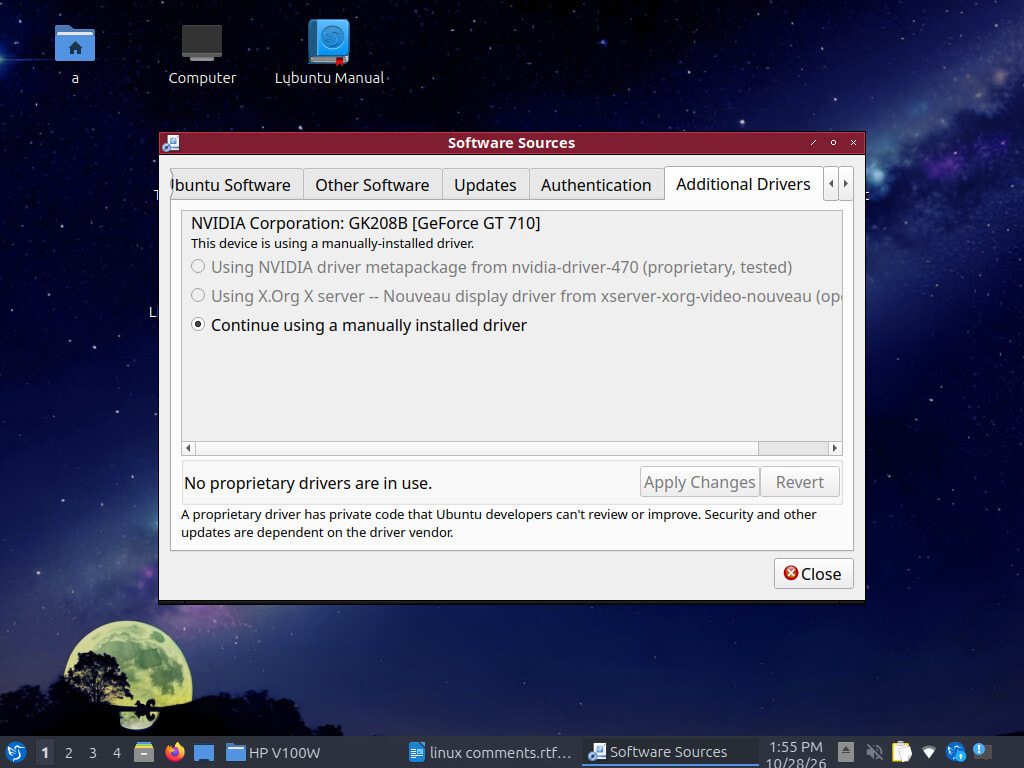
Once the 470 drivers are loaded how do I keep the update function for updating it? The additional drivers program shows the following for the Nvidia drivers.

Note that the Nouveau and Nvidia metapackage options are blanked out. Will leaving this as a manual load keep the automatic update function from replacing the 470 packages next time there is an update? If not how do I turn off auto updates for a package(s)? Also how do I clear the 2 files on temporary hold in the autoupdate?
He absolutely didn’t!

Delete it. Do not use the .run file. There is no reason to do that now that Ubuntu restored the (non-server) version of 470. (The -server version is still broken)

Am I reading this correct and I have 3 different versions loaded: 470, 535 and 580?

Yes, though the 470-server and 535 packages are empty “transitional” packages that point to 580. Get rid of all of them and install the 470 driver with:

sudo apt purge *470* *535* *580*
sudo apt install nvidia-driver-470 nvidia-dkms-470

Once the 470 drivers are loaded how do I keep the update function for updating it?

You could put the nvidia-driver-470 package on hold, or you could hope that Ubuntu devs learned their lesson and won’t try to “transition” a legacy driver to a newer one again.

1 Like

Thank you all for your help. I’ve followed the instructions from dtl131 and they worked perfectly. Video drivers working again. One last question though. How do I “put the nvidia-driver-470 package on hold”. Will this suffice?

This should work:
sudo apt-mark hold nvidia-driver-470 nvidia-dkms-470

Given that the 470 driver will not get any update anymore I doubt you need to put it on hold at all …

Just make sure to stick with the GA kernel (do not switch to HWE) for the lifetime of the system since the 470 driver will not work with newer kernels (and nobody will update them for a new kernel version, neither nvidia nor the ubuntu devs)

1 Like

I doubt it too, but given the inconsistent responses from Ubuntu devs in the bug report I linked to, one never knows..

Just make sure to stick with the GA kernel (do not switch to HWE) for the lifetime of the system since the 470 driver will not work with newer kernels (and nobody will update them for a new kernel version, neither nvidia nor the ubuntu devs)

Which means I have until July when Noble Night suopport ends. At that point I have to either upgrade my video card or switch to another version of Linux.

I have no idea what “Noble Night” is. Ubuntu 24.04/Noble is supported until 2029, along with extended support for several more years.

You may be able to continue using the 470 driver with: GitHub - joanbm/nvidia-470xx-linux-mainline: Patches for the officially unsupported nvidia-470xx driver to work with the latest Linux kernels. · GitHub
But in terms of support, you’re on your own there.

2 Likes