First, my Gear:
Ubuntu 24.04.2 LTS
Gnome version 46, Windowing system: Wayland
Laptop: HP HP EliteBook 850 G7 Notebook PC
Problem Description:
Earlier I had an original 250 GB SSD hard disk in my laptop. Everything worked fine, except the hard disk was too small. Then I bought Kingston KC3000 PCIe 4.0 NVMe M.2 SSD hard drive (1024 GB) and replaced the earlier hard drive. I did a clean install of Ubuntu on this new Kingston hard drive. Everything installed ok BUT now battery drains superfast. If I leave the machine without external power in Suspend mode, it takes just some hours/minutes before the battery is empty.
I suspect that I would need a firmware update or similar so that Ubuntu can handle properly the power management (?)
I believe the default is for the output to display CPU usage in descending order. Do you see anything using a crazy amount of CPU time? Post the first few results back here.
Next, install powertop, which is a tool to view the relative resource consumption of devices or processes.
Install powertop:
sudo apt install powertop
and then run it:
sudo powertop
Use the tab key to traverse the category tabs at the top of the console. Check for anything hogging an unusually large amount of resources.
Post back anything that looks outrageous.
Addendum: I looked up the general specs on that machine, but without a serial number I can’t check on your machine specifically. You may want to go to the HP website to be sure. From the general specs, it seems the original NVMe was PCIe Gen 3. Is that correct? Substituting a Gen 4 device should generally work (at Gen 3 speed), but there are sometimes quirks.
Top-command showed that my Firefox (and Tuta) take some resources. Nothing unusual.
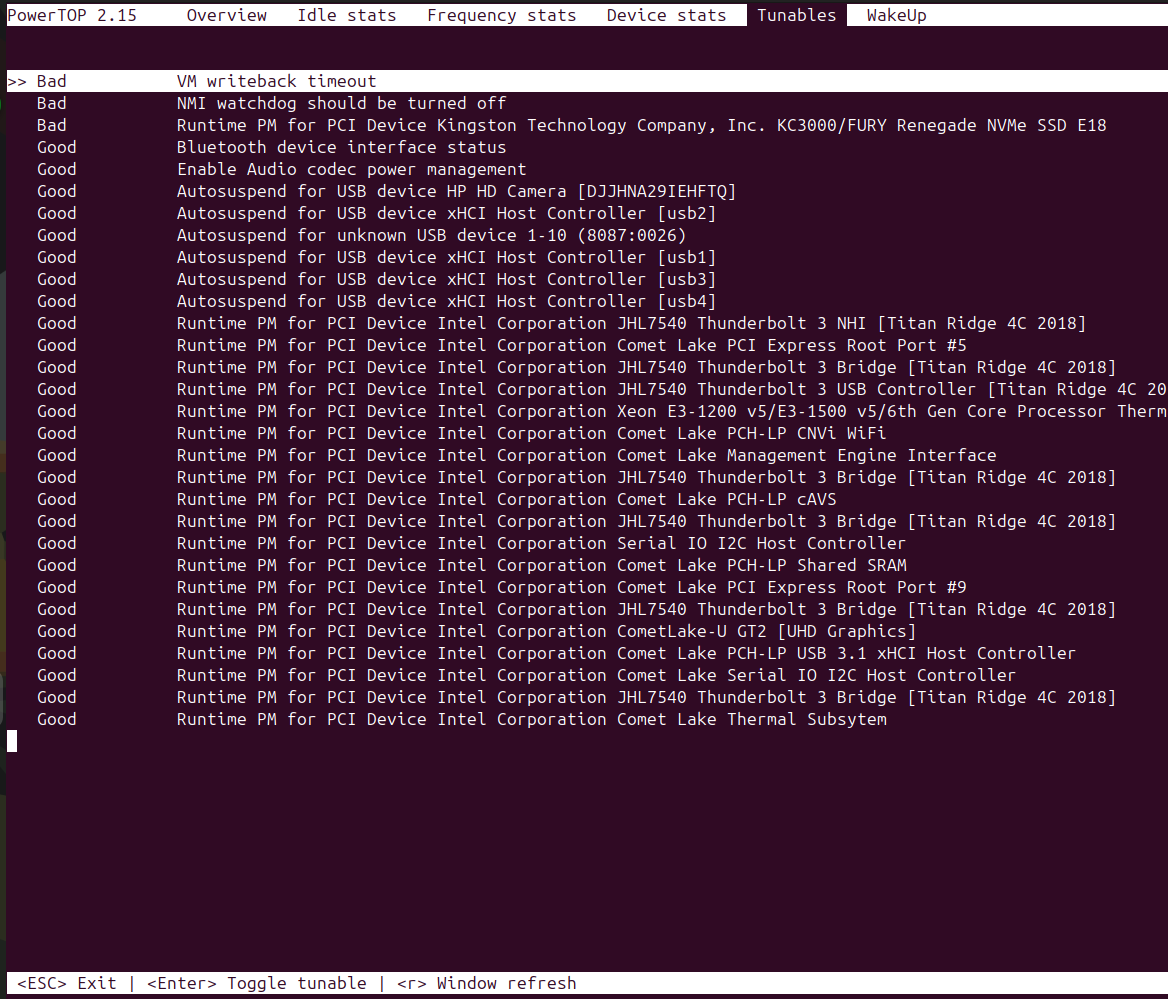
BUT, that PowerTOP is very useful with its Tunables-view. It shows 3 problem (Bad) areas:
VM writeback timeout
NMI watchdog should be turned off
Runtime PM for PCI Device Kingston Technology Company, Inc. KC3000/FURY Renegade NVMe SSD E18
So, I can perhaps turn off Virtual Machine services (Virtual Box ?) and make NMI Watcdog’s priority lower (unix command: nice) , BUT the new hard disk seems to be the problem, like I anticipated. As you pointed out, this new Gen 4 Kingston SSD hard disk may be/stay as the problem.
UPDATE: As a slow learner, I just noticed that by clicking [Enter] on top of those problematic areas, you can change them from Bad to Good. Even related to Kingston SSD. Sorry for my cognitive defects Anyways, I am now running my laptop with new settings and will report if I will notice substantial improvement in battery life.
Folks, any additional tips for this Kingston SSD NVMe?
Your suggestion, Marecki, is … what I was afraid of
I would not easily touch a Windows-machine, but perhaps I have to. Update: PowerTOP power adjustments for Kingston (above) did not help, laptop is still a power-hog and is empty in 2 hours without power cable, even in Suspend-state/mode.
Additional Question for that firmware update operation:
If I now remove my Kingston SSD from my current HP Ubuntu laptop and connect that to a Tower PC with Windows 10 as an additional SSD harddisk
—> Can I with that Windows Kingston Firmware updater software O-N-L-Y update Kingston’s firmware without destroying the Ubuntu (EXT4+LVM2 ) file system & related partitions on that SSD disk?
So, I did not run any Kingston’s own updater. Just that Grub-update (above).
Next questions are:
How on earth that little line ( GRUB_CMDLINE_LINUX=”
nvme_core.default_ps_max_latency_us=0" ) could make my hard disk so much faster in Linux/Ubuntu?!?!
What effect this has now on my laptop’s battery? (Can not say yet, testing/observing)
 Anyways, I am now running my laptop with new settings and will report if I will notice substantial improvement in battery life.