Ubuntu Version
Ubuntu 26.04 LTS
Desktop Environment (if applicable)
GNOME
Problem Description
Hello everyone,
I’ve upgraded this week from Ubuntu 24.04 to 26.04 and find myself with a printing problem since.
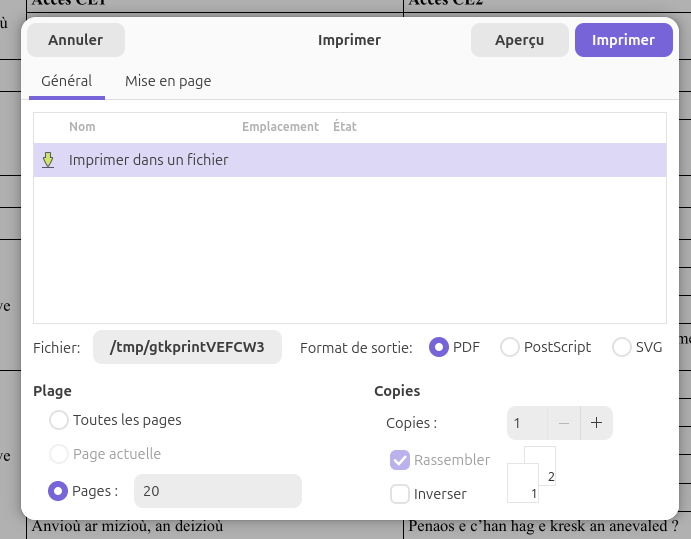
I’ve never had to download any printer driver, CUPS always made it effortlessly easy but since upgrading I can’t print multiple copies of the same document nor print the current page. Those options are shown gray in the printing dialog box. It doesn’t matter which printer I select, I gave a Canon at home and use an Kyocera and an Epson at work and all three show the same problem. Same thing with printing in a file (see screenshot)
Did someone encounter the same problem? Does someone have an idea about how to fix it or should it be reported as a bug?
Relevant System Information
Some info (using the same pattern as asked on the French ubuntu forum) :
DISTRIB_ID=Ubuntu
DISTRIB_RELEASE=26.04
DISTRIB_CODENAME=resolute
DISTRIB_DESCRIPTION="Ubuntu 26.04.1 LTS"
7.0.0-38-generic inconnu
clyde adm cdrom sudo dip plugdev users lpadmin
Bus 001 Device 001: ID 1d6b:0002 Linux Foundation 2.0 root hub
Bus 001 Device 002: ID 0bda:0821 Realtek Semiconductor Corp. RTL8821A Bluetooth
Bus 001 Device 003: ID 13d3:5a02 IMC Networks EasyCamera
Bus 002 Device 001: ID 1d6b:0003 Linux Foundation 3.0 root hub
About CUPS
ii  bluez-cups                                    5.85-4ubuntu0.2                            amd64        Bluetooth printer driver for CUPS
ii  cups                                          2.4.16-1ubuntu1.3                          amd64        Common UNIX Printing System(tm) - PPD/driver support, web interface
ii  cups-browsed                                  2.1.1-0ubuntu3                             amd64        OpenPrinting cups-browsed
ii  cups-bsd                                      2.4.16-1ubuntu1.3                          amd64        Common UNIX Printing System(tm) - BSD commands
ii  cups-client                                   2.4.16-1ubuntu1.3                          amd64        Common UNIX Printing System(tm) - client programs (SysV)
ii  cups-common                                   2.4.16-1ubuntu1.3                          all          Common UNIX Printing System(tm) - common files
ii  cups-core-drivers                             2.4.16-1ubuntu1.3                          amd64        Common UNIX Printing System(tm) - driverless printing
ii  cups-daemon                                   2.4.16-1ubuntu1.3                          amd64        Common UNIX Printing System(tm) - daemon
ii  cups-filters                                  2.0.1-0ubuntu4.1                           amd64        OpenPrinting CUPS Filters - Main Package
ii  cups-filters-core-drivers                     2.0.1-0ubuntu4.1                           amd64        OpenPrinting CUPS Filters - Driverless printing
ii  cups-ipp-utils                                2.4.16-1ubuntu1.3                          amd64        Common UNIX Printing System(tm) - IPP developer/admin utilities
ii  cups-pk-helper                                0.2.6-2.1build1                            amd64        PolicyKit helper to configure cups with fine-grained privileges
ii  cups-ppdc                                     2.4.16-1ubuntu1.3                          amd64        Common UNIX Printing System(tm) - PPD manipulation utilities
ii  cups-server-common                            2.4.16-1ubuntu1.3                          all          Common UNIX Printing System(tm) - server common files
ii  libcups2t64:amd64                             2.4.16-1ubuntu1.3                          amd64        Common UNIX Printing System(tm) - Core library
ii  libcupsfilters2-common                        2.1.1-0ubuntu5                             all          OpenPrinting libcupsfilters - Auxiliary files
ii  libcupsfilters2t64:amd64                      2.1.1-0ubuntu5                             amd64        OpenPrinting libcupsfilters - Shared library
ii  libcupsimage2t64:amd64                        2.4.16-1ubuntu1.3                          amd64        Common UNIX Printing System(tm) - Raster image library
ii  printer-driver-hpcups                         3.24.4+dfsg0-0ubuntu8.1                    amd64        HP Linux Printing and Imaging - CUPS Raster driver (hpcups)
ii  python3-cups                                  2.0.4-3build1                              amd64        Python3 bindings for CUPS
ii  python3-cupshelpers                           1.5.18-4ubuntu2
Some other (relevant I hope) info:
scheduler is running
no system default destination
matériel pour EPSON_XP_4100_Series : implicitclass://EPSON_XP_4100_Series/
matériel pour Kyocera_TASKalfa_3011i : implicitclass://Kyocera_TASKalfa_3011i/
EPSON_XP_4100_Series accepte des requêtes depuis ven. 02 oct. 2026 10:27:20
Kyocera_TASKalfa_3011i accepte des requêtes depuis ven. 02 oct. 2026 11:08:27
printer EPSON_XP_4100_Series disabled since ven. 02 oct. 2026 10:27:20 -
    cause inconnue
printer Kyocera_TASKalfa_3011i is idle.  enabled since ven. 02 oct. 2026 11:08:27

clyde@clyde-Lenovo-ideapad-320-15ISK:~$ /usr/sbin/lpinfo -v
network ipps
network beh
network http
network lpd
direct hp
network https
network ipp
network socket
direct hpfax
network socket://192.168.1.21
network dnssd://EPSON%20XP-4100%20Series._ipp._tcp.local/?uuid=cfe92100-67c4-11d4-a45f-381a523d7dff
network dnssd://Kyocera%20TASKalfa%203011i._ipps._tcp.local/?uuid=4509a320-0072-0091-0052-0025075018b2
network ipps://Kyocera%20TASKalfa%203011i._ipps._tcp.local/

clyde@clyde-Lenovo-ideapad-320-15ISK:~$ sudo grep -v "Bad driver information file" /var/log/cups/error_log
[sudo: authenticate] Mot de passe :
W [28/Sep/2026:09:27:58 +0200] CreateProfile failed: org.freedesktop.ColorManager.AlreadyExists:profile id \'Kyocera_TASKalfa_3011i-Gray..\' already exists
W [28/Sep/2026:09:27:58 +0200] CreateProfile failed: org.freedesktop.ColorManager.AlreadyExists:profile id \'Kyocera_TASKalfa_3011i-DeviceN..\' already exists
W [28/Sep/2026:12:55:32 +0200] [Job 223] temp file (object 15 0, offset 10238): dictionary has duplicated key /x23; last occurrence overrides earlier ones
W [29/Sep/2026:09:26:06 +0200] CreateProfile failed: org.freedesktop.ColorManager.AlreadyExists:profile id \'Kyocera_TASKalfa_3011i-Gray..\' already exists
W [29/Sep/2026:09:26:06 +0200] CreateProfile failed: org.freedesktop.ColorManager.AlreadyExists:profile id \'Kyocera_TASKalfa_3011i-DeviceN..\' already exists
E [02/Oct/2026:09:08:58 +0200] [CGI] cups-brf must be called as root
E [02/Oct/2026:09:08:58 +0200] [cups-deviced] PID 10651 (cups-brf) stopped with status 1!
W [02/Oct/2026:09:13:27 +0200] CreateProfile failed: org.freedesktop.ColorManager.AlreadyExists:profile id \'Kyocera_TASKalfa_3011i-Gray..\' already exists
W [02/Oct/2026:09:13:27 +0200] CreateProfile failed: org.freedesktop.ColorManager.AlreadyExists:profile id \'Kyocera_TASKalfa_3011i-DeviceN..\' already exists
W [02/Oct/2026:10:17:42 +0200] CreateProfile failed: org.freedesktop.ColorManager.AlreadyExists:profile id \'Kyocera_TASKalfa_3011i-Gray..\' already exists
W [02/Oct/2026:10:17:42 +0200] CreateProfile failed: org.freedesktop.ColorManager.AlreadyExists:profile id \'Kyocera_TASKalfa_3011i-DeviceN..\' already exists
E [02/Oct/2026:10:20:37 +0200] [CGI] cups-brf must be called as root
E [02/Oct/2026:10:20:37 +0200] [cups-deviced] PID 19143 (cups-brf) stopped with status 1!
E [02/Oct/2026:11:29:33 +0200] [CGI] cups-brf must be called as root
E [02/Oct/2026:11:29:33 +0200] [cups-deviced] PID 23569 (cups-brf) stopped with status 1!


clyde@clyde-Lenovo-ideapad-320-15ISK:~$ dpkg -l | grep -v ^ii
+-- Desired=Unknown/Install/Remove/Purge/Hold
|+- Status=Not/Inst/Conf-files/Unpacked/halF-conf/Half-inst/trig-aWait/Trig-pend
||+ Err?=(none)/Reinst-required (Status,Err: uppercase=bad)
||| Nom                                           Version                                    Architecture Description
+++-=============================================-==========================================-============-===========================================================================================================================================
rc  lightdm                                       1.32.0-6ubuntu4                            amd64        simple display manager
rc  numlockx                                      1.2-10build1                               amd64        enable NumLock in X11 sessions
Screenshots
Error Messages / Logs
No error message, just the ‘Current page’ and ‘Print multiple copies’ in gray in the dialog box.
What I’ve Tried
I haven’t tried anything yet since I’m not finding any similar issue in all the places I know.