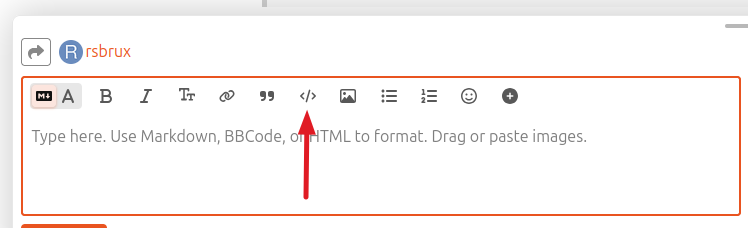
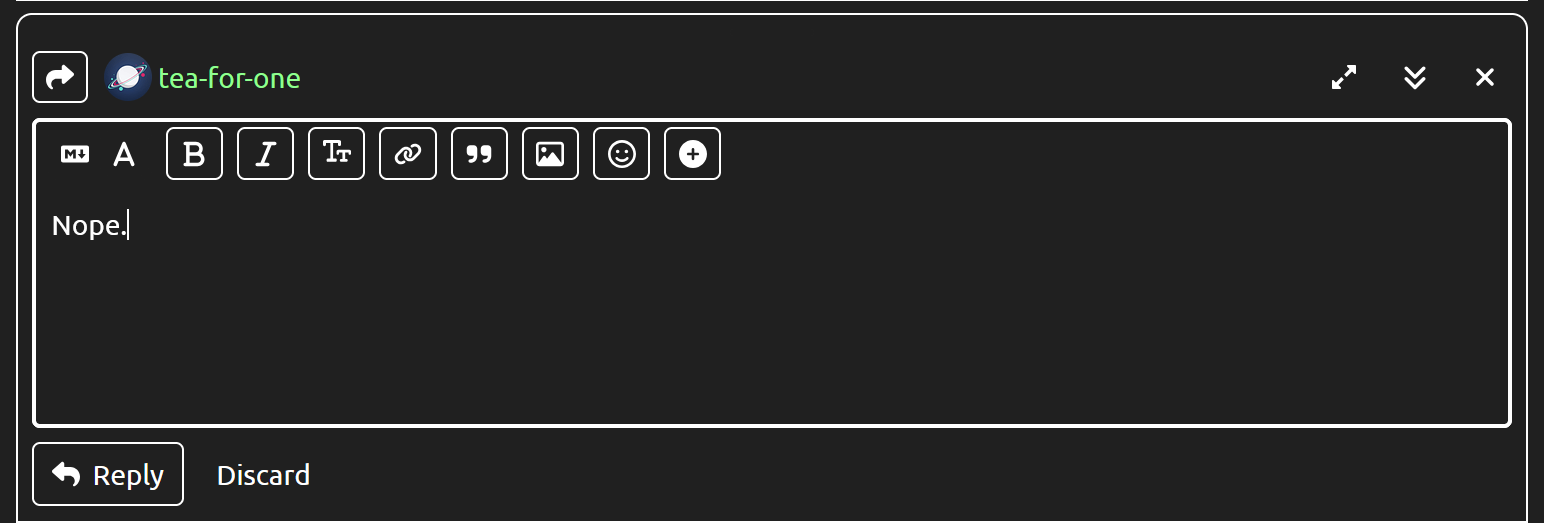
I tested in both Light and Dark mode and it should appear.
We will have to come back to that another time, it is off-topic for now.
Use backticks before and after for now, like this some text
Paste the output between those and it should save correctly.
Also missing Bulleted List and Numbered List
I would first set the Discourse Interface back to default.
Under Preferences - Interface, Theme is already set to default. What should i reset?
I am accessing Discourse from Firefox 157.0 running under Windows 11 Pro x64 25H2.
Elements are missing in both high-contrast mode (previous screenshot) and normal mode.

Please check in Safe Mode if you are still unable to see the composer and other elements:
https://discourse.ubuntu.com/safe-mode
I have the same behavior in Firefox on my iPad (runnning iPadOS 26.7.1) with or without safe mode.
I just tried it with Edge 154.0.4258.53 on Windows and I do not see this button either. Do not remember if it ever was there (I never needed to use it anyway).
In order not to clutter up the support topic I moved all these posts to Site Feedback.
I need to check a few things and will then try and see if there is a solution.
Hang in there please.
2 Likes
Tested on the following:
Edge on Windows
Firefox on EndeavourOS
Chromium on Bodhi Linux
The </> icon as well as bulleted and numbered list icons all appear normally whether in Markdown or Rich Text editing mode.
@aaronprisk it would be much appreciated if we can look into this seemingly odd behaviour that some users are encountering.
1 Like
This reply was sent via Microsoft Edge Version 154.0.4258.53 (Official build) (64-bit) in Windows 11 VM
All edit icons are present and usable in both Markdown or Rich Text Format
1 Like
In Firefox 157.0 running under Ubuntu Studio 26.04 LTS, I can see the missing toolbar elements!
2 Likes