File Manager search not searching content

Ubuntu Version

Ubuntu 26.04 LTS

Desktop Environment (if applicable)

GNOME

Problem Description

When searching in File Manager it is not searching file content, only file names. I’m trying to find content within code files (so text files with various extensions such as .py). I use the search bar, click the filter options, but whether I select the “Content & Filename” or “Filename only” I seem to get exactly the same results.
To confirm this I created a text file containing the string “stringtofind” and saved it as test.txt. Search will only find this file if I search for “test”, not if I search for “stringtofind”, whether or not I have the “Content & Filename” option highlighted.
How do I get it to actually search the content of files?

My understanding is that Nautilus depends on GNOME Search to show the full text results. Are the files in the indexed locations (Settings - Search - Search locations)? Are the files extensions whitelisted?

gsettings list-recursively org.freedesktop.Tracker3.Miner.Files
1 Like

Localsearch, the GNOME indexer behind desktop content search, skips git repositories, hidden folders, .nomedia directories and mountpoints listed in /etc/fstab by default, so code inside a git working copy is never content-searchable no matter what the Nautilus filter says.

Two commands separate configuration from indexing state: localsearch index lists what is actually indexed, and localsearch-3 -e /path/to/test.txt reports whether that file is eligible under the current rules.

Then localsearch search stringtofind shows whether the string is in the index at all, independent of the file manager UI.

Are the .py files you are searching inside a git working copy or on a separate mount listed in /etc/fstab?

1 Like

Thank you for the the replies. In this example it wasn’t a git repo, although I have tried searching within git repos in the past and been frustrated by the lack of results, so that is useful to know.

The test example I gave here was a subfolder (several levels deep) from the Home directory, which was set to be indexed, so should have been an indexed location. However trying it this morning it works, both the command line localsearch search stringtofind finds it and using the file manager search box. I swear this didn’t work yesterday! But now it seems to be working for a .txt file whatever I do (I’ve tried creating more files in subfolders with different content and they all get found)

However, yesterday wasn’t the first time I had been frustrated by a lack of search results, mostly when searching for lines of code, so I then experimented renaming with different extensions, I tried test.py and test.cpp and these both failed to be found (either command line or gui). Switching it back to test.txt allowed it to be found.

So now the question is, how to I set it to include these extensions in the search (preferably just to ignore the extension and include any text file as I also want yaml, json, sh and probably a few others that don’t come to mind). Also to stop it from ignoring the contents of folders just because they’re git repos.

Running: gsettings list-recursively org.freedesktop.Tracker3.Miner.Files

returns:
org.freedesktop.Tracker3.Miner.Files crawling-interval -1
org.freedesktop.Tracker3.Miner.Files enable-monitors true
org.freedesktop.Tracker3.Miner.Files ignored-directories [‘po’, ‘CVS’, ‘core-dumps’, ‘lost+found’]
org.freedesktop.Tracker3.Miner.Files ignored-directories-with-content [‘.trackerignore’, ‘.git’, ‘.hg’, ‘.nomedia’]
org.freedesktop.Tracker3.Miner.Files ignored-files [‘~', '.o’, ‘.la’, '.lo’, ‘.loT’, '.in’, ‘.m4’, '.rej’, ‘.gmo’, '.orig’, ‘.pc’, '.omf’, ‘.aux’, '.tmp’, ‘.vmdk’, '.vm*’, ‘.nvram’, '.part’, ‘.rcore’, '.lzo’, ‘autom4te’, ‘conftest’, ‘confstat’, ‘Makefile’, ‘SCCS’, ‘ltmain.sh’, ‘libtool’, ‘config.status’, ‘confdefs.h’, ‘configure’, ‘##', '~$.doc?’, ‘~$.dot?', '~$.xls?’, ‘~$.xlt?', '~$.xlam’, ‘~$.ppt?', '~$.pot?’, ‘~$.ppam’, '~$.ppsm’, ‘~$.ppsx’, '~$.vsd?’, ‘~$.vss?', '~$.vst?’, ‘*.directory’]
org.freedesktop.Tracker3.Miner.Files index-on-battery true
org.freedesktop.Tracker3.Miner.Files index-on-battery-first-time true
org.freedesktop.Tracker3.Miner.Files index-optical-discs false
org.freedesktop.Tracker3.Miner.Files index-recursive-directories [‘$HOME’]
org.freedesktop.Tracker3.Miner.Files index-removable-devices false
org.freedesktop.Tracker3.Miner.Files index-single-directories @as
org.freedesktop.Tracker3.Miner.Files initial-sleep 15
org.freedesktop.Tracker3.Miner.Files low-disk-space-limit -1
org.freedesktop.Tracker3.Miner.Files removable-days-threshold 3
org.freedesktop.Tracker3.Miner.Files throttle 0

I can’t see any extensions whitelisted, although I assume ignored-files are the blacklisted ones, but py and cpp don’t appear in that list. I see `ignored-directories-with-content`includes .git, which I guess explains why git repos aren’t indexed. How do I change the settings to remove the .git ignore rule and add rules to include the extensions I want?
Although I’ve just installed Catfish (available in the App Centre) and that seems great, finds contents of code files including in git repos. Although it would still be nice to do that through the file manager GUI.

Content indexing is decided by detected mimetype, not by extension: the extractor ships one rule file per format, and the plain-text rule (src/extractor/15-text.rule in the localsearch repo) matches only text/plain and text/markdown. test.py is detected as text/x-python and test.cpp as text/x-c++src, so no rule matches and no content is ever stored; your gsettings dump confirms there is no extension whitelist, ignored-files is a blacklist only. localsearch extract test.py versus the same command on test.txt shows the difference directly. For git repos the docs name ignored-directories-with-content as the knob: gsettings set org.freedesktop.Tracker3.Miner.Files ignored-directories-with-content "['.hg', '.nomedia']" then restart the localsearch-3.service user unit so the miner re-crawls; the .git folder itself stays ignored as a hidden folder. What does localsearch extract test.py print on your machine - a nie:PlainTextContent line, or only filesystem metadata?

1 Like

Text files miner explicitly restricts the allowed file extensions.

For a plain text file to be indexed it

  1. must be in one of the indexed locations (by default on 26.04 it is $HOME recursively)
  2. have allowed MIME type:
bor@resolute:~$ grep MimeTypes /usr/share/localsearch3/extract-rules/15-text.rule
MimeTypes=text/plain;text/markdown
bor@resolute:~$ xdg-mime query filetype wacom/pyvenv.cfg 
text/plain
bor@resolute:~$
  1. Have allowed file name extension
bor@resolute:~$ gsettings get org.freedesktop.Tracker3.Extract text-allowlist
['*.txt', '*.md', '*.mdwn']
bor@resolute:~$

I tested adding e.g. *.cfg to the text-allowlist and I get full text search hits on the available pyvenv.cfg file. To trigger rescan after changing anything of the above - localsearch reset will rebuild the whole database.

1 Like

I’ve updated my ignored-directories-with-content key to not exclude folders with .git files, so that’s good.

Running: localsearch extract test.py

Returns:

Metadata extraction failed, Unknown target graph for uri:‘file:///home/timbo/Cloudbase/Useful%20docs/House/test.py’ and mime:‘text/x-python’

I tried using gsettings set org.freedesktop.Tracker3.Miner.Files text-allowlist “[‘.txt’, '.md’, ‘.mdwn’, '.py’, ‘.cpp’, '.yaml’]” to add .py, etc but this returned:

No such key “text-allowlist”

It is org.freedesktop.Tracker3.Extract. Look at my post.

Thanks, but I still can’t get this to work!

(base) timbo@asus-laptop:~$ grep MimeTypes /usr/share/localsearch3/extract-rules/15-text.rule

returned:MimeTypes=text/plain;text/markdown
and:

(base) timbo@asus-laptop:~$ xdg-mime query filetype test.py
returned: text/x-python

so I edited the file /usr/share/localsearch3/extract-rules/15-text.rule and added the relevant file types to line 3 and now

(base) timbo@asus-laptop:~$ grep MimeTypes /usr/share/localsearch3/extract-rules/15-text.rule

returns: MimeTypes=text/plain;text/markdown;text/x-python;text/x-c++src;application/yaml

I added the extensions to the allowlist and confirmed this:
(base) timbo@asus-laptop:~$ gsettings set org.freedesktop.Tracker3.Extract text-allowlist "['*.txt', '*.md', '*.mdwn', '*.py', '*.cpp', '*.yaml']"
(base) timbo@asus-laptop:~$ gsettings get org.freedesktop.Tracker3.Extract text-allowlist
['*.txt', '*.md', '*.mdwn', '*.py', '*.cpp', '*.yaml']

I restarted the computer, and behaviour is still the same! It finds the string in the file if the file extension is .txt, .md or .mdwn but not if it’s .py, .cpp or .yaml.

And it you read my post again. I said

OK, thanks, I’d assumed restarting would do the same thing. Now it finds it, but only if it’s in the Home folder or a folder within the home folder. Any level of subfolders below that and it doesn’t find it (regardless of the extension). I even tried adding the subfolder containing the file through to the Search locations listed in the Settings GUI, but even then it still wouldn’t find it (and I did do the reset too)

To be honest, I think I’m just going to give up on this now. I can use Catfish, that works properly. It’s a bit annoying to not be able to use the File Manager to search for content, but Catfish is fine.

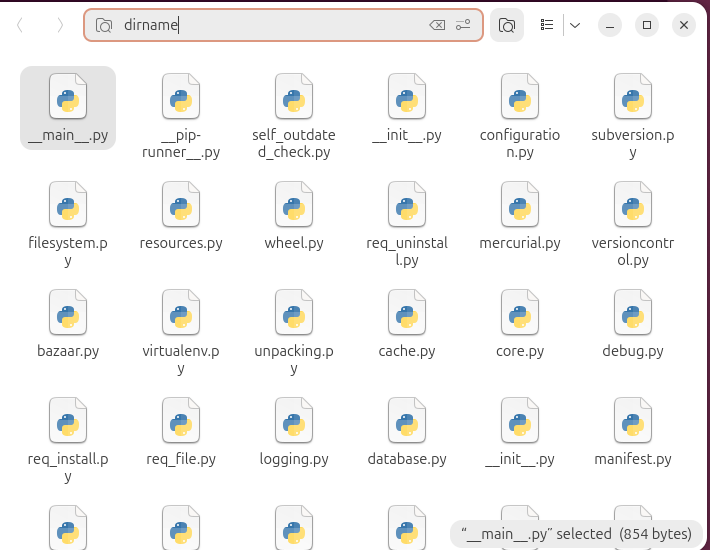
bor@resolute:~$ localsearch search dirname | cat
file:///home/bor/wacom/lib/python3.14/site-packages/pip/__main__.py
file:///home/bor/wacom/lib/python3.14/site-packages/pip/__pip-runner__.py
file:///home/bor/wacom/lib/python3.14/site-packages/pip/_internal/commands/debug.py
file:///home/bor/wacom/lib/python3.14/site-packages/pip/_internal/configuration.py
file:///home/bor/wacom/lib/python3.14/site-packages/pip/_internal/network/cache.py
...