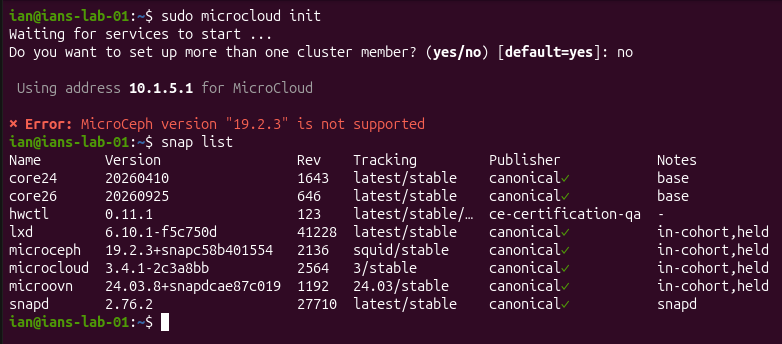
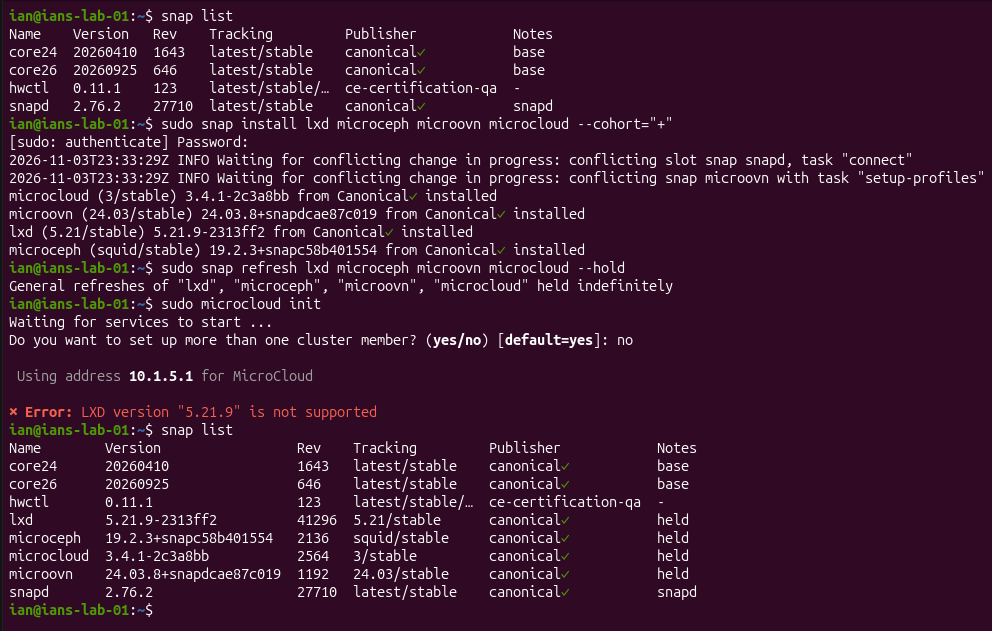
Hi, I’m having a bit of bother while trying to follow the default getting started single node tutorial for setting up MicroCloud.
I tried a couple of times, first was with LXD latest/stable (6.x), and then the micro* snaps installed together, and then again with all 4 snaps installed together (so LXD at 5.x).
On my first attempt I got the following error after selecting the internal IP address:
⨯ Error: MicroCeph version “19.2.3” is not supported
Any idea on what combination of snap versions are needed?
Thanks,
Ian
P.S: Also, you might notice that 2nd time around none of the 4 snaps got marked as “in-cohort” even though I used the --cohort=”+” option when installing them. I’ve found that the cohort option only works if you’re installing an individual snap, or apply it to each snap afterwards via refresh, as I did for the 1st attempt.
The problem with setting cohort happens when you install multiple snaps in one command with that flag, as shown in the tutorial. The cohort flag only applies when you install the snaps one at a time.
As a result, I think the tutorial is a little out of date, and isn’t as smooth sailing as it could be. I’d recommend splitting the single snap install command into 4 lines that includes the currently supported version combinations and cohort flag, e.g:
That’s what I’d just done after checking the MicroCloud source code to work out the latest expected versions, and got microcloud init past the version check, just before your message popped up pointing me to the requirements doc!