Problem Description:
Hi all, I’m new to the forum. I’ve attempted to become more proficient learning and using
Linux systems as I mentioned in my profile
I looked around to see if I could find any preinstalled apps that may help me but didn’t see one.
Saw a suggestion for Brasero and used the following command to install:
sudo apt install brasero.
Seemed like it installed successfully, since I was able to open it without issues.
I selected to burn an image, and pointed to my iso file.
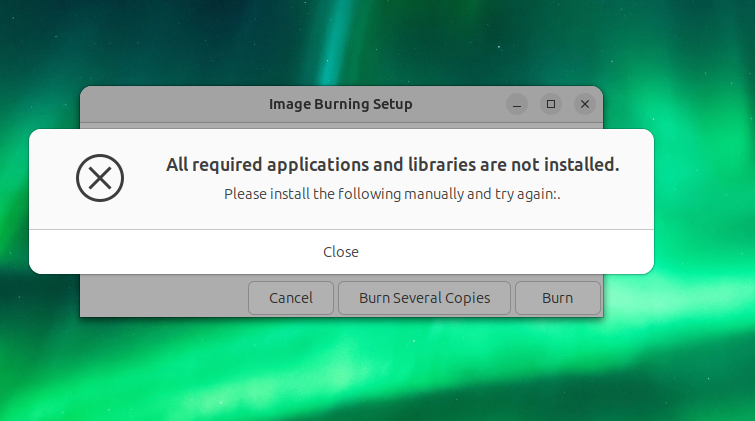
Then this popped up.
I haven’t tried any corrective action yet, but I thought I might use
apt remove
and then apt install again, in case I missed any messages
Yeah the message you show isn’t that helpful, given the package(s) missing aren’t listed.
If that occurred on my current system, I’d just exit the app, and start it from terminal, as that way all messages may stream by on the terminal (yeah it can be messy, but problems are still easier to see amongst any noise) and hope to see a clue there.
I’m not using your release (but something far newer), installed brasero here, and ran it at terminal, selected an ISO to burn, and only got a single message that is what I consider app noise, I couldn’t continue as it wanted me to select a DISC to burn it to, but this box doesn’t have a DVD drive so I couldn’t do that. I’d expect it to have worked if I’d used another box with DVD, but this system is different to yours.
I’d just exit the app, and start it from terminal, as that way all messages may stream by on the terminal (yeah it can be messy, but problems are still easier to see amongst any noise ) and hope to see a clue there.
That’s the best way to find out what’s going on, the output will be messy, but it will show the message that is missing there.
Then copy and paste it here, or try it on your web browser to get more search results.
This way helped me more times than I can remember.
Hi everybody.
I started the program by typing
brasero
into the terminal; the program started, I selected the image, got the error -
but no further messages were produced in the terminal.
Successfully burned the image using xfburn as suggested by jaime-cruz above.
This poster also mentioned brasero seems to be broken in 24.04LTS,
so thanks for that extra info.
For now, I’ve uninstalled it.
How is this kind of issue handled in ubuntu, properly analyzed and fixed?
Bugs need to be reported on a bug tracker, as that allows developers to see the report, and it automatically allows tracking the report through to resolution.
That process is started by using the command
ubuntu-bug brasero
You need to sign into launchpad, as that is the Ubuntu Bug tracker. Include as much information as possible, though many of the fields in the bug report will be auto-collected because of the ubuntu-bug command being used. You add a description, and can even provide a link to this thread if you wish, though the bug report should contain all details so people aren’t needing to go elsewhere (ie. coming here should be optional only and not required for details).