Display/video issues on MacBook Pro 10,1 (early 2013) running Ubuntu 26.04 LTS

Ubuntu Version

Ubuntu 26.04 LTS

Desktop Environment (if applicable)

GNOME

Problem Description

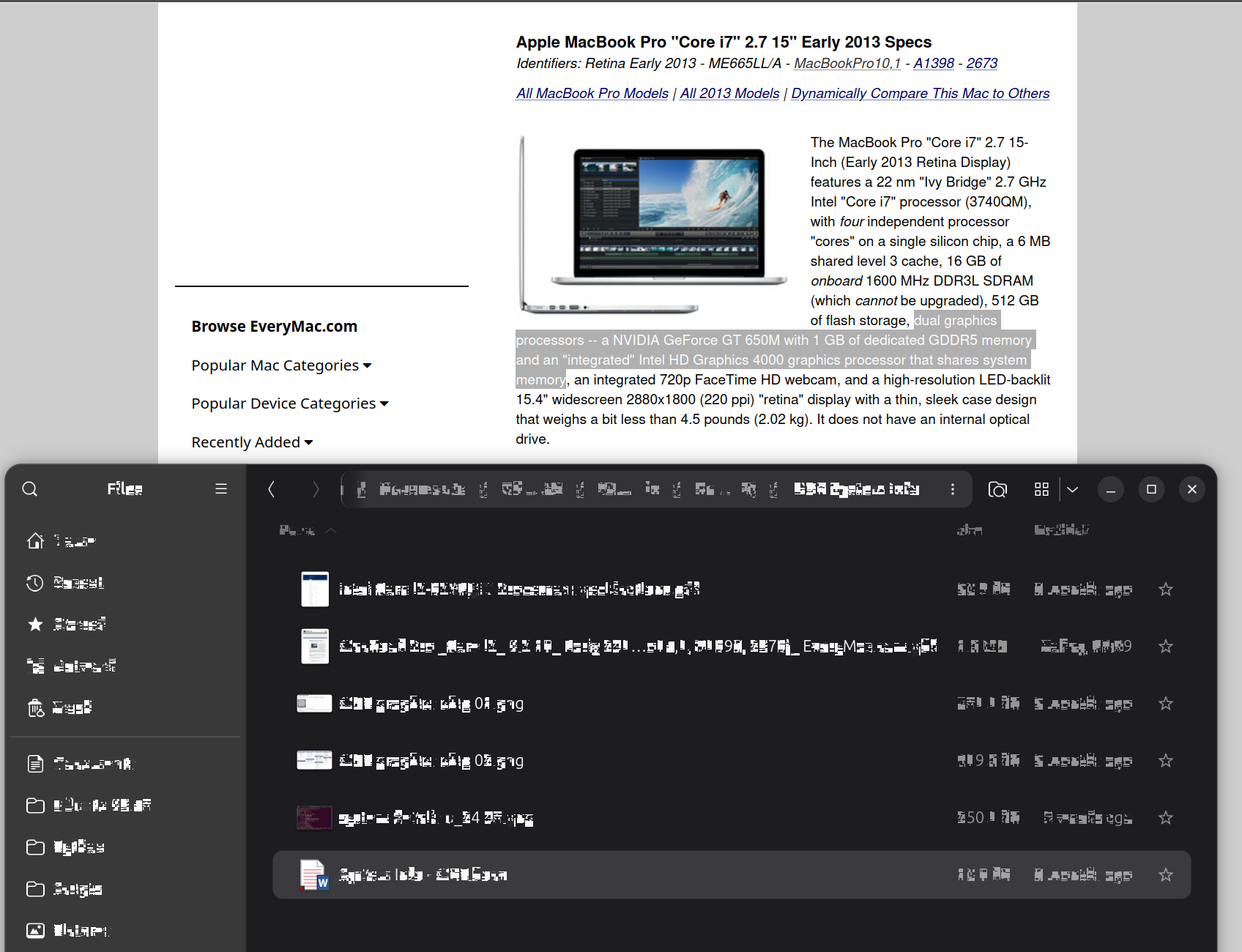
The attached screencap illustrates the problem best: a fractured-tile, shimmering effect that’s seen a short while after opening Files, Image Viewer, terminal, Text Editor.

Firefox has been unaffected. The desktop has been mostly okay, but the upper-right system menu is occasionally involved. The image shows a coherent Firefox window open below an affected Files instance.

Pointer movements and window resizing or movement sometimes clear or partly clear the problem, as does text entry, but not always.

I was previously running Ubuntu 24.04 on the same machine with no similar issues.

The Ubuntu 26.04 is a clean install. I elected to install from scratch to replace 24.04 and reclaim disk space from the (now gone) dual boot MacOS/Catalina I had running previously because automated upgrade attempt from 24.04 was unsuccessful.

Relevant System Information

MacBook Pro 10,1 (early 2013)

video hardware:

  1. NVIDIA GeForce GT 650M with 1 GB of dedicated GDDR5 memory
  2. ‘Integrated’ Intel HD Graphics 4000

Nvidia recommended driver:

  • Linux x64 (AMD64/EM64T) Display Driver 418.113 | Linux 64-bit

from the terminal:
ubuntu-drivers list → no information returned
ubuntu-drivers devices → no information returned

from Software & Updates, Additional Drivers tab

  • No additional drivers available.
  • No proprietary software in use.

I have not yet installed ‘applesmc-next’ as I did on 24.04 & do not know if that kernel add-on for Apple hardware would affect this issue or not.

Error Messages / Logs

No error messages or logs as yet; see ‘What I’ve Tried’

What I’ve Tried

I’m no expert at debugging this sort of stuff.

Before I start adding tools or trying to parse out lengthy log info or attempting video driver update/replacement, etc., I’m hoping for advice toward either a quick resolution or on how to best target my investigation to get at the root cause & what’s needed to set it right.

I have reviewed this item, which may or may not be related, given the age of the hardware: Action Required: Ubuntu to retire Legacy NVIDIA Graphics Drivers 470
Welcome.

Unfortunately I have to give some bad news. Your hardware is still very capable and while it lasts you should definitely keep using it and a proper Linux distro is indeed the way to go forward. However, your graphics subsystem, both the iGPU Intel and the dGPU Nvidia are “too old” and support for it ended de facto many years ago. For reference, the article about the 470 branch driver for Nvidia isn’t even applicable. The latest driver supporting a Nvidia GeForce GT 650M was the 418 branch release back in 2019. But because you’ve read that article about 470 I’m sure you understand 418 (from 2019) is out of the question for use with any of the current kernel versions.

So, your only option forward is to use the default open-source community driver nouveau for Nvidia. And the standard Ubuntu (with Gnome) is probably “too heavy” for the hardware. A lightweight flavor will give much better results for that machine, even the “somewhere in the middle” Kubuntu is expected to perform much better. I suggest you test a few in live sessions.

2 Likes

Appreciate the reply, thanks.

The puzzle for me is how well everything was working under 24.04 - no issues whatsoever with the display under the default install & regular Ubuntu software updates, right up to a week or so ago when I made the move to 26.04.

I’ve not tried installing the legacy nvidia driver to see what, if anything, breaks - might be worth a go, unless anyone here knows for sure it’d trash the kernel (the article is not definitive on this, but as you say it’s a very old driver).

I’m comfortable restoring from Timeshift when things break.

Adding: I notice the nouveau driver has been updated from 24.04 to 26.04 - might there be a way to revert to the prior version of nouveau and lock it in?

ref: https://manpages.ubuntu.com/manpages/noble/man4/nouveau.4.html

And the latest: a buddy suggests re-install 24.04 and decide that’s the o/s to sunset this system on. Is upgrading really worth all this bother? 24.04 was running like a song.

Going back to 24.04 is a valid choice for this MacBook since it gets standard security updates until April 2029, but I’d test the GTK renderer first because only Files, Image Viewer, Text Editor, and the terminal show the corruption.

Close Files, then start it from a terminal with the GL renderer:

GSK_RENDERER=gl nautilus

If the tiles stop shimmering in that window, make it the default for your session by creating ~/.config/environment.d/gsk.conf with this line, then log out and back in:

GSK_RENDERER=gl

If gl still shows the corruption, test GSK_RENDERER=cairo the same way.

2 Likes

Thanks for this; I think we have a workable solution.

Both tested after setting up as per above & logging out/in & with system restarts.

GSK_RENDERER=gl → no joy (problem perhaps less pronounced, but still evident)

GSK_RENDERER=cairo → appears to have resolved the rendering weirdness

Hopefully, this fix will survive future Canonical/Ubuntu Software Updates.

For those more technically oriented than I, here’s a page I found that sets out details of the various GTK environment variables:

https://docs.gtk.org/gtk4/running.html#environment-variables

I feel confident enough in the system to start re-establishing my dev environments now.

Another suggestion received elsewhere for end users like me contemplating the move to 26.04: run it in a virtual environment on the same box first, see how things go – probably wise for hardware as old as this.

Given these laptops were built at the height of Apple’s commitment to build & design quality, I’m more than pleased - performance is great & (knock wood) I’m seeing no other hardware-related problems at the moment. 26.04 seems to have also avoided the battery drain issues I saw on first installing 24.04 before applying a bunch of fixes - that’s been a real time-saver this time around.

No. The GT650M was a Kepler chip and was supported by 470.

1 Like

This topic was automatically closed 18 hours after the last reply. New replies are no longer allowed.