I am trying to change a password I used for encrypting the hard-drive (secure boot) during installation. I had some difficulty with outdated firmware (which was related to Windows KEK CA 2011 and 2023). I resorted to updating firmware and adding a password just to get everything installed and operational.
The computer is running Ubuntu properly BUT I am still researching how to abandon the Microsoft involvement on my machine. I had several UEFI DB errors during setup that eventually stopped after updating the firmware.
My current goal is to change the hard drive encryption password.
I tried using the gui system/disk/ and right clicking on the partition that has EFI system on it to change the password and the “change passphrase . . .” is not active (grayed out).
I tried the terminal using this command:
sudo snap-tpmctl replace passphrase
which appears like it is going to work. However, after pressing enter to confirm the change I get this message:
ERROR: failed to check passphrase: snapd error: this action is not supported on this system
I restarted snapd and checked for error - nothing is wrong there.
I am trying to catch-up after a long while away from doing installs like this.
I am a little lost with the windows security measures on third party hardware. I don’t know if this is a hardware issue, software issue and thinking it probably operator error
Do you mean what I think you mean? The existence of a Trusted Platform Module or integrated circuit comes from Microsoft’s insistence that motherboards have a TPM chip if suppliers wanted to sell their computers with Windows 11 pre-installed.
I have a laptop with Ubuntu pre-installed. It has a TPM chip. So, I have to axcept some level of Microsoft involvement. I am not fussed about that.
The involvement is greater than that. The TPM contains a database of trusted platforms. Canonical goes to Microsoft to have Ubuntu certified as a trusted platform. That certificate is added to the database. Microsoft could use TPM to block the installation of Linux but is not doing that.
I am grateful that Canonical works with Microsoft to get these certificates.
One should also note that Canonical offers its own key (not Microsoft signed) as well and you can use it (many OEMs do so when pre-installing Ubuntu on their hardware), the Microsoft signed Canonical EFI key is only actually required for dual boot setups where both OSes use secure boot (for convenience it is also used for single boot Ubuntu installs to not having to bother the user with UEFI key selection, but there is no such requirement).
And @avb66 is indeed correct, the TPM is simply a chip designed to securely store keys, it has even existed before UEFI IIRC …
That doesn’t talk about any relationship between secure boot UEFI keys (which are usually just sitting in a signed binary blob in NVRAM) and TPM (which is a general purpose cryptographic key storage chip (and can even be emulated by the firmware as fTPM))…
It’s rather more than just storage. TPM can generate symmetrical and asymmetrical keys, can encrypt and decrypt data and do other cryptographic operations as well. The whole point of TPM is that generated (private) keys never leave it and so cannot be compromised.
I don’t really have any underlying statements. I am thankful that I have a computer I can add my own OS on.
The issue I have is with planned obsolescence. I have had machines over the course of 20-30 years from relatives who have computers that work perfectly fine with a variety of LInux OS but were not operational due to pushed updates from Microsoft running updates that rendered their Windows OS obsolete. It has taken me some time to explain that just because a computer is slow or no longer serving the needs of the user does not mean that alternative OS will have the same results. They typically end up purchasing another machine and the old one moves from being a paper weight to being a place for games, music, or simply something for children to use safely instead of on a trash heap.
I am still learning the relationship between the newer security features being integrated into the hardware. I just did not understand why it was so difficult for me to do an install after years of not having an issue in the past. I expected to have my own chosen OS to have full control of everything. Learning that I had to update firmware that came was Microsoft was unexpected.
Thanks! That is what I was thinking. If I had known what I know now, then I would have ordered Ubuntu pre-installed. I considered dual boot but decided not to do that an just use two machines. I kept getting UEFI errors during install and read enough to find some posts about the errors and updated the firmware. I thought that running the update would then provide an avenue for the expectations I had for single boot. Is this option available for end users or only OEM?
What passphrase are you trying to change? There is no passphrase by default - the LUKS encryption key is protected by TPM and additionally by the recovery key.
Have you added any passphrase to your TPM FDE volume?
Nitpick:
There is no such command. The correct command is
snap-tpmctl replace-passphrase
That is not what I get:
bor@resolute:~$ sudo snap-tpmctl replace-passphrase
Enter current passphrase: ********
Enter new passphrase: ********
Confirm new passphrase: ********
ERROR: failed to change passphrase: snapd error: cannot change passphrase: invalid key slot reference (container-role: "system-data", name: "default"): unsupported authentication mode "none", expected "passphrase"
bor@resolute:~$
Please, never manually type in computer input and never describe computer output. Always copy and paste the exact input and the exact output. And do it as preformatted text to retain layout and formatting.
I will be learning this at some point. I am pretty sure this is the method I needed to use to change the password.
I ended up running different scenarios to see where the inconsistencies were during my install and doing a reinstall to reestablish with my desired password and pay closer attention to why I landed where I did.
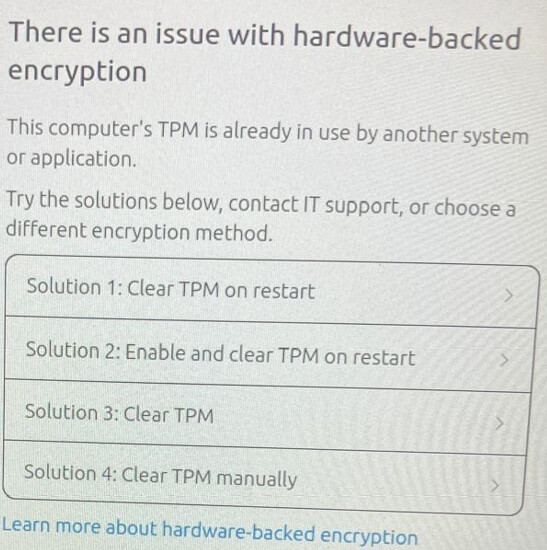
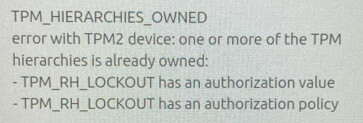
This is the error that came up when I tried to install using “hardware backed encryption”
I did not have access to be able to take these pictures. I was down a machine. I thought I took pictures but didn’t. I did try the terminal inputs again to make sure I did not have “sudo” on the command and still had the same issue.