Can a EFI partition be changed from FAT16 to FAT32?

Ubuntu Version

Ubuntu 26.04 LTS

Desktop Environment (if applicable)

GNOME

Problem Description

I wanted to test Kubuntu 26.04.1, in a new partition just for the OS, however the installation has come to a halt. I usually have Kubuntu installed but the last attempt was quite unstable, so have been using Ubuntu 26.04.1 now for a few weeks.

Fortunately I keep logs and screen dumps of various installs, and it seems the previous Kubuntu installs made the EFI partition FAT32. Yet the Ubuntu install has made it FAT16.
So, the Kubuntu install from a usb failed, because Kubuntu required a FAT32 EFI partition.

All this was attempted as ā€˜manual paritioning’; I will no doubt try the install again, so that the Kubuntu OS goes ā€˜alongside’ the other partitions.

But for the meantime, can a EFI partition be changed from FAT16 to FAT32 ?

This is from the attempted Kubuntu install - https://imgur.com/a/ACjkmYU

This is how a Kubuntu install setup the EFI - https://imgur.com/a/Y66jQsx

I know @oldfred is an expert in UEFI partitions; possibly he will see this.

A EFI System partition (ESP) can be formatted to whatever file system we choose to format it. Apparently, the EFI System partition can be FAT 32; Fat 16 or even FAT 12. It depends upon the hardware. Apparently, we are more likely to find FAT 16 or FAT 12 on removable discs.

Modern motherboards use FAT 32 and that is the format the Ubuntu and Kubuntu installers will use. Unless the installer offers something else and we choose that something else.

I do not have any idea about what happened with your attempted installations. But your conclusion that the Kubuntu install failed because Kubuntu required a FAT 32 EFI System partition is not something I can agree with.

Perhaps, the installer was not told to format the partition from FAT 16 to FAT 32. If we dual boot with another operating system we do not instruct the installer to format the EFI System partition because that will wipe out the boot files of the other operating system.

2 Likes

The image in the first link you posted shows a boot of an installer in UEFI mode and a failure to create or configure an EFI partition and that was the reason for the failure and it suggests using FAT32. Was there an existing EFI partition on the drive before starting the install and was it set to /boot/efi?

The image in your second link shows the standard partitions for an EFI install, and EFI partition formatted fat32 plus / and /home. Where is the fat16 partition you want to change?

I agree with everything in post 2 and you can change the format to fat16 but the problem with that is explained also in post 2, it will wipe the file from an existing partition.

1 Like

Be careful with fat16.
It does not support long filenames (and maxes out at 2GB file size, though you hopefully wont have such big files in EFI :slight_smile: ) and thus defaults to the old 8+3 DOS format, so even if the UEFI of the mainboard supports it, the naming convention might cause breakage (not to mention that i.e. Windows only allows fat32 EFI partitions in case you want to dual boot later on)

1 Like

You can only have one ESP per drive/device. If you change the format of the ESP - efi system partition, you will have to totally reinstall grub, either manually or with Boot-Repair. And need to first check if /etc/fstab has mount of ESP and its UUID and make sure new ESP has correct UUID. Reformat also resets GUID/partuuid, so reinstall of grub is required to add new/correct GUID to ESP entry in computers UEFI.
If other systems also boot from same ESP, you have to totally reinstall those boot loaders, also.

to see uuid & partuuid(GUID)

lsblk -e 7 -o name,mountpoint,label,size,fstype,uuid,partuuid

to see fstab

cat /etc/fstab & check uuid of esp

to see UEFI boot entries in system’s UEFI

efibootmgr to check partuuid used to find ESP

3 Likes

The Kubuntu install required a FAT32 EFI partition. It wasn’t a conclusion I arrived at, it was a fact.

Yes correct, I want to use the same SSD that now has the EFI, Ubuntu OS and the data, and ADD a new partition to install Kubuntu. There is no way I’m going to instruct the installer to format an EFI partition given that scenario.

My post was to enquire if the EFI can be changed to FAT32 , outside of the installation. Then the Kubuntu install can proceed. Plus I can see from other posts, that FAT16 is not a good idea, because of long filenames. The Ubuntu install a week or so ago, created that, unfortunately.

Yes.

That image is from 3 weeks ago, prior to the Ubuntu install, which managed to format the EFI to FAT16, unfortunately.

Thanks. yes it has always been FAT32 from Kubuntu installs. It’s only after the recent Ubuntu install that it went to FAT16. Whether the installer simply defaulted to FAT16 I do not know.

Okay thanks. It does seem I may be snookered. Wanting to add a new partition to the same drive so I can install Kubuntu in it. But Kubuntu is hindering the install on the FAT16/FAT32 issue. yes I could wipe it, but what a mess.

And it seems from the other posts, FAT16 is limiting.

Yes, it would be the one drive/ESP and two Operating systems, Ubuntu and Kubuntu. The plan was to do the install of Kubuntu and then select which OS at grub/boot.

There is also another component. Whether or not it affects this issue. On the one Lenovo laptop.

  • Internal SSD - windows 10
  • External SSD - Ubuntu, includes the ESP.

So, I’m not totally clear if that ESP on the external SSD also controls the windows boot ? Hmm, no it doesn’t , I disconnect the external SSD when I boot to windows.

lsblk -e 7 -o name,mountpoint,label,size,fstype,uuid,partuuid
NAME MOUNTPOINT LABEL SIZE FSTYPE UUID PARTUUID
sda 931.5G
ā”œā”€sda1 /boot/efi 480M vfat C669-BDD3 df0eeac9-da2a-46b2-b571-a91ec5bcf1d2
ā”œā”€sda2 / 30.8G ext4 ba5cca34-7079-44ec-9452-58a917295c7a 52b98f1f-84bb-4c7e-b5c4-8015984a7792
└─sda3 /home 900.2G ext4 a438077b-3d02-4303-9869-caa958129121 bf97e610-0a6a-4957-a640-eb90fa0a8f2e
sdb 0B
nvme0n1 238.5G
ā”œā”€nvme0n1p1 100M vfat D409-6E0B 91328940-5e3a-426d-8d8e-f56ddc0c8478
ā”œā”€nvme0n1p2 16M 114c146a-55af-439d-b338-30cd1ae82a6d
ā”œā”€nvme0n1p3 143.1G ntfs DABA0B69BA0B418D 21600ef4-2f6d-4bf9-b98a-6eecd29f09ef
ā”œā”€nvme0n1p4 Phone_Backups 45.9G ntfs 864A15EE4A15DC2D 72bb50bf-a947-4761-bc74-b4962dce1895
ā”œā”€nvme0n1p5 Data 48.8G ntfs AA429B21429AF175 14e53fb8-71d8-4d61-b23c-c0c08c262842
└─nvme0n1p6 509M ntfs 9862A51762A4FB60 e7e22210-cb00-418d-ba4b-c2def6047377

cat /etc/fstab & check uuid of esp
[1] 5116

/etc/fstab: static file system information.

Use ā€˜blkid’ to print the universally unique identifier for a

device; this may be used with UUID= as a more robust way to name devices

that works even if disks are added and removed. See fstab(5).

/ was on /dev/sda2 during curtin installation

/dev/disk/by-uuid/ba5cca34-7079-44ec-9452-58a917295c7a / ext4 defaults 0 1

/home was on /dev/sda3 during curtin installation

/dev/disk/by-uuid/a438077b-3d02-4303-9869-caa958129121 /home ext4 defaults 0 1

/boot/efi was on /dev/sda1 during curtin installation

/dev/disk/by-uuid/C669-BDD3 /boot/efi vfat defaults 0 1
/swap.img none swap sw 0 0

Command ā€˜check’ not found, did you mean:
command ā€˜fcheck’ from deb fcheck (2.7.59-27build1)
command ā€˜acheck’ from deb acheck (0.5.14)
command ā€˜hcheck’ from deb ganeti (3.1.0~rc2-4build1)
command ā€˜hcheck’ from deb ganeti-htools (3.1.0~rc2-4build1)
command ā€˜mcheck’ from deb mtools (4.0.49-1)
command ā€˜chuck’ from deb chuck (1.5.5.7-1)
command ā€˜icheck’ from deb icheck (0.9.7-9)
command ā€˜vcheck’ from deb libvisam-tools (2.2-3)
command ā€˜vcheck’ from deb vcheck (1.2.1-8)
Try: sudo apt install
[1]+ Done cat /etc/fstab

efibootmgr to check partuuid used to find ESP
BootCurrent: 0003
Timeout: 2 seconds
BootOrder: 0003,0001,001B,0000,0017,0018,0019,001A,001D,0023,001E,0002
Boot0000* Windows Boot Manager HD(1,GPT,91328940-5e3a-426d-8d8e-f56ddc0c8478,0x800,0x32000)/\EFI\Microsoft\Boot\bootmgfw.efi57494e444f5753000100000088000000780000004200430044004f00420
04a004500430054003d007b00390064006500610038003600320063002d0035006300640064002d0034006500370030002d0061006300630031002d006600330032006200330034003400640034003700390035007d0000006100010
0000010000000040000007fff0400
Boot0001* Kubuntu HD(1,GPT,df0eeac9-da2a-46b2-b571-a91ec5bcf1d2,0xffff,0xefff1)/\EFI\ubuntu\shimx64.efi
Boot0002* Linux-Firmware-Updater HD(1,GPT,df0eeac9-da2a-46b2-b571-a91ec5bcf1d2,0xffff,0xefff1)/\EFI\ubuntu\fwupdx64.efi
Boot0003* Ubuntu HD(1,GPT,df0eeac9-da2a-46b2-b571-a91ec5bcf1d2,0xffff,0xefff1)/\EFI\ubuntu\shimx64.efi
Boot0010 Setup FvFile(721c8b66-426c-4e86-8e99-3457c46ab0b9)
Boot0011 Boot Menu FvFile(126a762d-5758-4fca-8531-201a7f57f850)
Boot0012 Diagnostic Splash Screen FvFile(a7d8d9a6-6ab0-4aeb-ad9d-163e59a7a380)
Boot0013 Lenovo Diagnostics FvFile(3f7e615b-0d45-4f80-88dc-26b234958560)
Boot0014 Startup Interrupt Menu FvFile(f46ee6f4-4785-43a3-923d-7f786c3c8479)
Boot0015 Rescue and Recovery FvFile(665d3f60-ad3e-4cad-8e26-db46eee9f1b5)
Boot0016 MEBx Hot Key FvFile(ac6fd56a-3d41-4efd-a1b9-870293811a28)
Boot0017* USB CD VenMsg(bc7838d2-0f82-4d60-8316-c068ee79d25b,86701296aa5a7848b66cd49dd3ba6a55)
Boot0018* USB FDD VenMsg(bc7838d2-0f82-4d60-8316-c068ee79d25b,6ff015a28830b543a8b8641009461e49)
Boot0019* NVMe0 VenMsg(bc7838d2-0f82-4d60-8316-c068ee79d25b,001c199932d94c4eae9aa0b6e98eb8a400)
Boot001A* ATA HDD0 VenMsg(bc7838d2-0f82-4d60-8316-c068ee79d25b,91af625956449f41a7b91f4f892ab0f600)
Boot001B* USB HDD VenMsg(bc7838d2-0f82-4d60-8316-c068ee79d25b,33e821aaaf33bc4789bd419f88c50803)
Boot001C* PCI LAN VenMsg(bc7838d2-0f82-4d60-8316-c068ee79d25b,78a84aaf2b2afc4ea79cf5cc8f3d3803)
Boot001D Other CD VenMsg(bc7838d2-0f82-4d60-8316-c068ee79d25b,aea2090adfde214e8b3a5e471856a35406)
Boot001E Other HDD VenMsg(bc7838d2-0f82-4d60-8316-c068ee79d25b,91af625956449f41a7b91f4f892ab0f606)
Boot001F* IDER BOOT CDROM PciRoot(0x0)/Pci(0x14,0x0)/USB(11,1)
Boot0020* IDER BOOT Floppy PciRoot(0x0)/Pci(0x14,0x0)/USB(11,0)
Boot0021* ATA HDD VenMsg(bc7838d2-0f82-4d60-8316-c068ee79d25b,91af625956449f41a7b91f4f892ab0f6)
Boot0022* ATAPI CD VenMsg(bc7838d2-0f82-4d60-8316-c068ee79d25b,aea2090adfde214e8b3a5e471856a354)
Boot0023* PCI LAN VenMsg(bc7838d2-0f82-4d60-8316-c068ee79d25b,78a84aaf2b2afc4ea79cf5cc8f3d3803)

I highly doubt that since fat16 isn’t even in the official UEFI spec and the installer respects that …

2 Likes

Thanks, so I don’t even know what tools are necessary to do that ? A mystery.

The only tool I use in addition to apt is fwupdmgr , as there are firmware updates from lenovo. But that surely wouldn’t mess with the ESP ?

Just ran sudo fwupdmgr update , and there were updates there to do with UEFI. I didn’t continue though, just being cautious.

After doing some more reading on EFI, I definitely don’t want to change the current EFI partition. Too many risks.

So, is this considered ā€˜safe’ ?

  • Current EFI, Ubuntu OS and data - 3 partitions, leave as is
  • New EFI - install Kubuntu - 2 new partitions

Grub boot - Select option to use Ubuntu, as now, OR Kubuntu, which uses the new EFI partition, plus the Kubuntu OS partition (the data used for that boot can be /dev/sda3).

So, two new partitions, both for the Kubuntu install side of things.

Data is shared between Ubuntu and Kubuntu.

It’s not recommended, but it des seem possible. Can grub handle two EFI’s for booting ?

https://www.reddit.com/r/linuxquestions/comments/1bztydu/comment/kyu8hpu/?utm_source=share&utm_medium=web3x&utm_name=web3xcss&utm_term=1&utm_content=share_button

https://www.tangibleabstraction.com/2020/05/27/how-to-boot-multiple-ubuntu-installs-with-efi/

Quora - https://www.quora.com/Can-I-have-two-EFI-System-Partitions-on-the-same-drive

Booted from the Kubuntu install, and ran the install to checkout a few things with partitions.

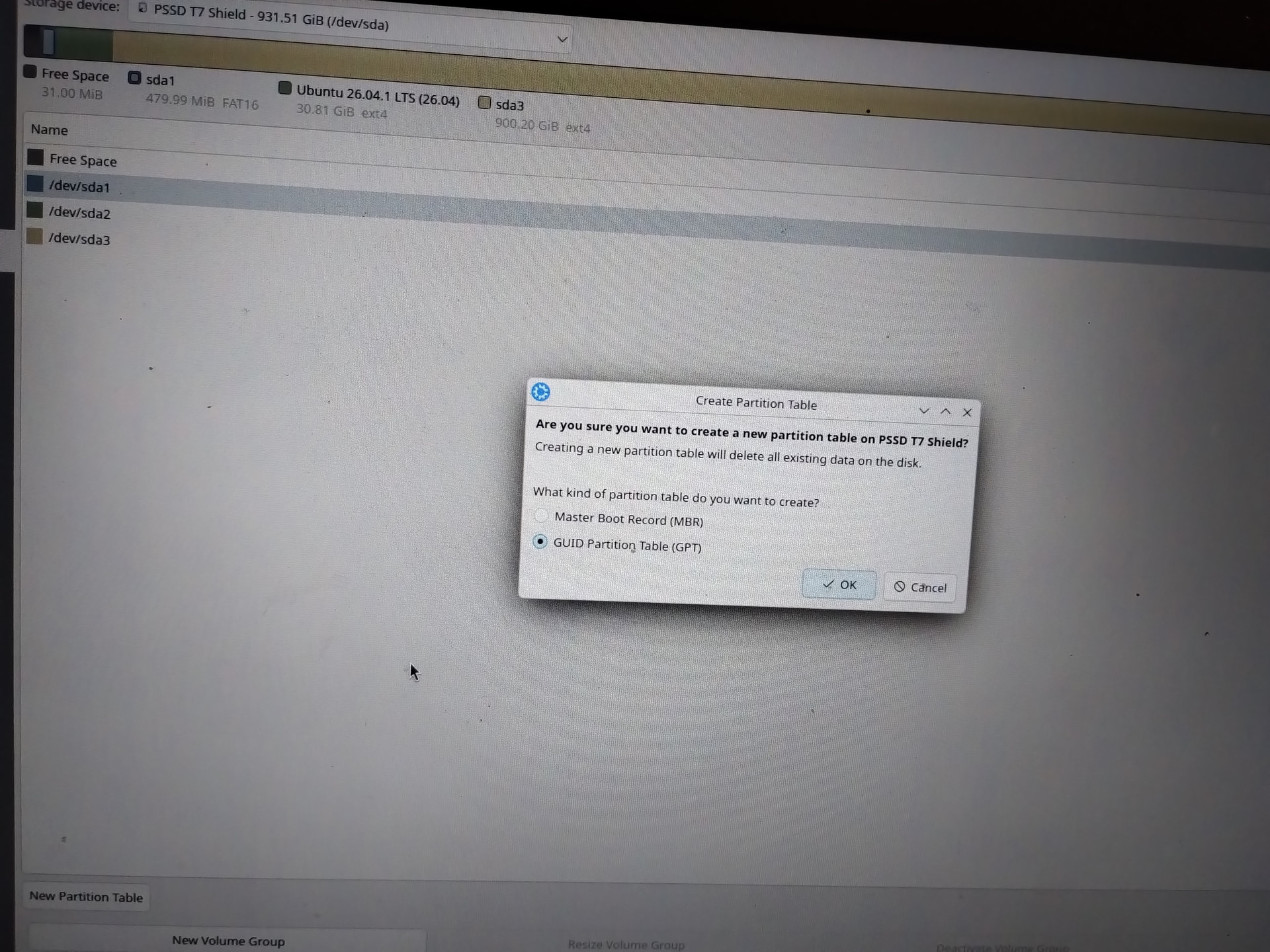
  1. Selected manual partitioning, and ā€˜new partition’, however the msg was that the data will be overriden, which is not what I want.

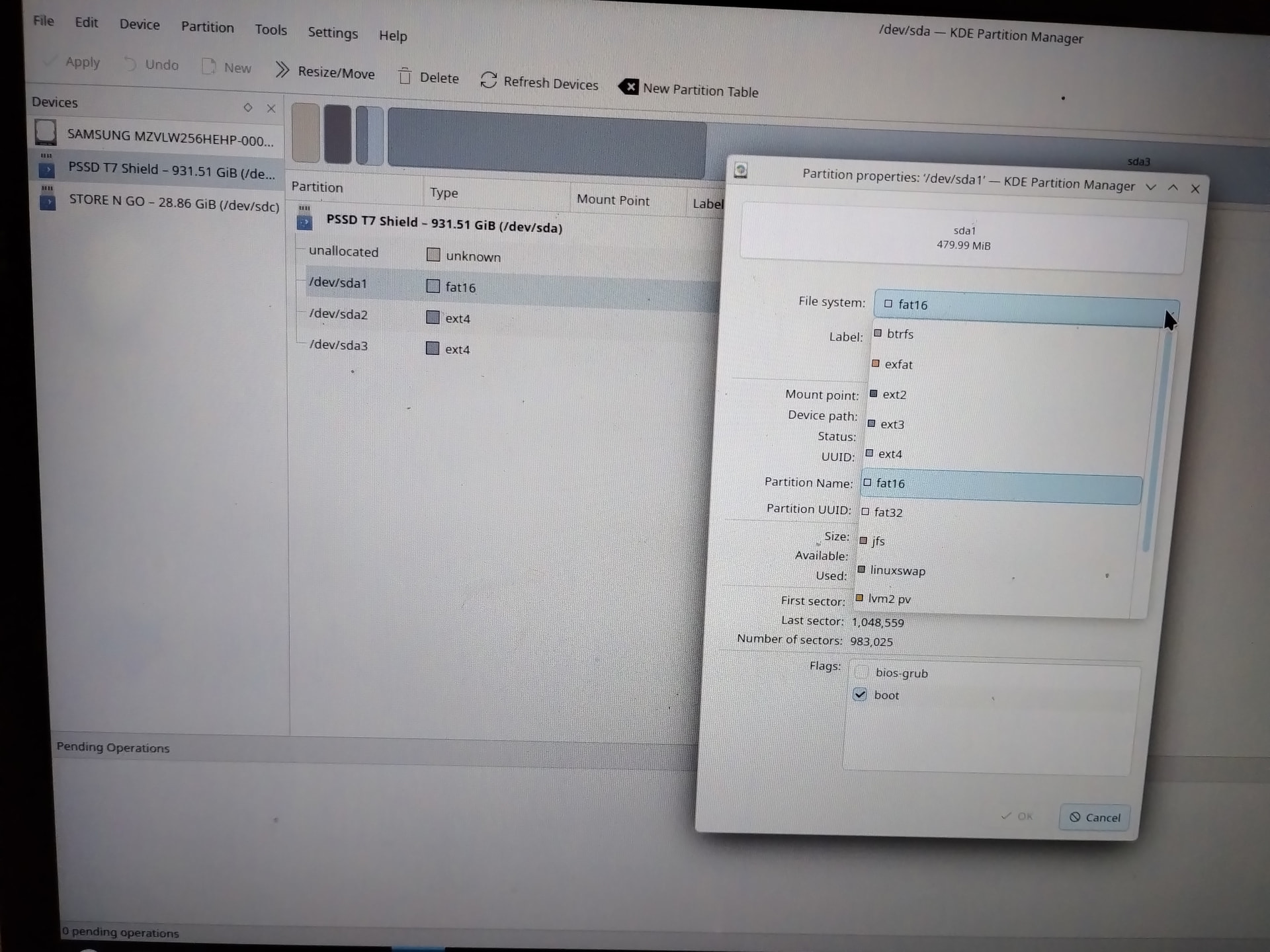
  2. then did the ā€˜try’ and ran KDE partition manager. It seems to indicate the EFI partition can be changed from FAT16 to FAT32 ?

As it was a boot from the usb, the EFI partition wasn’t mounted, so that would be the only way to change it, it seems (after backups). But is that ā€˜safe’ ?

If it looks like it may get messy even attempting to change the EFI partition, is this possible ?

  • make an image of the Ubuntu OS
  • reinstall Ubuntu 26.04.1
  • use the image in step 1 and restore it (overwrite the OS partition in step 2)

The data side of things is easy, I have backups, so that is easy to restore. Just that it literally takes days to do a fresh install of Ubuntu or Kubuntu, with all the add ons and bits and pieces I modify, so doing it that way should give the opportunity to overwrite the EFI partition and make sure it is FAT32.

If you mean the button in the lower left corner, it does not say ā€œnew partitionā€. It says ā€œNew Partition Tableā€ which is something entirely different.

2 Likes

Bit of a difference with an external drive.

Best to have ESP on external drive and as FAT32. But most installers default to internal drive’s ESP. But if you disconnect the external drive UEFI may ā€œforgetā€ the Ubuntu/Kubuuntu entry in UEFI. Then you have to boot just like you boot live installer, directly from UEFI using drive entry.

Internal drive’s ESP will say ā€œubuntuā€ or maybe now 'kubuntu". It used to be all flavors & even many unofficial flavors used ā€œubuntuā€ in UEFI boot entry. So only one Ubuntu install would be listed, and it would be last install.

Years ago FAT16 was available for ESP. Intended for very small external drives. Have seen one or two cases where a FAT32 somehow got changed to FAT16. Seemed to be a Windows issue? But the change caused issues with all systems booting.

UUID of ESP should have mount the external drive’s ESP in fstab.

1 Like

As pointed out, the first image in your most recent post indicates it will create a new ā€˜partition table’ NOT a new partition so if you want another partition you need to make a different selection and have free space on the drive. I can’t read the fonts in the image so…?

You can change the EFI partition from fat16 to fat32 but that is hardly ideal as formatting as fat32 will overwrite all data on the EFI partition so it would need to be moved elsewhere first then copied back after reformatting and will also create a new UUID (see earlier post by oldfred for problems. entailed with that).

A possibility if you reinstall is to make a backup of the EFI ubuntu directory of the first install then install Kubuntu. You should then be able to create an entry with a unique bootloader id for Kubuntu but that gets into reinstalling grub as also discussed in the post above by oldfred.

1 Like

Under 512MB mkfs.fat defaults to FAT16, but you can reformat it with

sudo mkfs.fat -F 32 -i C669BDD3 /dev/sda1

after backing up /boot/efi so the UUID stays identical.

Also shrink sda3 in GParted first, your disk has no unallocated space for another OS right now.

1 Like

Whenever I use Windows (internal drive/SSD), the external is disconnected, to ensure windows can never corrupt the EFI or data, etc on the UBuntu external drive. There are measures I put in place to ensure it is disconnected, like it is impossible to login to windows unless the external is disconnected. Ubuntu/Kubuntu installs only ever get done to the external.

Yes, it can be done, but can be messy. Like what if the EFI backup won’t restore properly, etc,etc.