Ubuntu Version
Ubuntu 26.04 LTS
Desktop Environment (if applicable)
GNOME
Problem Description
Hi, I’m having a problem with Bluetooth and it won’t turn on, and it’s not detecting my wireless headphones. I need help, please.
Open a terminal Ctrl Alt t and enter
rfkill list
Please post the output within code tags </>
Hi @tea-for-one, thanks for your reply. Here is the result.
pc@pc-HP-240-G5-Notebook-PC:~$ rfkill list
0: phy0: Wireless LAN
Soft blocked: no
Hard blocked: no
1: brcmwl-0: Wireless LAN
Soft blocked: no
Hard blocked: no
2: hci0: Bluetooth
Soft blocked: no
Hard blocked: no
Can you show the output of
lsusb
Based on your earlier topic concerning wifi, my guess would be
0a5c:216d Broadcom Corp. BCM43142A0 Bluetooth 4.0
I’m getting this
pc@pc-HP-240-G5-Notebook-PC:~$ lsusb
Bus 001 Device 001: ID 1d6b:0002 Linux Foundation 2.0 root hub
Bus 001 Device 002: ID 04f2:b56c Chicony Electronics Co., Ltd HP TrueVision HD
Bus 001 Device 003: ID 0a5c:216d Broadcom Corp. BCM43142A0 Bluetooth 4.0
Bus 002 Device 001: ID 1d6b:0003 Linux Foundation 3.0 root hub
Third line is your Bluetooth device
I have a similar device on a 10year old laptop but I cannot get it to work yet
Can you supply output from
sudo dmesg | grep -i bluetooth
Likely needs https://github.com/winterheart/broadcom-bt-firmware/raw/refs/heads/master/brcm/BCM43142A0-0a5c-216d.hcd to be put in /lib/firmware/brcm and it may need to be compressed
I have that file in /lib/firmware/brcm with extension .hcd.
Not working yet but how do I compress it?
PS @Jeremy31 I’m glad you arrived, I knew I was going to struggle
Have to use zstd on the file, sudo zstd /lib/firmware/brcm/BCM43142A0-0a5c-216d.hcd
The firmware file is device specific, so your device would have to have the same USB ID in lsusb
this is my result
pc@pc-HP-240-G5-Notebook-PC:~$ sudo dmesg | grep -i bluetooth
[sudo: authenticate] Contraseña:
[ 7.408222] Bluetooth: Core ver 2.22
[ 7.408255] NET: Registered PF_BLUETOOTH protocol family
[ 7.408258] Bluetooth: HCI device and connection manager initialized
[ 7.408263] Bluetooth: HCI socket layer initialized
[ 7.408267] Bluetooth: L2CAP socket layer initialized
[ 7.408274] Bluetooth: SCO socket layer initialized
[ 7.616870] Bluetooth: hci0: BCM: chip id 70
[ 7.619057] Bluetooth: hci0: BCM: features 0x06
[ 7.634873] Bluetooth: hci0: BCM43142A
[ 7.634881] Bluetooth: hci0: BCM43142A0 (001.001.011) build 0000
[ 7.636635] Bluetooth: hci0: BCM: firmware Patch file not found, tried:
[ 7.636643] Bluetooth: hci0: BCM: ‘brcm/BCM43142A0-0a5c-216d.hcd’
[ 7.636648] Bluetooth: hci0: BCM: ‘brcm/BCM-0a5c-216d.hcd’
[ 9.391135] Bluetooth: BNEP (Ethernet Emulation) ver 1.3
[ 9.391142] Bluetooth: BNEP filters: protocol multicast
[ 9.391147] Bluetooth: BNEP socket layer initialized
[ 9.663210] Bluetooth: hci0: command 0x1003 tx timeout
[ 9.663225] Bluetooth: hci0: Opcode 0x1003 failed: -110
wget https://github.com/winterheart/broadcom-bt-firmware/raw/refs/heads/master/brcm/BCM43142A0-0a5c-216d.hcd
zstd BCM43142A0-0a5c-216d.hcd
sudo cp BCM43142A0-0a5c-216d.hcd.zst /lib/firmware/brcm/
Reboot
Thank you @jeremy31 when I restarted the PC, now the Bluetooth is working fine. Thank you both very much for helping me.
When using my headphones headphones like the YouTube videos are
between short. and the quality looks super bad, but when I deactivate the bluetooth the videos return to normal in HD 1080p and it works fine. what I’m experiencing. right now
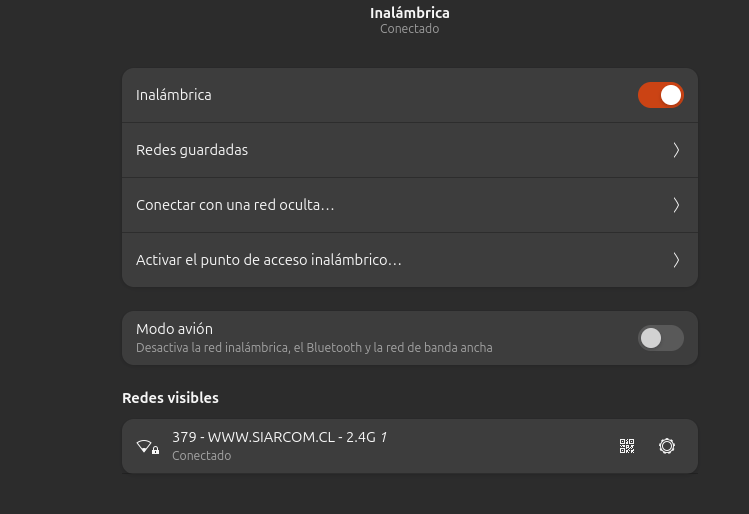
Can you connect to 5Ghz wifi? This issue is likely caused by interference between the wifi and bluetooth
This is what my screenshot looks like; how can I connect to my 5GHz network? Please excuse my ignorance.
Maybe the router doesn’t have 5GHz
That’s the command I needed.
zstd compression is brand new for me.
Thank you @Jeremy31 and, also, thank you for helping @Chocolate
No, it doesn’t have it. But I’ll have to speak with the administrator’s provider to get the router changed. Thanks a lot.
I don’t think that BCM43142 is 5G compatible
Try this command
nmcli -f DEVICE,SSID,IN-USE,FREQ,BARS dev wifi
I have a router with both 2.4G and 5G but BCM43142 only shows a frequency of 2412 MHz
I’m getting this result.
pc@pc-HP-240-G5-Notebook-PC:~$ nmcli -f DEVICE,SSID,IN-USE,FREQ,BARS dev wifi
DEVICE SSID IN-USE FREQ BARS
wlp2s0 379 - WWW.SIARCOM.CL - 2.4G * 2462 MHz ▂▄▆█