I want to encrypt some files (not drives) in my computer and I tried Veracrypt. However, I noticed that it doesn’t work as I need. Could someone please recommend me an alternative? I’m using Ubuntu form one year only, so I’m not a hardcore Linux guy. That means I need something visual-friendly (not inserting commands on the console only) and easy to install, if possible.
There is one thing that’s ambiguous in your post: Are you wanting a file-based container, which when decrypted looks like a separate partition? Or are you wanting to encrypt each file separately, perhaps grouped together in an archive?
If the former, i.e. using containers, for a user-friendly GUI, I don’t think that you’ll find better than VeraCrypt. I’ve been using it for many years, even its predecessor TrueCrypt. It’s a highly competent and secure cross-platform program.
The gold standard for Linux is LUKS, which you can use with the GNOME Disks utility — but that is for partitions only, not for file containers. As far as I know, there is no user-friendly GUI for LUKS for file containers.
If you’re after the latter, i.e. encrypting each file individually or grouped in an archive, you can use File Roller, which comes by default. Highlight the file(s) that you want encrypted in Nautilus (your file browser), right-click, and select Compress. You can choose ZIP with a password. Be aware that even with a strong password, ZIP is far from as secure as LUKS; don’t depend on it for important data. The result is compatible with Windows and MacOS. (It is possible to create more secure ZIP files, but not from File Roller, and still not as secure as LUKS.)
Firstly, thank you very much for both replies. I have to admit that I should have explained what I need in a more detailed way, sorry.
I got a whole lot of files (up to 500 texts, images, videos) that are organized into folders. I created a single folder including all of those folders and texts. I want that folder (ie, all the folders and files included within) to be encrypted so that only me can access it. All those files are used on a daily basis because of my professional activity. That means I need to decrypt them easily every day at the beginning of my workday and then encrypt them again at the end of it.
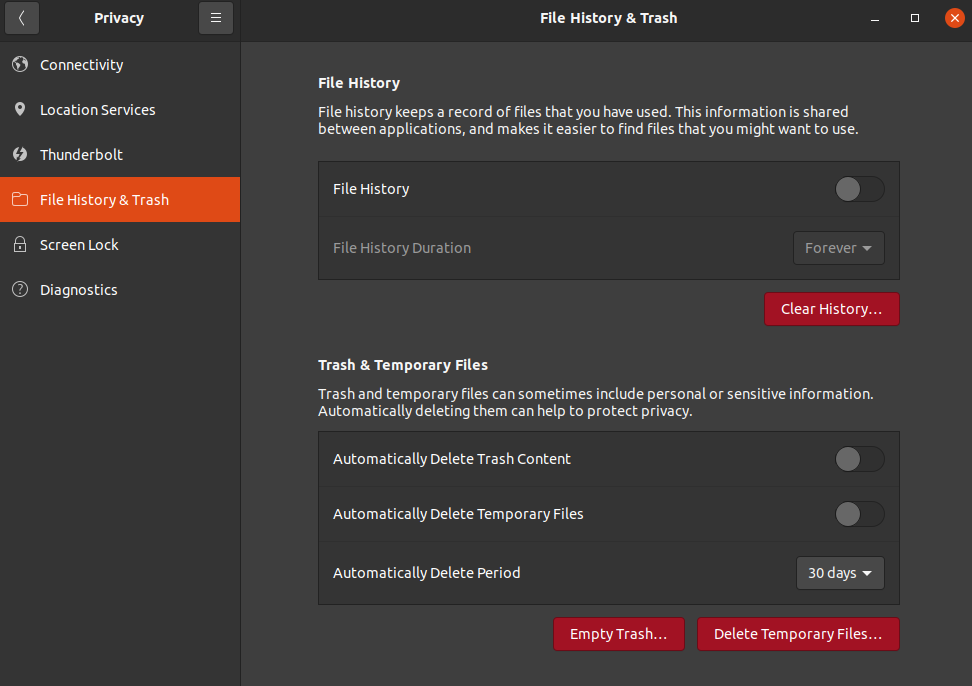
The problem with Veracrypt is that, once the common folder is encrypted I can open a file from within and encrypt it back again. However, that same file is perfectly accessible unencrypted via the ‘Recent’ folder What’s the point of encrypting a file if it is stored unencrypted as a recent file?
Does it happen after you close the Veracrypt container?
I never tested it because I always disable file history in Security & Privacy so no ‘recent’… But it can’t give access to the actual file if the container is no longer mounted. I can imagine it showing at most the file name in history, never the actual contents. If this is a problem for you then you must disable history. It’s not a problem of the encryption software tool. BTW, VLC does the same (and irrespective of the system settings), i.e., it keeps track of the name of reproduced files (it can be disabled in advanced options), even for deleted ones or those that are/were in drives/partitions no longer mounted. Of course this is aplicable for Veracrypt containers no longer mounted as well, but that doesn’t mean the files are accesible.
So, you may need to disable history both in the system wide Ubuntu settings AND in the software you’re using to open those encrypted files. Again, this has nothing to do with the encryption software. This seems to be a X-Y problem.
When you have opened a VeraCrypt container, it appears to the applications as if it’s just another normal folder. VeraCrypt makes it transparent to you and the applications — it looks as though it’s not encrypted, when in reality it is. So, when you save back to the container, the file is automatically encrypted, transparently (invisibly) to you and the applications.
The files will continue to be available until you close the container. At that point, VeraCrypt closes the connection, and the files are no longer available.
If you can still access the file via the Recents folder while the container is still open, that is perfectly normal and expected; it’s by design. But, if it’s still available once you have closed the container, it means that the application is caching the file somewhere else. If it’s the latter, let us know which application you’re using to open the files.
This is for the system wide file history. Programs can and often have their own independent file histories (e.g. VLC).
But again…
This matters ONLY if you don’t want other people accessing your system using the same user account to know which files you’ve been working with by their file names. Now, having multiple users with the same account is the main problem here, for starters. Adopt correct practices and not even the NAME of the files will be accessible to others, let alone the files themselves which is impossible if the Veracrypt container is no longer mounted.
There’s also this:
which again has nothing to do with Veracrypt or any other encryption software so…
In summary, the reason for this thread and your request is a problem that doesn’t exist.
Thank you very much to both of you for your help. Certainly, I didn’t understand how Veracrypt works. I made those suggested changes and so far everything works fine. Sadly, I can only select one of you as the one providing the solution, when it was both.
Another great option is Cryptomator. Simple and easy to use, unlock or lock whenever you feel like it. My number 1 option before uploading to any cloud service.

 What’s the point of encrypting a file if it is stored unencrypted as a recent file?