Hi, this is Xubuntu recently upgraded to 26.04.01 via do-release-upgrade. It is a desktop, which was never suspended nor hibernated. Now, after some inactivity and screensaver lock, there are several messages: None of the screen lock tools run successfully, the screen will not be locked. Do you still want to continue to suspend the system?
I don’t want to suspend. The message is annoying. The screensaver works as does the screen lock.
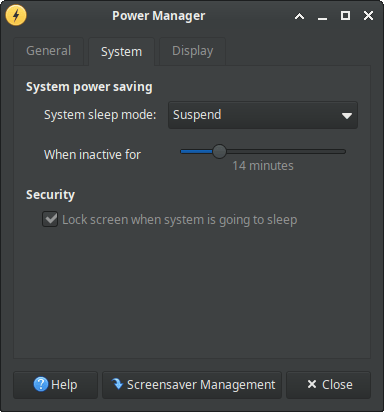
The xfce4-power-manager-settings showsSystem power saving: System sleep mode: Suspend (can be changed to Hibernate or Hybrid Sleep), When inactive for 14 minutes. The slider is grayed out, I can’t change the 14 minutes to never.
Edit: Similar desktop with xubuntu 26.04.01 recently upgraded via do-release-upgrade shows in When inactive for Never. And it is also grayed out, cannot be moved. How do I get Never in my settings?
If this desktop should never sleep at all, turn suspend off for the whole system. Create the folder with sudo mkdir -p /etc/systemd/sleep.conf.d, then create /etc/systemd/sleep.conf.d/nosleep.conf containing:
Thanks, that helped. Indeed, the problematic machine had inactivity-on-ac set to 14. The working machine didn’t have the field at all. Tried to set it to 0. But then decided to delete it completely in ~/.config/xfce4/xfconf/xfce-perchannel-xml/xfce4-power-manager.xml
Hope, it works. Sleep is already disabled in /etc/systemd/sleep.conf.
Any idea why the value inactivity-on-ac set cannot be changed using xfce4-power-manager-settings? It is now never, but still grayed out.
It’s likely grayed out because suspend is turned off in /etc/systemd/sleep.conf. The power manager disables the system sleep slider when the system reports it can neither suspend nor hibernate.